


★★★★★
“This is a game-changer for our content team. It found dozens of high-intent topics our agency missed and shipped them in record time. Our organic signups are climbing.”
Margaret M.
SaaS Marketing Lead
Verified Customer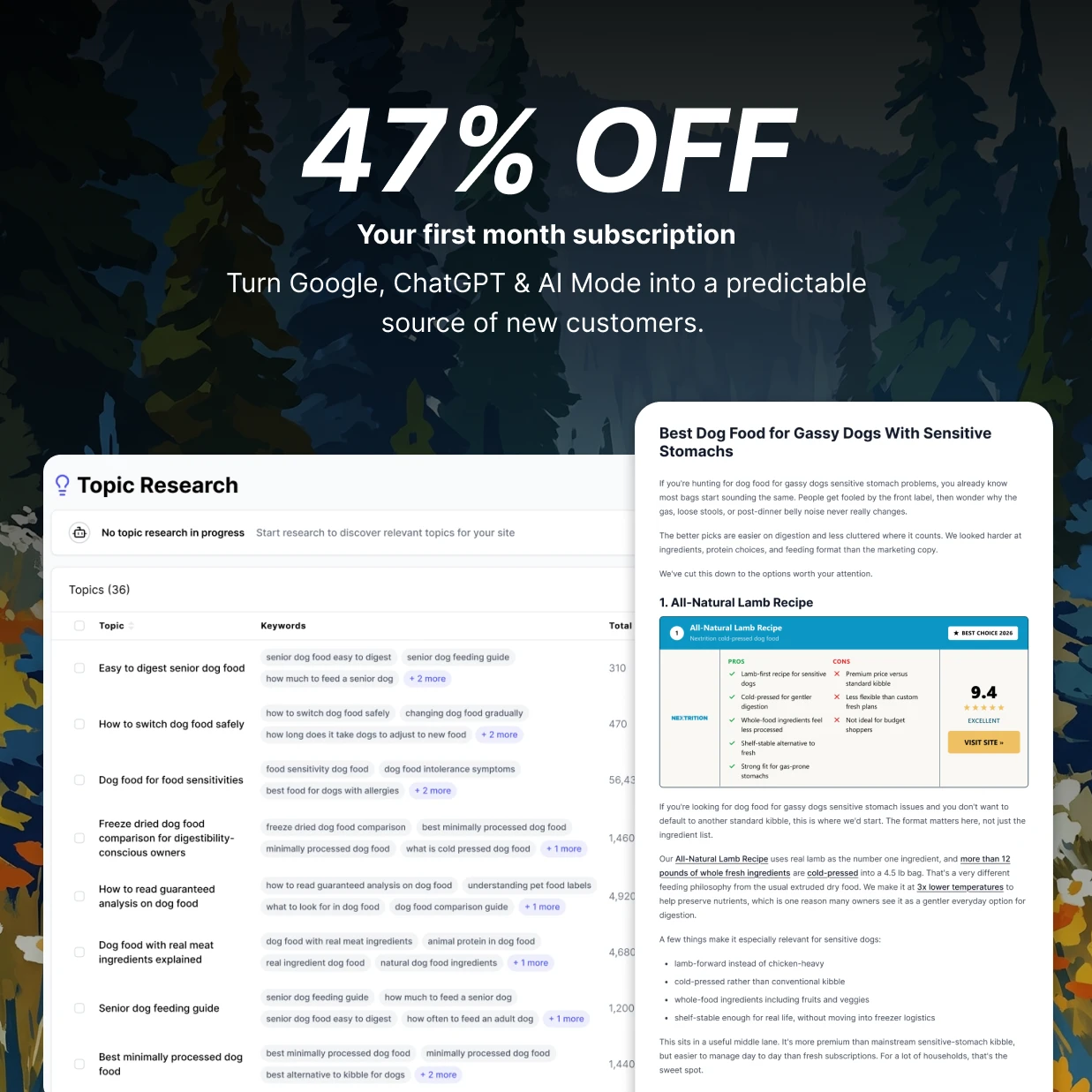
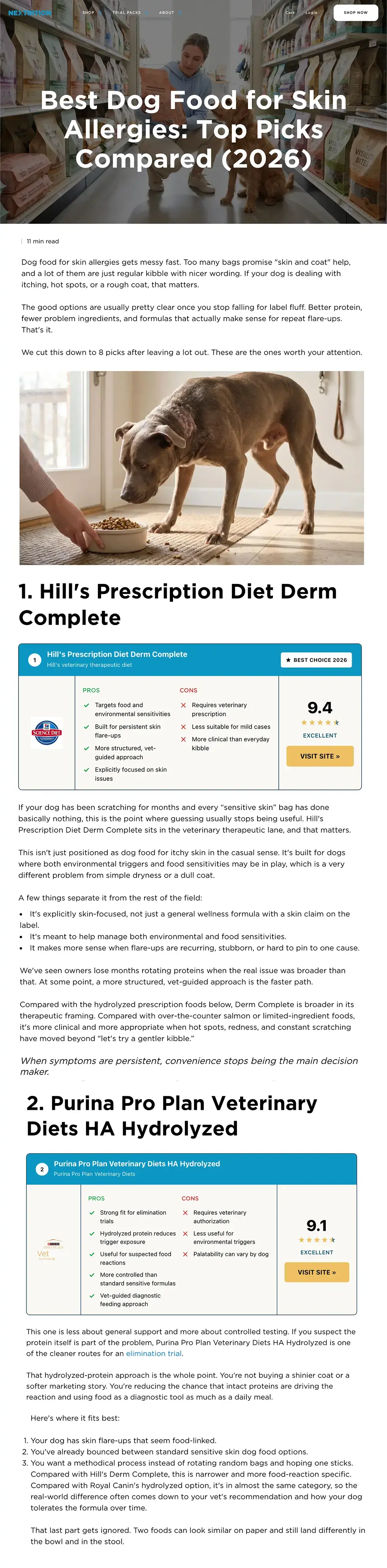
Turn approved topics into on-brand WordPress posts with keyword research, internal links, images, formatting, and publishing handled in one workflow.
We're dedicated to helping you find success growing your business.
clicks generated for our customers
Trusted by 300+ ambitious brands and agencies










A WordPress auto blogger automates recurring work between choosing a topic and publishing a finished post. Some tools generate new drafts, while feed-based tools import or transform RSS items. Intelliminds follows a keyword-led research and writing workflow.
The workflow starts with your site, audience, competitors, and search intent so the calendar is based on useful topics rather than publishing for volume.
The category includes RSS importers, AI writing plugins, and full publishing platforms. Choose based on the work you need removed, not the word 'automatic.' Instead, you want a WordPress auto blogger that:
Avoid tools that create more cleanup than they remove:
Feed importers can be useful for curation, but scraping, spinning, or lightly rewriting sources is not the same as researching and writing an original article.
A generated document still leaves you formatting headings, adding links and images, creating the slug and excerpt, and moving everything into WordPress.
Unlimited output is not useful when the topics overlap or the posts add little value. Look for a review step and a cadence you can control.
The tool should explain how it connects, what it sends, whether drafts are supported, and how updates avoid creating a second post.
Remove repetitive production work while keeping control of what appears on your site.
Build coverage around relevant search intent instead of publishing disconnected posts.
Reduce research, formatting, image uploads, taxonomy setup, and copy-paste.
Prioritize buyer questions and commercial topics that can support a purchase decision.
“This is a game-changer for our content team. It found dozens of high-intent topics our agency missed and shipped them in record time. Our organic signups are climbing.”
“After a few weeks of publishing, we're landing on page one for terms we never thought we'd touch. Didn't expect it to start working this fast.”
“We tested 4 other AI writers before this. Nothing else came close to matching our brand voice. Now we publish 5 articles a week without a single rewrite.”
“It saves my team so much time. I review the strategy, click approve, and articles ship straight to WordPress. My editorial calendar basically runs itself now.”
“I was skeptical AI could outrank human-written content. After 6 weeks I'm a believer. We replaced our agency retainer and our organic traffic keeps climbing.”
AUTH-IQ reads the query before Intelliminds writes, then matches it to the article, listicle, comparison, or alternative page a searcher expects to find.

Connect your site once, approve the plan, and move each article from research to WordPress without manual handoffs.
Activate the Intelliminds plugin and approve a WordPress application password for the user that will edit posts and upload media.
Review the content plan, choose your cadence, and edit or approve each finished article before it is sent.
Send the title, slug, excerpt, body, links, standard categories and tags, and images as a draft or published post.
When a post needs a refresh, Intelliminds targets its saved WordPress post ID so the existing URL and publication history remain intact.
Make sure your brand shows up when customers are discovering new products/services and deciding which to choose.
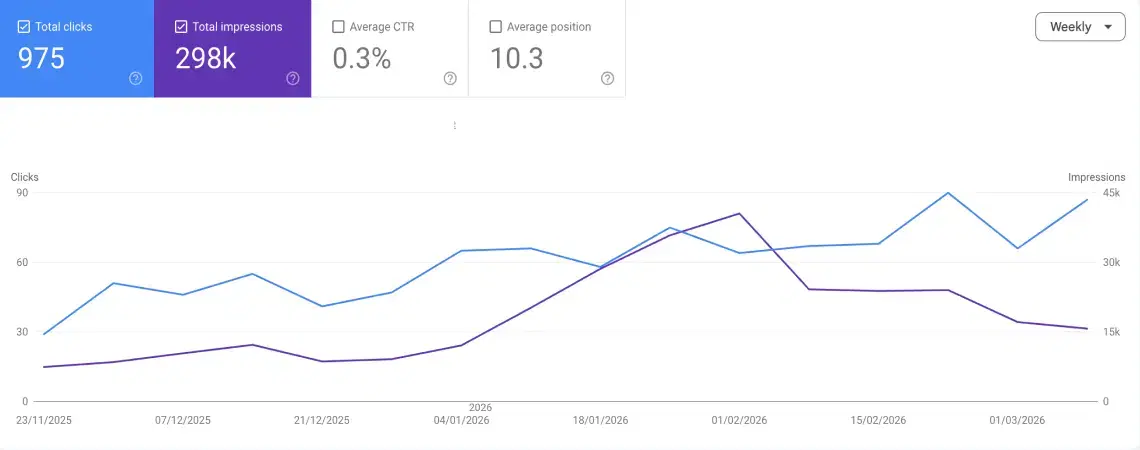
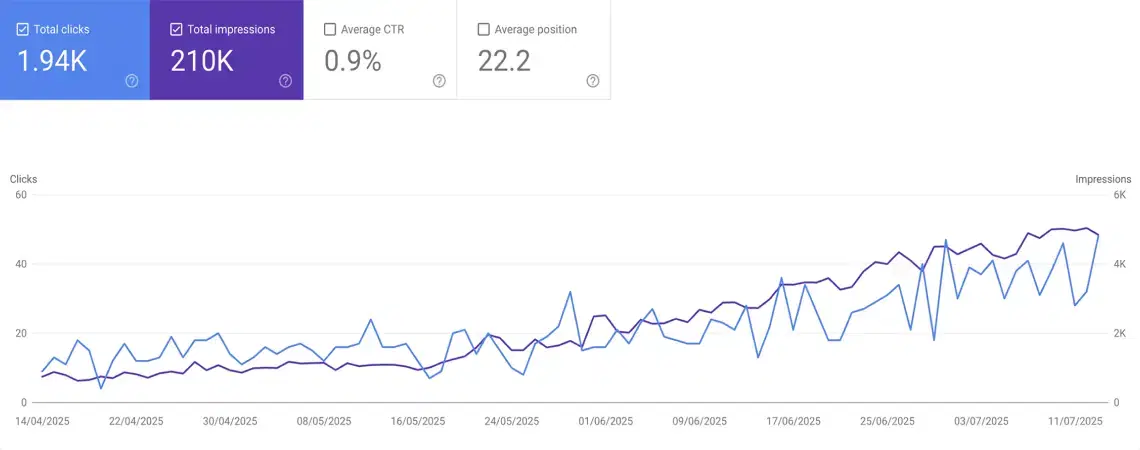
Historical customer results across Intelliminds accounts. Outcomes vary by site, market, competition, and publishing strategy.
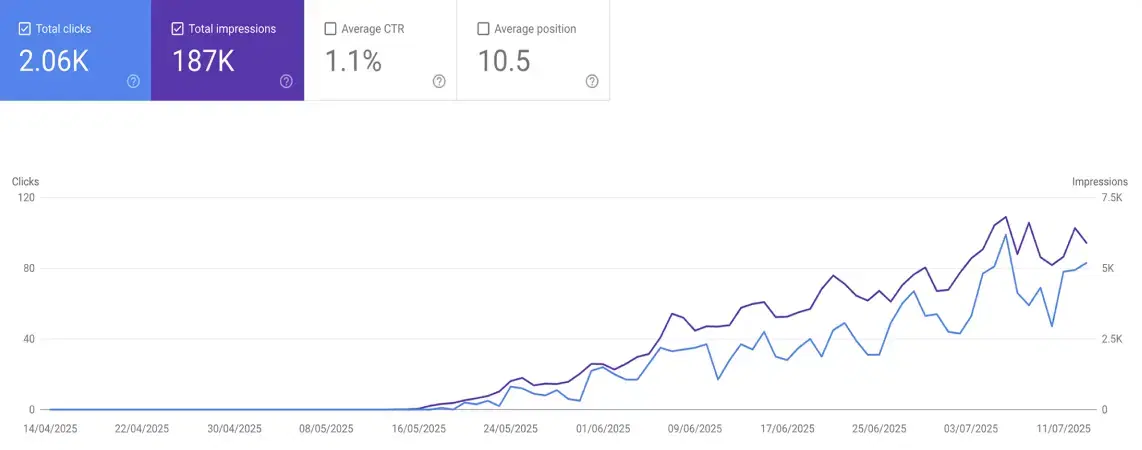


“Intelliminds is one of the best products I’ve seen for helping clients scale SEO content without adding more work to their team.”
“Intelliminds is one of the best products I’ve seen for helping clients scale SEO content without adding more work to their team.”
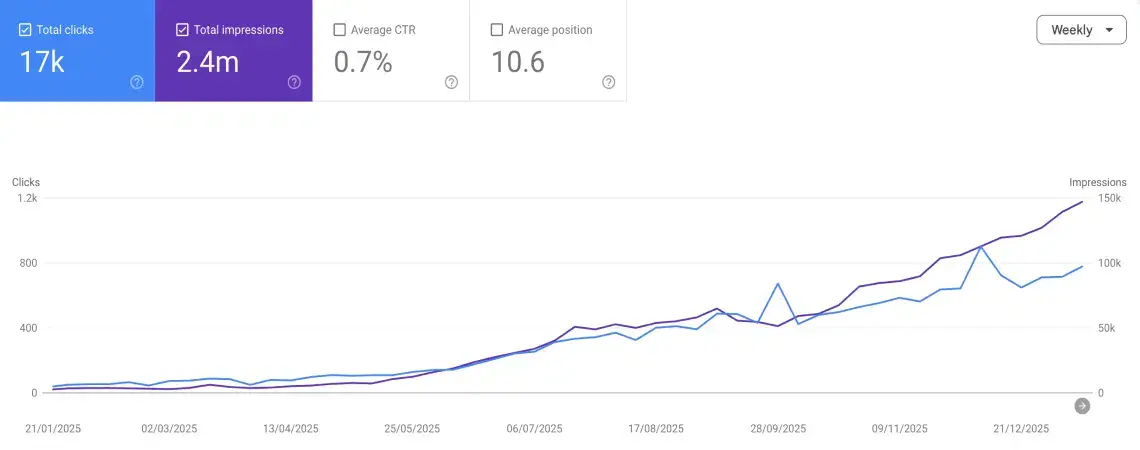


“Intelliminds helped us publish more articles than we ever thought possible and two years later they’re still ranking, generating traffic, and bringing in revenue every month.”
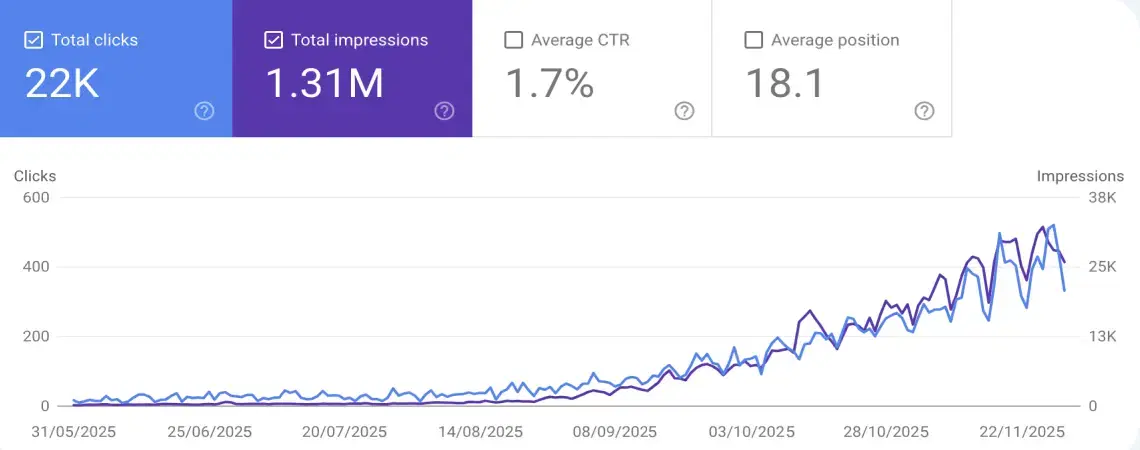
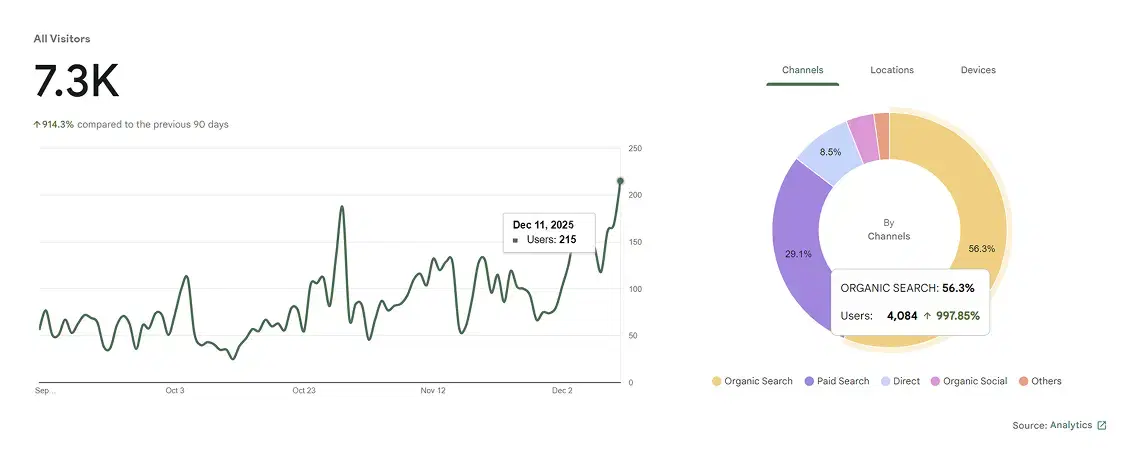


“Intelliminds turned SEO from something we kept putting off into a reliable channel for qualified traffic.”
“Intelliminds helped us publish more articles than we ever thought possible and two years later they’re still ranking, generating traffic, and bringing in revenue every month.”
“Intelliminds turned SEO from something we kept putting off into a reliable channel for qualified traffic.”
The writing, formatting, media, taxonomy, and publishing steps move through one connected workflow.
Builds the plan around your site, audience, and search intent.
Controls when approved articles move into WordPress.
Creates a draft or published post with its structure intact.
Updates the linked post when existing content needs new work.
Learns your audience, offer, tone, and reference content before writing.
Builds a useful article around the reader's task instead of filling a template.
Uploads featured and inline images with available alt text to the Media Library.
Review, edit, and approve before sending a draft or published post.
Uses a descriptive title, clean slug, useful structure, and a concise excerpt.
Connects new articles to relevant site pages and credible external sources.
Prioritizes useful coverage and editorial review instead of publishing for volume.
Chooses the content format based on what the reader expects from the query.
This comparison is specific to plugins whose primary job is importing third-party RSS items. AI writing plugins and hybrid tools vary by product.
Intelliminds automates production steps while WordPress remains the system of record for your published content.
Keep, remove, or reorder topics before writing begins. Review the finished article before choosing draft or direct publication.
The post and its media live in your WordPress database and Media Library. Disconnecting Intelliminds does not remove them.
Intelliminds retains the WordPress post identity after publishing so a later refresh can update that post instead of creating another URL.
A WordPress auto blogger automates the work needed to keep a WordPress blog publishing. Modern AI systems can research topics, write original articles, add links and images, and create posts in WordPress. Older autoblogging plugins usually import or rewrite RSS feeds, so check which workflow a product actually supports.
Intelliminds is a web platform with a WordPress plugin connection. The platform handles research, writing, review, and scheduling; the connection sends approved content to your WordPress site through its REST API.
Yes. Intelliminds can create a WordPress post as a draft for final review or publish it when your workflow calls for immediate publication.
It can send the title, slug, rendered article body, excerpt, standard categories and tags, featured image, inline images, and available alt text. The remote post ID and editor URL are retained for later updates.
The connection uses the Intelliminds plugin, HTTPS, the WordPress REST API, and a WordPress application password. An application password is separate from your main login and can be revoked from WordPress without changing that login.
Intelliminds creates new posts from an approved topic plan rather than importing RSS feed items. The workflow researches the topic and writes for your brand, but you should still review every article for accuracy and originality before publishing.
The current integration sends the article fields WordPress itself stores, including title, slug, excerpt, body, taxonomies, and images. It does not promise direct writes to every SEO plugin's custom fields, so verify your plugin and theme with a draft before automating publication.
They remain in WordPress. Disconnecting Intelliminds clears the connection but does not remove posts or media already created on your site.
The Starter plan includes 8 new-article credits, 8 article-refresh credits, and 2 keyword-research credits each month. It uses the same WordPress publishing connection described on this page.
The standard connection targets WordPress posts, standard categories and tags, and the normal WordPress content fields. Custom post types, custom taxonomies, and page-builder-specific layouts are not promised on this page; confirm those requirements before automating publication.
Connect your site, approve the plan, and turn researched topics into complete WordPress posts without rebuilding each article by hand.
No credit card required. Published content remains in WordPress if you disconnect.