
Most teams build a content performance dashboard that looks busy, then still can’t answer which pages deserve attention. Traffic rises, reports multiply, and the real opportunities sit buried in a spreadsheet.
What matters is connecting search visibility to publishing, refreshes, and conversions—not admiring pageviews. You need signals your team can act on before a small dip becomes a costly cleanup.
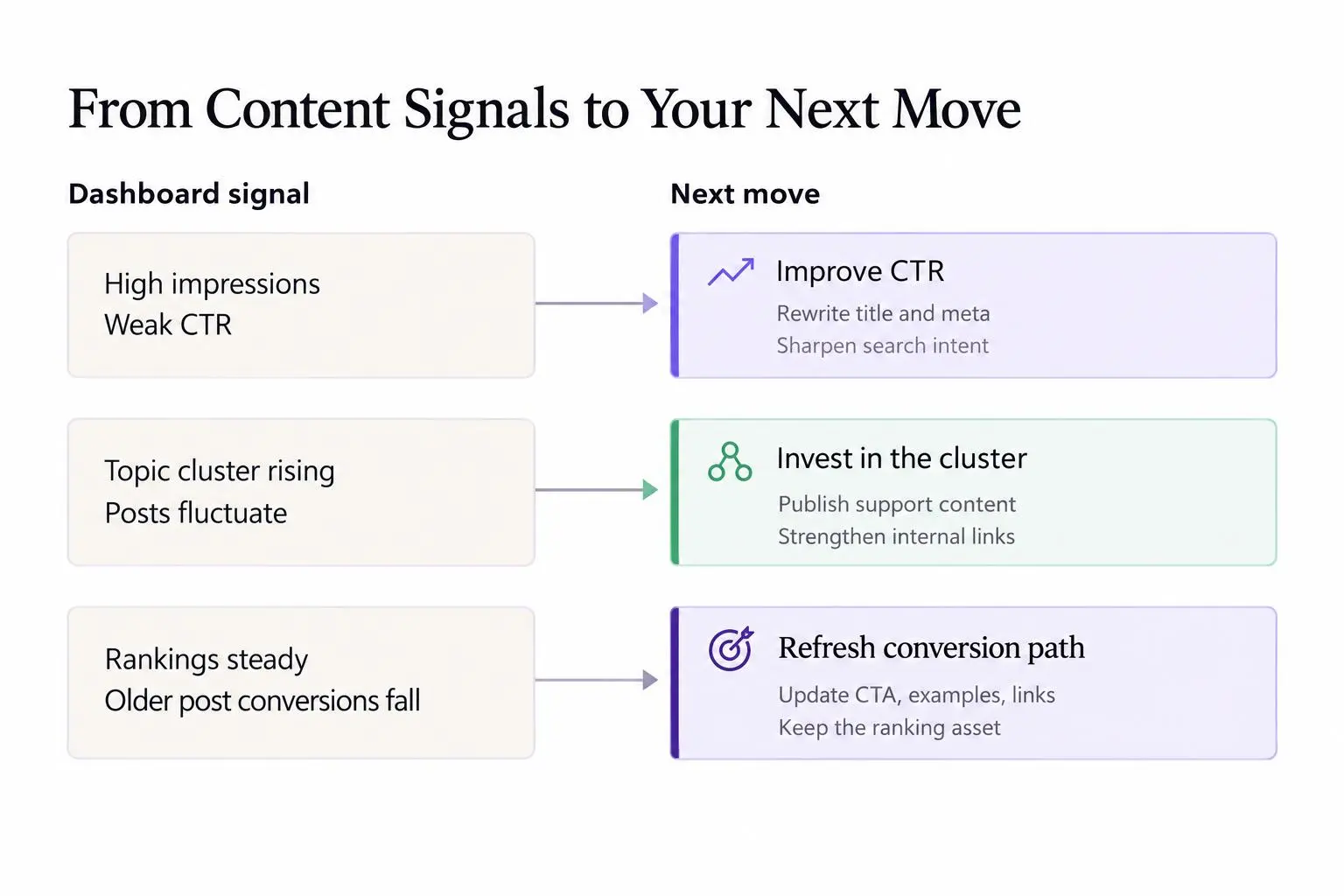
Watch for:
- High-impression pages with weak click-through rates
- Topic clusters gaining traction while individual posts fluctuate
- Older posts losing conversions after rankings hold steady
Make the next content decision clear.
What a content performance dashboard actually does
A content performance dashboard is not a prettier traffic report. It's a working view of how content contributes to search visibility, visits, engagement, leads, and revenue over time.
The point is focus. You do not need every SEO metric in one place. You need the signals that help your team decide what to publish next, what to improve, what to merge, and what to stop touching.
A general SEO dashboard usually leans sitewide. It cares about crawl issues, backlinks, index coverage, and broad ranking movement. Useful, yes. But a content performance dashboard stays closer to the pages and topics that actually produce growth.
That difference matters. If your dashboard can't help you answer "should we refresh this page or publish three more around the same topic?" then it's probably an SEO dashboard, not a content one.
The best version does two jobs at once:
- reports what happened
- points to the next move
That second part gets missed all the time. Teams monitor content like weather. They watch traffic rise and fall, then react late. A good dashboard changes that. It helps you manage a compounding content engine on purpose.
We like to anchor the dashboard around four stages:
Content lifecycle
- Choose topics
topic selection
- Create content
content production
- Publish
publishing
- Refresh content
content refreshing
If those stages aren't connected, reporting becomes a museum of charts. Nice to look at. Hard to operate from.
Why growing teams need more than basic traffic reports
Pageviews can make weak content look healthy. That's the trap.
A post can pull traffic for months and still do almost nothing for pipeline, trials, purchases, or qualified leads. We've seen teams feel good about "blog growth" while the pages bringing traffic have almost no connection to what the business sells.
Once content volume grows, the pain gets sharper:
- too many articles and no clear priority list
- rankings moving with no clear reason
- reporting split across analytics, Search Console, spreadsheets, and CMS exports
- content decay hiding in plain sight until traffic drops hard
This hits different teams in slightly different ways. SaaS teams usually struggle with attribution and buyer intent. Ecommerce teams feel it in category support content and weak internal click paths. Agencies get the added headache of turning messy data into client-facing reporting without wasting half the week.
A clean content performance dashboard lets you answer business questions fast:
- Which topics are quietly gaining momentum?
- Which pages took a lot of effort and still aren't pulling weight?
- Which refreshes actually moved rankings or conversions?
- Which clusters influence revenue, not just visits?
That's what good seo reporting for content teams is really for. Not executive theater. Operational clarity.
If your reporting can't change next week's publishing plan, it's too shallow.
Scalable SEO growth comes from consistency and feedback loops. You publish, observe, adjust, refresh, and allocate resources better the next round. A dashboard gives that loop shape.
The core metrics every content performance dashboard should include
Don't organize the dashboard by tool. Organize it by decision.
That sounds small, but it changes everything. "Search Console metrics" is not a decision category. "Visibility signals for pages that may need support" is.
Visibility metrics
These tell you whether content is being seen by search engines and entering the race:
- impressions
- indexed status
- keyword footprint
- ranking distribution by page, topic, or cluster
Impressions and indexation are often early signs. A page doesn't need traffic yet to tell you something useful. Rising impressions on non-brand queries usually means the topic is gaining traction before the click curve shows up.
Traffic and engagement metrics
Traffic tells you which pages are earning attention. Engagement tells you whether that attention means anything.
Useful metrics include:
- organic sessions
- landing page traffic
- new versus returning organic users, when it actually matters
- scroll depth
- time on page
- engaged sessions or bounce rate, depending on setup
- internal click-through to product, service, or next-step pages
A page with modest traffic and strong next-step clicks can be more valuable than a high-traffic page with dead-end behavior. That's where a lot of dashboards lie by omission.
Conversion and efficiency metrics
This is where content becomes an acquisition system instead of a publishing calendar:
- demo requests
- trial starts
- email signups
- purchases
- assisted conversions from blog content
- output per month
- time to publish
- refresh velocity
- performance per article or topic cluster
Some metrics lead. Some lag. Treat them differently.
Leading indicators:
- impressions
- indexation
- rising non-brand keyword coverage
Lagging indicators:
- conversions
- assisted revenue
- sustained traffic growth over time
Label vanity metrics clearly if you keep them. Otherwise teams start treating "views" and "business impact" like cousins. They aren't.
Add AI Overview status to CTR reporting
For informational and educational queries, a single blended CTR can hide a material change in the value of an impression. In a Q3 2025 panel study of 3,119 terms across 42 organizations, organic CTR was 0.70% where an AI Overview cited the brand, 0.52% where one appeared without a citation, and 1.45% where no AI Overview appeared. The corresponding paid CTRs were 7.89%, 4.14%, and 13.88%.[^seer]
[^seer]: Seer Interactive, “AIO Impact on Google CTR: September 2025 Update”
Organic and paid click-through rates for informational and educational queries, separated by whether an AI Overview appeared and cited the brand.
Sources
Seer Interactive; 3,119 terms across 42 organizations. Q3 2025 results.
- The source analyzes informational and educational queries, so its benchmarks should not be generalized to all query types or industries.
- The study is observational; it explicitly does not establish that AI Overview citation causes higher CTR.
- Results are monthly averages across a panel of 3,119 terms from 42 client organizations, not a universal Google benchmark.
| Search-result condition | Organic CTR | Paid CTR |
|---|---|---|
| AI Overview; cited | 0.70% | 7.89% |
| AI Overview; not cited | 0.52% | 4.14% |
| No AI Overview | 1.45% | 13.88% |
That makes AI Overview presence and citation status useful segmentation fields for high-impression, low-click pages—not just a single sitewide CTR benchmark. The study is observational and limited to its informational and educational query panel, so it shows an association rather than proving that a citation causes more clicks. Still, separating these conditions can prevent a dashboard from treating reduced clicks as a page-level failure when the search-results layout has changed.
How to structure a blog KPI dashboard that drives action
A useful blog KPI dashboard should not force one view on everyone. Executives, content managers, and writers do not need the same screen.
Three layers usually work best.
Executive summary
This is the business view. Keep it tight.
Track:
- organic traffic trend
- conversion trend from blog content
- top-performing topic clusters
- content contribution to customer acquisition
This layer should answer one basic question: is content helping us grow in a way the business cares about?
Content operations view
This is where the work gets managed.
Include:
- new posts published
- pages refreshed
- pages entering stronger ranking tiers
- underperforming posts by opportunity size
Notice the phrasing there. Underperforming by opportunity size, not by shame. A page ranking at position 11 with high impressions usually deserves more attention than a page ranking at 52 with no signal.
Page analysis view
This is the table your operators live in.
For each page, track:
- page title
- target topic or keyword
- publish date
- last updated date
- current traffic trend
- primary conversions
- recommended next action
The last field matters more than most teams realize. Every row should make a decision easier. Refresh. Improve CTR. Add internal links. Consolidate. Leave alone.
A blog KPI dashboard should help people understand performance and prioritize action from the same system. Otherwise reporting and execution split apart, and the lag starts creeping in.
The best way to group content for reporting
Article-by-article reporting works for a while. Then it quietly stops working.
At 20 posts, you can inspect everything manually. At 200, you can't. You'll either miss patterns or waste time staring at pages that don't matter.
Group content by dimensions that support decisions:
- topic cluster
- search intent
- funnel stage
- content format
- publish cohort by month or quarter
- new versus refreshed content
- brand versus non-brand content
This is where dashboards become useful instead of noisy. One page dipping doesn't always mean trouble. If the whole topic cluster is growing, patience may be the right move. On the other hand, five articles targeting the same intent often means you're splitting authority and confusing search engines.
We've seen teams panic over a single page drop when the smarter call was to zoom out. Cluster-level reporting calms that down.
Single-page reporting shows motion. Grouped reporting shows direction.
Tagging matters more than people want to admit. If content isn't tagged at creation, the dashboard gets worse every quarter. Clean taxonomy is part of the system, not admin work you do later if there's time.
Building a practical SEO content reporting template
An seo content reporting template should reduce thinking overhead, not add paperwork.
The goal is standardization. Same inputs, same logic, same reporting rhythm. That makes trends easier to trust.
A practical template should include:
- reporting period
- content owner or team
- total content published
- total content refreshed
- organic traffic trend
- top gains and top losses
- highest-converting pages
- pages with high impressions but low clicks
- pages with traffic but weak conversion behavior
- pages that may need consolidation, re-optimization, or republishing
- key learnings from the period
- actions planned for the next reporting cycle
The most important split in the template is simple:
Observations
What happened?
Actions
What will we do next?
A lot of reporting dies in the observation layer. Interesting data, no response. If you're an agency, this split also helps clients see that the report is about decisions, not just explanation.
Include a confidence note when the data is thin or attribution is messy. That's not weakness. It's good operating hygiene. Small sample sizes can make bad ideas look smart for a month.
A good seo content reporting template becomes muscle memory. Over time, that consistency makes seo reporting for content teams faster and more honest.
How to run weekly organic growth reporting without drowning in data
Weekly organic growth reporting is useful for monitoring. It is not where you prove the whole strategy.
That's the line to hold.
Weekly views work best when you're trying to catch movement early, spot issues, and tighten decision cycles. Monthly and quarterly views are better for validating trends and judging strategy.
A simple weekly structure works well:
- what changed this week
- what is trending up
- what is trending down
- what requires action now
- what should be watched, but not touched yet
The best weekly metrics are usually early signals:
- newly indexed pages
- significant ranking shifts
- emerging pages with impression growth
- traffic anomalies
- conversion spikes or drop-offs from blog landing pages
- refreshes published and their early signals
And just as important, know what not to overreact to:
- small ranking fluctuations
- new content that hasn't settled
- random traffic spikes from one-off events
This is where annotations help a lot. If traffic jumps after internal links were added, or CTR improves after a title update, note it. Otherwise three weeks later you're guessing.
If indexation drops unexpectedly, check that first before inventing bigger stories. A lightweight utility like Google Index Checker is useful here because it lets teams verify whether pages are indexed without turning a quick diagnostic into a full research project.
Weekly organic growth reporting should speed up action, not create panic.
A content analytics workflow that connects reporting to SEO execution
A content analytics workflow is just the process that turns signals into repeatable action. Simple idea. Easy to mess up.
The workflow can stay lean:
SEO execution workflow
- Collect data
collect performance data
- Spot opportunities and risks
identify opportunities and risks
- Prioritize
prioritize by business impact and effort
- Update or publish
update or publish content
- Measure results
measure results after the change
- Feed learning back
feed the learning back into future topic selection
When reporting lives outside the content pipeline, teams get stuck in handoffs. SEO spots an issue. Content waits. Publishing slips. Nobody circles back to measure the effect. That is how "we track a lot" turns into "we're not sure what's working."
The same workflow should surface different actions:
- create new content when there's demand but no coverage
- refresh content when rankings slide or info gets stale
- improve CTR when impressions are high but clicks lag
- strengthen conversion paths when traffic grows but acquisition doesn't
- consolidate overlapping pages when intent is split
Tools can help, but only if they reduce friction in that loop. For teams that want topic research, writing, publishing, and content refreshing in one place, Intelliminds SEO Automation Software is relevant because it keeps the content-side workflow connected while still leaving room for human review and approval.
Still, the workflow matters more than the tool. Bad process inside better software is still bad process.
The signals that tell you when to refresh, rewrite, consolidate, or leave content alone
Weak pages are not one problem. Treating them that way wastes time.
A solid content performance dashboard should point to the right intervention.
Refresh content when
- rankings slip on pages that used to hold steady
- competing pages have clearly updated their coverage
- search intent has shifted a bit
- examples, internal links, or references are outdated
Rewrite content when
- the page earns impressions but doesn't satisfy the query
- the structure misses search intent
- the topic got more competitive and the depth is no longer enough
Consolidate content when
- multiple pages target the same query family
- traffic and links are diluted across similar posts
- users hit repetitive or thin variations
Leave content alone when
- short-term volatility is normal
- impressions are still climbing
- seasonality explains the dip
- a recent update hasn't had time to mature
This is where a dashboard earns its keep. It can flag decay early, before a once-healthy cluster starts falling apart. And sometimes the right move is restraint. Operators who touch every wobble usually create more damage than growth.
Common dashboard mistakes that create reporting theater instead of growth
Most dashboard problems are judgment problems wearing a data costume.
The usual mistakes look like this:
- tracking too many metrics with no hierarchy
- reporting outputs like article count without business outcomes
- treating rankings as the goal instead of one signal
- ignoring refresh performance and obsessing over net-new content
- failing to separate branded traffic from non-branded discovery
- relying on averages that hide outliers
- using one dashboard for executives, writers, clients, and SEO leads
- overreacting to short-term movement
- measuring content without internal links, conversion paths, or site structure
- never updating the dashboard as strategy changes
Here's the blunt version: if everyone can "use" the same dashboard, it probably serves nobody well.
A dashboard should create clarity, not ceremony.
How to choose tools and setups for a scalable dashboard

The right setup depends on your content volume, team maturity, and tolerance for manual work.
Early-stage teams can get pretty far with spreadsheets if the tagging is clean and the reporting questions are tight. Analytics and BI dashboards give more flexibility, especially when you need custom views by page, cluster, or funnel stage. Content platforms matter when the bigger problem is workflow drag, not just data access.
Use these criteria to choose:
- ease of maintenance
- page- and cluster-level tracking
- support for weekly and monthly reporting
- fit for writers, editors, SEO managers, and executives
- ability to support refresh and republishing decisions
Be careful with tools that improve visibility but not usability. More dashboards do not fix broken handoffs.
Teams scaling content usually benefit from reducing the number of jumps between keyword research, article creation, publishing schedules, and refresh tracking. That's where Intelliminds fits naturally for some teams. We built it for brands and agencies that want to automate more of the content-side SEO workflow, from topic discovery through publishing and refreshing, without removing strategy or approvals from the process.
Fit matters more than feature volume. A modest setup you trust beats a complicated one nobody maintains.
What a high-performing dashboard should help you decide every week and every month
A high-performing dashboard should make recurring decisions easier. If it doesn't, it turns into storage.
Weekly, it should help you decide:
- which pages need immediate review
- which new pieces are getting indexed and gaining traction
- which refreshes deserve follow-up
- which anomalies need explanation
Monthly, it should help you decide:
- which topic clusters deserve more investment
- which formats or intents underperform
- which pages drive the strongest conversion assist
- which content should be consolidated or retired
Quarterly, it should help you decide:
- whether the strategy is compounding
- whether production mix matches revenue goals
- whether the team needs better systems, different coverage, or faster refresh cycles
The common thread is simple. Every reporting cycle should end with owners, next actions, and expected outcomes.
A dashboard is useful when it improves prioritization and confidence. Not when it becomes an archive of charts.
Conclusion
A content performance dashboard matters when it connects measurement to action. Not just reporting to reporting.
Track the signals that help you publish better, refresh faster, and see where growth is building before the numbers get loud. Group content in ways that expose patterns. Use an seo content reporting template that separates observations from actions. Build a content analytics workflow that feeds directly into production and refresh decisions.
Start smaller than you think. A focused dashboard used every week beats an ambitious one that falls apart by month two.
The practical next step is straightforward: audit your current reporting against the decisions you actually need to make each week. Then rebuild the dashboard around those decisions, not around whatever data happens to be available.
Article Record
ReferencesPrimary sources used for this article
- AIO Impact on Google CTR: September 2025 Update
- Analyze topic performance
- Monitoring Content Performance | Botify Knowledge Base
- Content Attribution Dashboard, Landing Pages by Conversion | SourceLoop
- Content Marketing Dashboard Builder With AI | Bricks
- Build a custom content performance dashboard | Softr