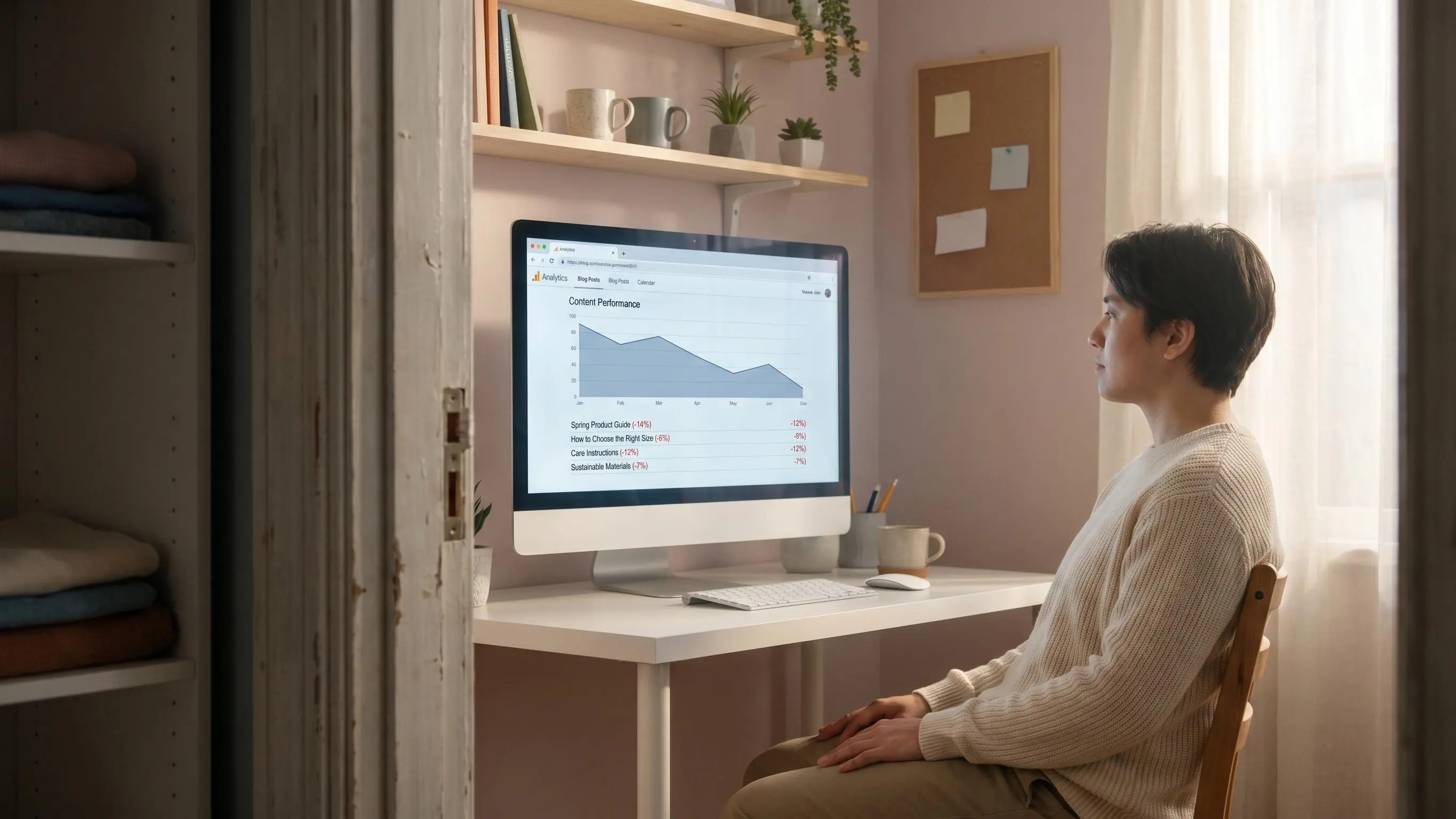
Content decay sneaks up on you. A page that used to pull traffic and pipeline starts slipping, and a lot of teams answer by publishing more instead of fixing the page that already proved it could win.
What matters is knowing why it slipped, what changed in search, and whether the right move is refresh, merge, or rebuild. We've seen small ranking drops turn into real revenue loss fast.
A few things are worth checking first:
- A two-position drop on a bottom-funnel page can hurt more than a bigger slide on a top-of-funnel post.
- Fresh screenshots, stats, and examples matter when the query changed, not just because the page is old.
- If three URLs are splitting the same intent, one clean fix beats three weak updates. That's how you recover faster.
What Content Decay Actually Means
content decay is the gradual loss of rankings, clicks, and business value on pages that used to work.
That distinction matters. This is not a sudden penalty, a broken analytics tag, or a sitewide technical collapse. It’s slower than that. A page gets traction, grows, peaks, levels off, and then starts slipping a little at a time until nobody notices the damage until pipeline is already down.
For growing brands, the real problem is rarely the article itself. It’s the assumption that once a page wins, it stays won.
Content is not a one-time asset. It behaves more like inventory that expires at different speeds.
We see teams misread decay as bad luck or algorithm chaos, then respond by publishing more net-new content while yesterday’s winners quietly stop carrying their share. That’s usually the wrong move. Strong SEO programs treat content as a living growth system that needs maintenance, repositioning, and sometimes a rebuild.
According to Google Search Central, content should be evaluated as helpful, reliable, and people-first rather than updated just to look fresh for search engines. That makes decay management a quality and usefulness problem, not a date-change tactic.
Why Content Decay Hits Growing Brands Harder Than They Expect
This is where frustration kicks in. A traffic decline on old posts feels unfair because the page may still look solid when you read it.
But smaller teams don’t have the luxury of manually reviewing hundreds of URLs every month. And when you’re still scaling, every lost ranking tends to have an outsized acquisition impact. The content library grows faster than the team’s maintenance capacity. That gap sneaks up on you.
Two numbers make the point clear:
- Only 1.74% of new pages reach the top 10 within a year
- 66% of pages older than two years show declining organic traffic
So protecting existing authority is often more valuable than chasing the next article idea. This isn’t a writing problem. It’s an operations problem. If your process only supports research, writing, and publishing, decay will eventually outpace output.
Why Rankings Drop Over Time Even When a Page Was Once Strong
Rankings don’t fall for one reason. Usually it’s a stack of smaller shifts.
A useful diagnosis lens is simple: page, query, SERP, business job. Decay begins when one moves and the page does not.
Common causes show up like this:
- Freshness gaps: old examples, stale screenshots, outdated tools, dead workflows
- Competitor velocity: other pages get deeper, cleaner, and more useful
- Search intent drift: the keyword now favors comparisons, templates, or tools instead of an explainer
- SERP changes: AI Overviews, videos, forums, and modules reduce clicks even if rank holds
- Cannibalization: multiple pages split relevance across the same topic
- Weak trust signals: old stats and obsolete product references make the page feel behind
- Quality reweighting: the SERP now rewards different content shapes than when the page first won
A page can still be well written and still be wrong for the current search result 30% to 40% annually
- Statistical or data-led guides often decline 15% to 25%
- Industry best-practice content often declines 20% to 30%
- Foundational how-to content tends to decline more slowly at 5% to 10%
- News and current-events content can collapse 80% to 95% once demand fades
That’s why SaaS, ecommerce, and fast-moving B2B teams usually need tighter refresh cadences than slower-moving educational publishers. We wouldn’t review a product integration guide on the same schedule as a basic evergreen tutorial.
A post being old doesn’t automatically make it urgent. Volatility, business value, and SERP change do.
Content Decay Now Has Two Layers: Search Rankings and AI Visibility
A page can decay in traditional search and AI-generated answers separately. That changes how you monitor performance.
You can still rank on page one and lose visibility inside AI summaries, recommendation flows, and answer layers. In practice, that means waiting for clicks to drop may already be too late.
The research is moving in one direction:
- AI citations tend to be 25.7% fresher than traditional organic results
- Around 70% of AI Overview citations can turn over within 2 to 3 months
The click risk is measurable, not just theoretical. In a preregistered field experiment, showing an AI Overview reduced outbound organic clicks by 39.8% and increased zero-click searches by 34.5%, conditional on an Overview appearing. That means a page can lose acquisition value even if its conventional ranking has not moved much.
That is a much shorter feedback loop than many teams are used to. The old approach of yearly audits won’t hold up in faster categories. Refresh strategy now needs to support both ranking recovery and answer-engine relevance. Same page, two visibility systems.
The experiment measures click behavior when an AI Overview appears, not the probability that one will appear for your keywords or the conversion impact of a lost click. Track query-level CTR alongside rankings and impressions so a stable position does not mask declining traffic value.
AI Overview Exposure Depends Heavily on Query Format
AI Overviews are not an equally likely source of click loss across a content library. A 2026 longitudinal measurement study of 55,393 trending Google queries found that an Overview appeared on 64.7% of question-form searches, compared with 9.5% of non-question searches. That makes query format a practical prioritization signal: pages built around direct informational questions may need closer CTR monitoring even when their conventional rankings are stable.
The study measured a broad, time-bounded sample of trending queries rather than any individual site’s keyword set. Treat these figures as a reason to segment your own Search Console data by query shape, not as a forecast of how often AI Overviews will appear for every topic.
AI Overview activation in a 40-day study of 55,393 trending Google queries. Question-form queries triggered an Overview much more often than non-question queries.
Source: Iqbal, Xu, and Montgomery’s 2026 measurement study.
- The study sampled trending queries across 19 categories from March 13 to April 21, 2026, so its activation rates may not represent a specific site, country, device, or keyword portfolio.
- Activation rate measures whether an AI Overview appeared; it does not measure a page’s probability of being cited, clicked, or converted.
View chart data
| Query format | AI Overview activation |
|---|---|
| All queries | 13.7% |
| Question-form queries | 64.7% |
| Non-question queries | 9.5% |
For decay triage, add AI Overview exposure to the page-query-SERP diagnosis. A falling CTR on question-led queries can reflect a changing results page rather than a failure of the page itself.
How to Tell True Content Decay From Other Traffic Loss
Before you update anything, make sure you’re solving the right problem.
A refresh won’t fix broken canonicals, a migration issue, or a tracking error. And pruning a page because of seasonality is just self-inflicted damage. Historical optimization for SEO starts with diagnosis, not automatic rewriting.
Use a basic validation checklist:
- The page is still indexed
- The decline was gradual, not overnight
- The topic isn’t strongly seasonal
- Impressions, clicks, CTR, or average position softened over months
- The rest of the site or section isn’t falling at the same rate
- No redirects, canonical conflicts, or crawl issues are involved
Sometimes the page isn’t decaying. Sometimes demand changed, or the click curve got worse because the SERP changed. Those are different problems and they need different responses.
The Early Warning Signs Most Teams Miss
Most teams catch decay after the drop is obvious in traffic reports. By then, recovery is usually slower.
The earlier signals tend to show up first:
- Impressions flatten or start fading
- Average position slips by one to three spots
- CTR falls while ranking stays similar
- The page starts ranking for weaker, less commercial queries
- Conversion quality drops even when sessions look stable
- AI or SERP features answer the simple version of the query before the click
Traffic decline on old posts is often the last symptom, not the first.
One practical habit helps here: compare every page against its own historical baseline, not just the site average. The most urgent pages aren’t always the highest traffic pages. They’re often the ones tied to revenue, internal link strength, or high-intent query coverage.
How to Find Decaying Content in a Repeatable Way
One-off audits feel productive for about a week. Then the backlog returns.
A repeatable process works better:
- Start with pages at least 6 to 12 months old so normal ramp time doesn’t get mistaken for decline.
- Compare the last 3 to 6 months against the previous period.
- Flag pages with sustained losses in clicks, impressions, CTR, or average position.
- Segment by page type such as blog posts, comparison pages, templates, product pages, landing pages, and help docs.
- Check query-level movement to see what fell, what emerged, and whether intent changed.
- Review the live SERP and rule out technical causes.
This is exactly where a recurring dashboard beats a spreadsheet. We’ve seen teams waste half a day just rebuilding the same view every month. Platforms like Intelliminds help by connecting topic research, refresh opportunities, and publishing workflows so the monitoring layer doesn’t become its own project.
A Practical Framework to Diagnose Why a Specific Page Is Decaying
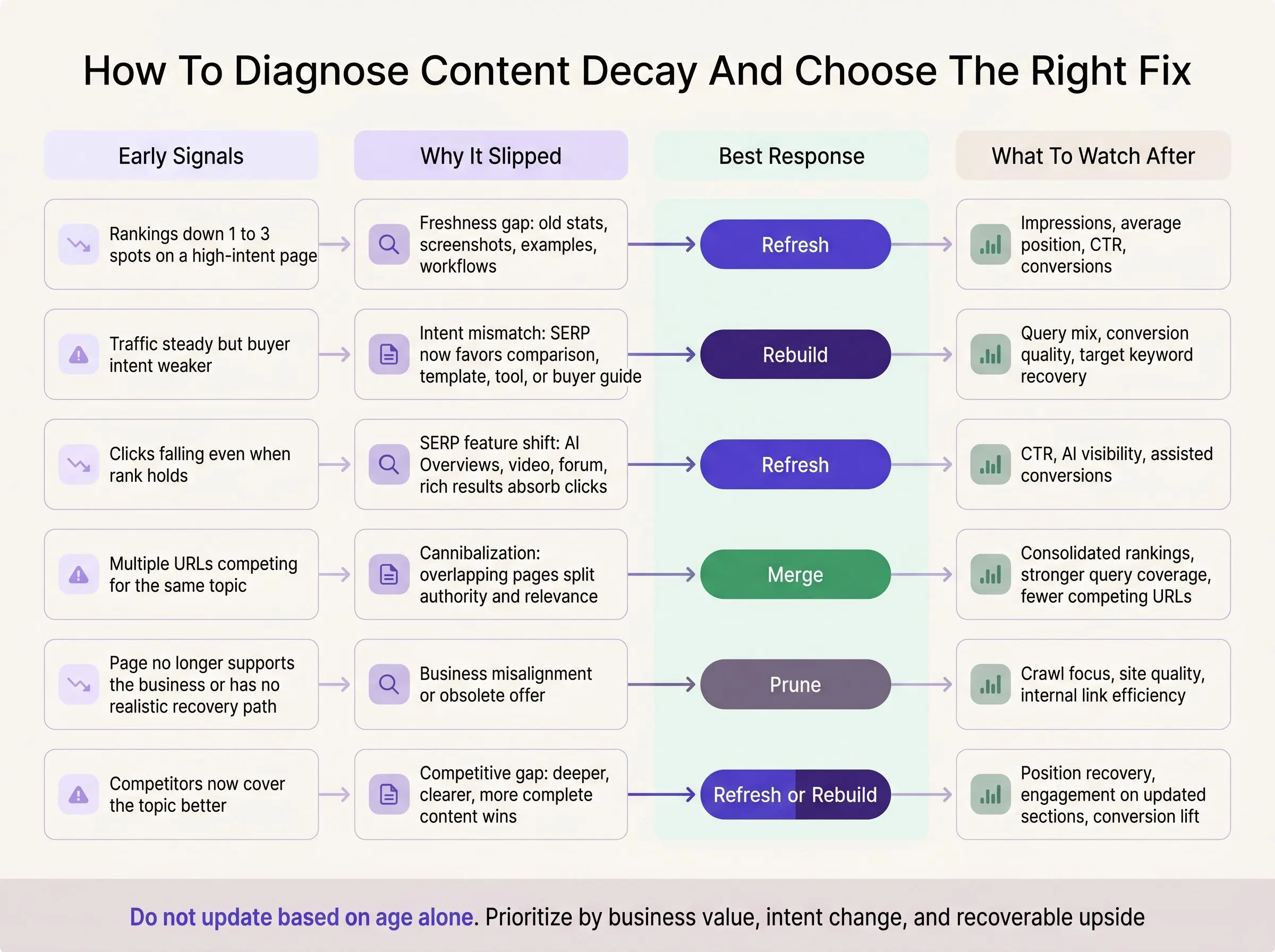
Once you’ve found a slipping page, don’t jump straight into editing. First decide what actually broke.
We use five diagnosis buckets:
Freshness gap
The examples, screenshots, numbers, product references, or recommendations are old enough to weaken trust.
Intent mismatch
The query now favors a different format. Maybe the SERP wants comparisons, templates, tools, or a more strategic angle.
Competitive gap
The current winners are deeper, better structured, more specific, or simply more complete.
SERP feature shift
The ranking may be stable, but new result features are soaking up clicks.
Business misalignment
The page still gets traffic, but it no longer supports the right audience or conversion path.
Write down the primary cause before you touch the draft. Otherwise teams end up rewriting intros while the real issue sits in the middle of the page untouched.
The Proven SEO Fix: Historical Optimization, Not Endless New Publishing
Historical optimization for SEO is the disciplined process of updating, expanding, consolidating, or repositioning existing content to restore performance.
It works because you’re building on existing authority, backlinks, and history. New content starts from zero, and zero is harder than it used to be. Research consistently shows refreshes can generate 3 to 5 times higher ROI than producing new pieces from scratch.
That doesn’t mean net-new content stops mattering. It means the answer to why rankings drop over time usually isn’t “publish more.” It’s “maintain proven assets better.”
Sustainable organic growth comes from research, writing, publishing, and updating working as one system.
Lean teams need compounding moves. Historical optimization is one of them.
When to Update Blog Content and When to Leave It Alone
A lot of wasted work starts with the wrong timing. Not every page that dips needs attention right now.
Good reasons to update:
- Steady decline over several months
- Outdated facts, screenshots, or product references
- Competitors now cover the topic more completely
- Search intent clearly shifted
- Revenue-driving pages softened, even a little
- AI visibility dropped on strategic topics
Reasons to wait:
- The page is still maturing
- The decline is seasonal
- Rankings and business outcomes are still strong
- The page is low-value and not worth the effort
Blog posts often need active review before the roughly 11-month index half-life becomes a problem. Product and pillar pages usually hold value longer, often 24 to 36 months, but they still need selective updates. Blanket monthly or annual rules are lazy. Topic-based cadences work better.
What Actually Works in a Content Refresh
Changing the date and adding a sentence is not a refresh. It’s paperwork.
Meaningful refresh work usually includes some mix of:
- Expanding coverage to match current intent
- Replacing outdated data, examples, tools, and screenshots
- Reworking headings and section order around the live SERP
- Adding missing subtopics, comparisons, FAQs, or use cases
- Improving internal links in and out
- Updating CTAs to match the page’s role in the funnel
- Removing obsolete or bloated sections
One finding matters here: minor edits usually don’t move much. Major expansions in the 31% to 100% range were the only updates linked to statistically significant ranking improvement, with an average gain of 5.45 positions.
Not every page needs a rewrite. But cosmetic edits rarely reverse meaningful content decay.
Refresh, Merge, Prune, or Rebuild: Choosing the Right Move
Refreshing everything is just another version of doing nothing. The right intervention depends on the page.
- Refresh when the page still has authority and the topic is still worth owning
- Merge when overlapping pages are cannibalizing each other
- Prune when the page has no business value and no realistic recovery path
- Rebuild when query intent changed so much that the original format no longer fits
A tutorial with strong backlinks but old screenshots usually gets refreshed. Three thin listicles competing for the same comparison term should probably be merged. A landing page for an offer you no longer sell should be pruned. A feature page targeting a keyword that now behaves like a buyer’s guide may need a rebuild.
Use a marginal-lift mindset. Old is not a reason. Recoverable upside is.
How to Prioritize Pages That Can Recover Lost Organic Traffic Fastest
The goal isn’t to touch the most pages. It’s to recover lost organic traffic where the upside is highest.
We’d stack-rank candidates using both SEO and business signals:
- Historical traffic peak
- Current decline rate
- Commercial intent
- Conversion contribution
- Backlink equity
- Internal link importance
- Ease of update
- SERP volatility
Then group them into tiers. Quick wins with authority and obvious freshness gaps go first. Strategic pages that need deeper rewrites come next. Low-value pages get merged or retired.
This protects editorial capacity. It also gives leadership a more credible plan than “we’re updating old blogs.” Tools like Intelliminds help here by surfacing decaying opportunities and reducing the manual work needed to prioritize them.
A Simple Workflow for Recovering Lost Organic Traffic at Scale
You need a workflow that survives real operating conditions, not one that looks good in a strategy deck.
A practical sequence looks like this:
- Identify decaying pages by segment and business value
- Diagnose root cause at the page, query, and SERP level
- Choose the right action: refresh, merge, prune, or rebuild
- Brief the update around intent shifts, missing subtopics, and conversion goals
- Execute meaningful edits
- Republish strategically and improve internal linking
- Monitor recovery windows and query movement
- Feed the lessons back into future topic research
The non-obvious part is step eight. Refresh work should improve future publishing decisions, not live in a separate maintenance lane. When research, writing, publishing, and refreshing sit in disconnected tools and teams, decay becomes permanent because nobody owns the full loop.
How Long It Takes to See Results After a Refresh
Teams quit too early on refreshes all the time.
Recovery speed depends on page type, crawl frequency, competition, and how substantial the update was. Landing pages showed a median refresh-to-reindex interval of 9 days. News pages took longer, with a median of 28 days.
But reindexing is not the same as ranking recovery. A page can be reprocessed quickly and still need weeks or months to reclaim positions and clicks. That’s normal.
Track performance over weeks and months, not over the next 72 hours. In compressed, fast-moving SERPs, you may need quicker iteration. Evergreen topics usually give you a longer window, but not an unlimited one.
Mistakes That Make Content Decay Worse
Some fixes feel productive because they’re easy. They usually make the problem worse.
Common mistakes include:
- Changing the publish date without improving the page
- Refreshing based only on age
- Ignoring query-level changes
- Treating every decline as an algorithm issue
- Rewriting intros while leaving old substance in place
- Measuring only sessions instead of conversions and query quality
- Refreshing too lightly when the page needs structural expansion
- Publishing more new content while high-value assets quietly erode
One subtle risk: stable traffic can hide a weaker query mix and lower buyer intent. So the page looks fine in the dashboard while business value is already slipping. Fresh-looking content is not the goal. Restored relevance is.
The Metrics That Matter After You Update
If you only watch raw clicks, you’ll miss whether the refresh actually worked.
A better post-update view includes:
- Impressions
- Average position for target queries
- CTR
- Query coverage
- Assisted conversions
- Internal link support
- AI visibility where relevant
Compare performance against the page’s own historical baseline. That’s more honest than sitewide averages.
You’re looking for signs like ranking recovery on core keywords, better coverage for relevant new terms, stronger engagement on the updated sections, and improved conversion quality from the page. Temporary traffic spikes can happen for noisy reasons. Recovered business value is the real score.
Building a Content Refresh Engine Instead of Running One-Off Fixes

This is the shift that matters. Winning brands don’t just update pages when traffic gets uncomfortable. They build an operating system for it.
That system includes continuous topic research, active monitoring for decay, structured refresh decisions, fast execution, and tight feedback loops. In many categories, competitive topics now have a 3 to 6 month performance half-life. Annual audits are too slow.
A few habits make the difference:
- Assign clear refresh ownership
- Set review cadences by topic type
- Keep source material and screenshots easy to update
- Connect performance data back to publishing decisions
Automation helps when it removes friction, not when it adds another dashboard. At Intelliminds, we care about connecting topic research, writing, publishing, and ongoing refreshing because that’s how momentum compounds. More output is not the win. Better maintenance is.
Conclusion
content decay is normal. It’s also diagnosable and fixable.
Pages lose rankings for understandable reasons: freshness gaps, intent drift, stronger competitors, SERP changes, and business misalignment. The right response is not panic, and it’s not endless net-new publishing. It’s disciplined historical optimization for SEO.
Start with the pages that used to drive meaningful traffic or revenue. Diagnose why they’re slipping. Then build a repeatable refresh workflow that helps you recover lost organic traffic before decline turns into a permanent loss. That’s how growing brands stop treating SEO like guesswork and start running it like a system.
Article Record
ReferencesPrimary sources used for this article
- Activation, Source Quality, Claim Fidelity, and Publisher Impact
- Measuring Google AI Overviews:
- Creating helpful, reliable, people-first content
- What Is Content Decay? (And How to Fix It Before It Tanks Your Traffic)
- Six Ways to Improve Your Site's Ranking (SEO)
- Are Google’s Search Quality Evaluator Guidelines A Ranking Factor?
- Lucas Mondora
Update HistoryMeaningful revisions to this article
- Added a chart showing how AI Overview visibility varied by query format.
- Made the research findings easier to understand with a clear comparison of question-based and non-question searches.
- Enriched the section on search rankings and AI visibility with data showing how AI Overviews affected outbound clicks and zero-click searches.
- Clarified why brands need to monitor both traditional search performance and visibility in AI-generated results.
- Added evidence from Google’s helpful content guidance to the section on what content decay actually means.
- Strengthened the article’s explanation with a direct official source.
- Completed one sourced content update without changing the article’s core structure.