
Most teams treat a content optimization checklist like a last-minute SEO chore. That is how you end up with bloated intros, stale titles, and pages that rank for terms nobody on your team can explain.
If you are scaling content without adding more manual work, focus on the fixes that change how a page is understood, used, and found. Skip the "quick wins" that amount to swapping a few keywords.
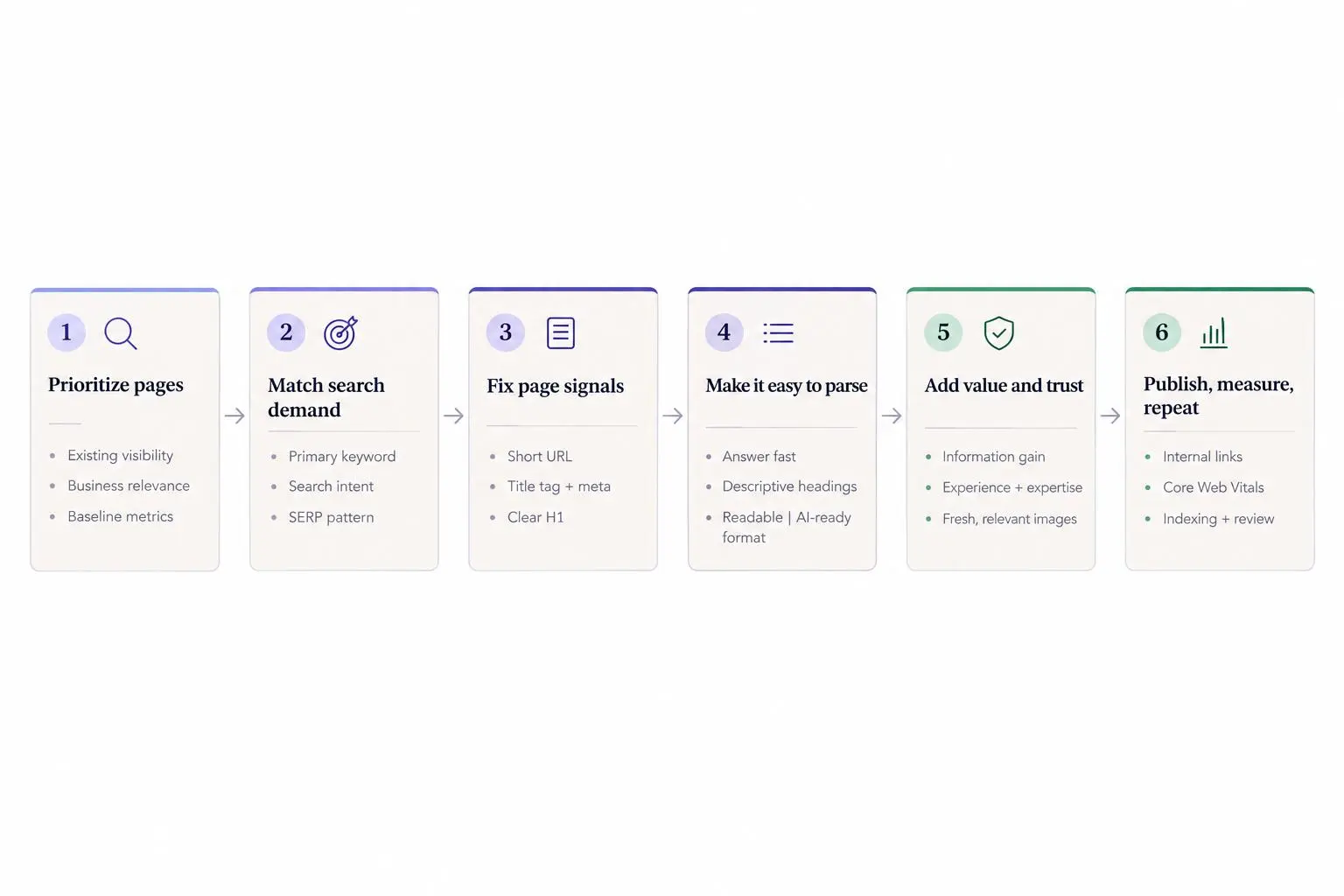
Clean up the right pages. Make every update count.
1. Short Descriptive URL
Start here because messy slugs quietly drag down otherwise decent pages. A clean URL helps readers, helps search systems, and saves you from weird cleanup later.
Keep the slug short, readable, and tied to the page topic. If your article is about a content optimization checklist, the slug should say that plainly. Not post-27-final-v2 and not a long chain of filler words nobody will ever type or remember.
A few rules hold up well in the real world:
- use words that match the page topic
- remove repeated words already covered by the folder path
- skip dates unless the page is truly time sensitive
- don't make the slug so narrow that it breaks when the article expands later
This is one of those details teams ignore until they have 400 posts and half of them look stale because the URL says 2023. The page may still be fine. The slug makes it look abandoned.
If you publish often, set a simple rule and stop debating it every week: primary topic plus a clear modifier when needed. If your team needs quick options, a tool like our SEO Permalink Generator can speed that part up without turning slug creation into a meeting.
2. Compelling title tag and meta description
Your title tag is the promise. Your meta description is the reason to care. Treat them that way.
The title should align with the primary keyword and the actual problem behind the search. Not just the phrase. There's a difference between matching a keyword and matching a need, and you can feel it in the search results.
A strong setup usually does three things:
- names the topic clearly
- signals the outcome or use case
- avoids vague drama or clickbait
The meta description should preview who the page is for, what it helps with, or what the reader will get. If you've refreshed a page and left an old meta description in place, you've already created friction before the click.
One practical habit we like: check the top results before rewriting yours. Look at their patterns, then look for the gap. Maybe they're all broad and generic. Maybe they're all aimed at beginners. That tells you where to get sharper.
3. Title wrapped in H1
This sounds basic because it is basic. It still gets missed.
Make sure the visible page title is wrapped in an H1 and clearly states what the page is about. The H1 doesn't need to be an exact copy of the title tag, but it should point in the same direction. If the title tag promises one thing and the H1 says something clever but fuzzy, the page starts losing trust immediately.
During an article refresh checklist review, check the H1 before touching the body copy. We see the same issues over and over:
- missing H1
- multiple competing H1s
- a diluted H1 that sounds like branding instead of a topic
Readers landing from search are making a fast judgment. They want confirmation that they clicked the right result. Don't make them work for that.
4. Gets to the point fast
Most weak content doesn't fail because it lacks words. It fails because it stalls.
Lead with the answer, the framework, or the takeaway early. The opening section should tell the reader they're in the right place and what they'll get. If your intro spends 200 words warming up, you've already lost part of the audience and made the page harder to extract into search features or AI summaries.
This matters more than people admit. For growing brands, slow intros often come from trying to sound polished. The result is dead air.
A better opening usually includes:
- a direct answer or angle in the first few lines
- the target keyword used naturally
- a clear statement of scope
- language that supports the topic without padding it
Self-contained passages help too. If a section can stand on its own and still make sense, it's easier for search systems to interpret and easier for readers to skim.
5. Descriptive subheadings
Subheadings do more than break up text. They carry the logic of the page.
Use headings that tell the reader exactly what a section covers. "Common issues with old blog posts" beats "What to know." "How to prioritize pages for refresh" beats "Next steps." This is not the place to get cute.
Good subheadings tend to mirror real questions buyers and evaluators ask:
- what is this
- how does it work
- when should we update it
- what should we fix first
- what mistakes should we avoid
They also help machines parse the page. That's not abstract anymore. Search queries fan out into subtopics, and pages with clear structure are easier to retrieve, summarize, and cite.
If you're doing a content optimization checklist across dozens of pages, heading cleanup is one of the fastest wins. It improves clarity without forcing a full rewrite.
6. Search-intent alignment
Keyword matching without intent matching is how brands waste six months.
Before you optimize anything, ask what the searcher actually wants. Is the query informational, navigational, commercial, or transactional? That answer should shape the page itself, not just the wording on it.
Current top-ranking results are still the best practical proxy. Review them for three things:
- content type
- content format
- content angle
If the results are mostly guides and comparisons, a thin product page probably won't feel like the right answer. If the query triggers AI style summaries, your page needs a clean answer plus supporting subtopics, not a vague essay.
Smaller teams usually do better when they stop chasing broad terms with weak fit. A narrower keyword with strong intent is often the page that actually converts.
7. Target keyword identification
Don't start editing headlines and body copy until you've confirmed the target keyword. Otherwise you're optimizing into fog.
We use three practical filters here:
- search volume
- keyword difficulty, ideally personalized to your site
- search intent
That combination keeps teams honest. High volume alone means very little if the term is unrealistic or irrelevant to the business.
A better approach is to build around one primary keyword and the related subtopics that belong with it. That gives the page topical depth without forcing one phrase into every section. It also separates vanity terms from buyer-relevant searches, which is where a lot of content programs quietly go off track.
Automation can help here. Our platform can speed keyword and topic research, but the final call still has to pass a business test: does this term matter to the audience and to revenue, or does it just look good in a spreadsheet?
8. Information gain
This is the part most refreshes miss. They update wording, maybe swap a screenshot, and call it done. That isn't improvement. It's housekeeping.
A refreshed page should add something meaningfully useful beyond the current results. That can take different forms:
- a better framework
- clearer decision criteria
- fresher examples
- stronger comparisons
- sharper explanations
- updated screenshots that actually reflect current tools or workflows
Ask a simple question: would someone bookmark this page, send it to a teammate, or come back to it later? If not, the refresh probably didn't add enough.
Maintenance keeps a page alive. Information gain gives it a reason to rank.
This is where mass-produced content usually falls apart. It can summarize. It struggles to add judgment.
9. Showcasing experience and expertise
Trust isn't built by saying you're trustworthy. It's built by sounding like you've actually done the work.
Pages feel more credible when they show real familiarity with the topic through informed analysis, accurate claims, and useful context. That's especially important for how-to content, reviews, comparisons, and advice tied to business outcomes.
When we review refreshed pages, we look for:
- thin claims with no support
- factual drift from older versions
- generic advice that could apply to anything
- missing context around when a tactic works and when it doesn't
Growing brands can beat larger publishers here. Not with louder branding, but with clearer experience. If your page sounds like it came from a real operator, people notice. Search systems are getting better at noticing too.
10. Good readability
A page can be technically optimized and still be painful to read. That kills performance in slower ways.
Good readability means clear language, shorter paragraphs, useful bullets, and structure that works on mobile. It also means removing filler. A lot of content isn't hard to understand because the topic is advanced. It's hard to understand because the writing won't get out of its own way.
A quick readability pass usually means:
- cutting repeated points
- simplifying jargon
- breaking dense sections into smaller units
- checking mobile flow
- reading the page aloud, section by section
That last one catches more than most tools do. If a sentence feels awkward in your mouth, it'll feel awkward in the reader's head.
11. Core Web Vitals criteria
Content quality and page experience work together. You don't get to ignore one because the other is strong.
Review the three current Core Web Vitals during a refresh:
- Largest Contentful Paint: aim for 2.5 seconds or faster
- Interaction to Next Paint: aim for under 200 milliseconds
- Cumulative Layout Shift: aim for under 0.1
Use the 75th percentile view, not the prettiest lab snapshot. You're optimizing for how the page performs for most users, especially on mobile.
A 2025 web-wide benchmark makes the mobile emphasis concrete: 48% of sites were rated good on all three Core Web Vitals for mobile visitors, compared with 56% on desktop. The analysis, based on Chrome UX Report data, also shows that loading remains a more common mobile weakness than responsiveness or layout stability.
If a refreshed page still underperforms, look past the copy. Common issues are heavy images, unstable layout blocks, or interactive elements that lag after load. We've seen teams spend hours tuning paragraphs while the real problem was a bloated hero image pushing LCP in the wrong direction.
A comparison of the share of websites meeting good thresholds for all three Core Web Vitals together and for each individual metric in July 2025. Mobile trails desktop overall and on LCP and INP, while mobile has a higher CLS good-rate share.
Sources
SiteQwality's summary of HTTP Archive's 2025 Chrome UX Report analysis.
- The benchmark is a web-wide snapshot based on Chrome UX Report data from July 2025, not a causal study of content refreshes.
- Chrome UX Report coverage excludes iOS Chrome and includes publicly discoverable pages that meet an undisclosed traffic threshold, so small sites and some audiences may be underrepresented.
- The notebook source is a secondary analysis reporting HTTP Archive results; teams should use their own field data for page-level decisions.
| Performance measure | Mobile | Desktop |
|---|---|---|
| All three Core Web Vitals | 48% | 56% |
| Largest Contentful Paint | 62% | 74% |
| Interaction to Next Paint | 77% | 97% |
| Cumulative Layout Shift | 81% | 72% |
The combined pass rate requires all three metrics to meet their thresholds, so it should not be treated as an average. The 12-point mobile–desktop gap on LCP is a useful triage signal: test the mobile loading path before assuming a content refresh is the problem.
These are broad web benchmarks, not a forecast for an individual page. Check your own 75th-percentile field data by device before prioritizing a fix.
12. AI search optimization
AI search optimization is mostly disciplined on-page SEO with less fluff and better structure. That's the honest version.
If AI systems are retrieving and summarizing content, your page needs to be easy to parse. That means direct answers, clean headings, clear subtopics, and sections that focus on one idea before moving to the next. Clever phrasing has its place. Not in every heading.
Treat this as overlapping work, not a separate workflow. The same improvements that help a page rank well in traditional search often help it get cited or summarized too:
- strong structure
- complete topical coverage
- useful, self-contained passages
- direct answers early in sections
For a refresh workflow for marketers, this changes the standard. You're not just adjusting keywords. You're making pages more useful and easier to extract.
13. Paragraph, list, and table snippet formats
Search systems often prefer answers in recognizable shapes. You should too.
Use short paragraphs when the query asks what, why, or how. Use lists when the topic is sequential or grouped. Use tables when the reader needs side by side comparison. This is less about chasing featured snippets and more about reducing friction.
A practical rule:
- paragraph for explanation
- list for steps
- table for structured choices
For paragraph answers, concise blocks around 40 to 50 words often fit well. Not because there's magic in the number, but because short answer blocks are easier to extract.
You can't manually assign your page as a featured snippet. All you can do is make the answer obvious.
14. On-page SEO image optimization
Images should earn their spot. If they don't clarify, support, or demonstrate something, they're just taking up space and slowing the page down.
During a refresh, review whether screenshots, diagrams, or product visuals still match the surrounding section. Old screenshots create quiet trust issues. Readers notice when the interface in the image doesn't match the explanation beside it.
A solid image review covers:
- descriptive alt text where it helps
- mobile placement that doesn't break reading flow
- relevance to the surrounding section
- file handling that doesn't create performance drag
Visual cleanup is part of optimization, not decoration work. Treat it that way.
15. Internal links to other pages
Internal linking is one of the highest-leverage fixes because it helps readers and search systems at the same time.
Add links to relevant pages so people can move deeper into the topic without starting over. Connect supporting articles, category pages, service pages, and high-intent resources. Use anchor text that clearly signals where the link goes.
One thing teams forget: add links into the refreshed page from older pages too. Don't just link out from the page you updated. If the rest of the site never points back to it, you've only done half the job.
In a content refresh checklist for SEO teams, this often turns into a fast win because it improves navigation, context, and discoverability without needing a full rewrite.
How to prioritize a content refresh checklist for SEO teams
Don't refresh everything. That's how teams burn time and lose momentum by the second afternoon.
Start with pages that already have some visibility, rankings, or business relevance. Pull a baseline before editing so you can measure what changed later. We like to capture page URL, word count, H1, meta description, top keywords, estimated traffic, and obvious issues.
Then separate pages into two buckets:
- surgical update
- full rewrite
That's a real operational distinction. Thin pages, outdated year references, and pages ranking for too few keywords are common refresh candidates, but they don't all deserve the same effort.
Review cadence should follow content type. Many blog posts deserve a look every three to six months. Time-sensitive pages need more frequent checks. Evergreen assets can run longer. Turn this into a working seo content update checklist by assigning an owner, due date, target keyword, and expected scope for every page.
How to build a repeatable blog update process and refresh workflow for marketers
The blog update process falls apart when it lives in scattered docs and memory. Build a tracker.
Your tracker should show page status, due date, target keyword, update type, and related notes. Pair it with a publishing calendar so refreshed content, new content, and follow-up promotion stay coordinated instead of competing for attention.
A clean refresh workflow usually moves through stages like this:
Sequential workflow
- Audit
audit
- Brief
brief
- Rewrite
rewrite
- Review
review
- Publish
publish
- Internal links
internal link update
- Indexing
indexing check
- Performance
performance review
Keep human approval in the loop, especially for brand voice, factual accuracy, and strategic judgment. That's one reason Intelliminds SEO Automation Software fits naturally into this workflow. We built it to handle keyword and topic research, writing, publishing, and content refreshing while still leaving room for review before anything goes live.
After republishing, confirm the page is accessible and eligible for search. If you're checking multiple URLs after updates, a batch tool like our Google Index Checker can speed up that last pass.
Conclusion
A strong content optimization checklist isn't a pile of SEO tips. It's an operating system for improving the right pages in the right order.
For growing brands, the win comes from consistency. Choose better keywords. Match intent. Improve the page itself. Refresh with purpose. Keep publishing on a steady rhythm. That's how content starts acting like an acquisition channel instead of a side project.
Start with a small set of underperforming but relevant pages. Run them through this 15-step checklist. Then turn what works into your standard article refresh checklist going forward. That part matters most. The system beats the burst.
Article Record
ReferencesPrimary sources used for this article
- What Is a Good Page Load Time? Benchmarks and Research
- Creating Helpful, Reliable, People-First Content
- Google Search Essentials (formerly Webmaster Guidelines) | Google Search Central | Documentation | Google for Developers
- Understanding Core Web Vitals and Google search results
- About PageSpeed Insights Stay organized with collections Save and categorize content based on your preferences.
- Our latest update to the quality rater guidelines: E-A-T gets an extra E for Experience | Google Search Central Blog | Google for Developers
- Featured Snippets and Your Website
- A Comprehensive On-Page SEO Checklist for 2026
- Content Optimization: The Complete Guide
- Content optimization: 20 tactics to boost SEO & AI visibility
- On-page SEO checklist: The complete task list for 2026
- 6 Important Keyword Metrics & How to Analyze Them
- 5 Tactics To Ready Content Now for a Future Refresh
- How To Set Up a Content Publishing Process Worthy of Repetition
- Missing features in Google Search results