
Content workflow software gets messy fast when teams buy for task tracking and ignore what happens after the brief. If you're scaling SEO, that mistake shows up in missed reviews, stale drafts, and posts stuck in limbo.
The good tools handle research, writing, approvals, publishing, and refresh work without 6 tabs open (that's the tell). The weak ones just shuffle tickets.
We cut this list down to the options worth your time.
Show 5 more productsShow fewer products
1. Intelliminds SEO Automation Software

- Research to publishing in one flow
- Built-in keyword research and AI writing
- Direct CMS publishing reduces handoffs
- Human approval before content goes live
- Supports ongoing content refresh workflows
- Less suited for complex content architecture
- May be more than workflow-only teams need
- Requires editorial review for best results
If your SEO team is stuck between strategy docs, writing briefs, draft reviews, and manual publishing, this is the kind of content workflow software built to collapse that sprawl. We designed Intelliminds for teams that want one system to move from keyword discovery to live content without building a larger editorial machine just to keep up.
Intelliminds is strongest when the bottleneck isn't just approvals or task tracking. It's production. Research has to happen, articles have to get written, on-page SEO has to be handled, content has to reach the CMS, and old pages need refreshing before they decay.
A few things matter here:
- automated keyword research and topic discovery are built into the workflow
- the platform supports AI writing and SEO production, not just status management
- CMS publishing automation removes a handoff that quietly slows most teams
- human approval stays in the loop before content goes live
- content refreshing is part of the operating model, not an afterthought
That last point is easy to miss. A lot of teams buy software for net-new output and then realize six months later that half their organic opportunity is buried in aging pages. If your workflow ends at publish, it isn't really a workflow.
Compared with workflow-first tools, Intelliminds goes deeper into actual SEO execution. Compared with CMS-first platforms, it's less about content architecture and more about helping marketing teams write and publish SEO content in one flow. That's why it tends to fit brands scaling blogs, landing pages, category content, and refresh programs.
The best workflow is the one that removes handoffs, not the one that documents them beautifully.
If you're looking for a seo tool with writing and publishing in one place, or an all in one seo content tool that still gives your team approval control, this is the lane.
2. Wrike

- Strong request intake automation
- Clear cross-team workflow visibility
- Handles complex approval chains well
- Useful for campaign planning
- Fits existing SEO tool stacks
- Limited native SEO production features
- Can add process overhead
- Requires separate writing and CMS tools
Wrike makes sense when your content operation has become a coordination problem. Not a writing problem. Not a publishing problem. A people problem.
Some SEO teams have too many stakeholders touching every asset: SEO leads, freelance writers, editors, designers, product marketing, legal, clients. In that setup, workflow breaks because no one knows what's waiting, what's blocked, or who owns the next move. Wrike is built for that kind of environment.
Where Wrike earns its place
Request intake is a bigger deal than most teams admit. When content requests come through Slack, email, meetings, and random docs, your pipeline starts drifting by the second afternoon. Wrike's forms and workflow automation bring discipline to the front end.
It also helps when campaign planning matters as much as single-article execution. That's common in agencies and enterprise teams where SEO content is one stream inside a larger marketing calendar.
Wrike is a stronger fit when you already have separate tools for:
- keyword research
- content briefs
- writing
- CMS publishing
In that case, you don't need another platform trying to do everything. You need a system that keeps the work moving and visible.
The tradeoff is obvious. Wrike doesn't solve SEO production the way a platform with research, writing, and publishing built in does. If your real issue is slow output, adding more workflow states may just make slow work look organized.
3. Sanity

- Structured content scales across channels
- API-first delivery supports flexible publishing
- Strong fit for programmatic SEO
- Reusable models reduce duplicate work
- Custom workflows suit technical teams
- Requires developer support for setup
- Can feel heavy for blogs
- Less autonomous for non-technical marketers
Sanity belongs on this list for teams that think about content as a structured system, not just a series of articles. That's a different mindset, and it changes what you need from content workflow software.
For technical SEO programs, structured content isn't a nice extra. It's the whole game. If you're managing reusable landing page components, multi-site content, regional variations, or programmatic SEO pages, workflow has to live at the content model level, not just the editorial checklist level.
Here's where Sanity gets interesting:
- content can be modeled for reuse across channels and templates
- API-first publishing supports flexible delivery
- workflows can align to structured content operations, not only blog publishing
- it works well when developer support is already part of the setup
That flexibility is powerful, but it isn't free. Teams sometimes buy an API-first system and then discover they mostly needed a faster way to produce and publish articles. Sanity shines when content needs to feed many surfaces or power large, structured libraries. It can feel heavy if your team just wants to ship blog content more efficiently.
Compared with Storyblok and Contentful, the evaluation usually comes down to how technical your team is and how much customization you actually plan to use. If your marketers need heavy day-to-day autonomy, don't underestimate that requirement. A platform can be elegant on paper and still create drag in practice.
4. Optimizely
- Strong approval routing controls
- Clear draft-to-publish states
- Reliable version history and rollback
- Reduces high-stakes publishing errors
- Less focused on SEO creation
- Added process can slow teams
- May feel heavy for simple workflows
Optimizely is a serious choice for teams that care about control more than speed. That's not a criticism. In some organizations, publishing mistakes are expensive, and loose workflows aren't acceptable.
Its strength is governed editorial flow. Drafts, approval routing, publishing states, and version control are central. That matters for SEO teams updating important pages where one premature change can create compliance issues, legal problems, or just a messy rollback.
Why workflow states matter more than they sound
A clean separation between draft, in review, approved, and published reduces a kind of operational noise that many teams normalize. People stop asking whether the page is ready. The system already knows.
Versioned drafts matter even more on high-stakes pages:
- important landing pages get updated in layers
- multiple contributors often touch the same asset
- rollback needs to be clean when something slips through
That level of governance is worth the added process when risk is real. It becomes overkill when your main goal is producing more SEO content faster. Optimizely is less about helping you discover topics or write articles, and more about making sure the publishing chain stays controlled.
Some teams need that. Others just need to stop using email for approvals.
5. Filestage

- Speeds up stakeholder signoff
- Centralizes feedback in one place
- Handles mixed content asset reviews
- Works well for distributed teams
- No SEO research or writing
- Narrower than full workflow suites
- Best as a stack add-on
Filestage is narrower than most tools here, and that's exactly why it can be useful. When the real bottleneck is review friction, a focused approval layer often beats a bloated platform.
We've seen teams misdiagnose this all the time. They assume they need better planning software, when the actual problem is that content sits for four days waiting on scattered comments from brand, product, or clients. That's not a planning issue. That's approval drag.
Filestage is built around browser-based review and signoff. It works well when SEO content isn't just text in a doc, but also:
- landing page drafts
- visual assets
- PDFs
- campaign materials that need stakeholder review in one place
Compared with Wrike, it's much narrower. Compared with a production platform, it doesn't help with research, drafting, or optimization. But for agencies and distributed teams, that can be fine. If your content already gets created elsewhere and keeps stalling at review, solving that step can unlock more output than adding another SEO tool.
Approval chaos is still workflow chaos, even if the draft is already written.
This is the kind of tool you add when feedback is the choke point, not when you're trying to replace the full stack.
6. Storyblok

- Visual editor helps marketers move faster
- Good balance of headless and usability
- Strong localization for multi-market SEO
- Structured content supports scalable publishing
- Less suited to SEO content creation
- Still needs technical setup resources
- Workflow depth trails dedicated PM tools
Storyblok sits in an interesting middle ground. It gives you headless CMS flexibility, but with a more marketer-friendly editing experience than some technical platforms. For SEO teams, that balance matters more than vendors like to admit.
A lot of headless setups sound great until marketers need to move quickly and can't see how a page will actually come together. Visual editing changes that. It reduces preventable formatting mistakes, shortens review loops, and helps non-technical stakeholders move faster inside the publishing layer.
Where Storyblok tends to fit
It works especially well for teams dealing with multilingual SEO or multi-market publishing. Localization isn't just about translation. It's workflow. Different markets need different owners, different review timing, and sometimes different page structures.
Storyblok makes sense when you need:
- structured content for scale
- collaboration inside the CMS
- localization support
- enough visual context for editors to work confidently
Compared with Sanity and Contentful, Storyblok often appeals to teams that want headless architecture without turning every workflow discussion into a developer ticket. That's the real compromise it offers. Not perfect simplicity, but less friction between architecture and editorial speed.
If your publishing layer is where marketers spend most of their time, usability deserves more weight than teams usually give it.

7. Contentful
- Strong structured content foundation
- Supports omnichannel publishing at scale
- Helps teams reuse content efficiently
- Good fit for multi-brand operations
- Limited native SEO writing support
- Less ideal for fast content production
- Can feel infrastructure-heavy for marketers
Contentful is usually the choice for businesses building content operations across many properties, teams, and delivery channels. It's less of a seo platform with article writer functionality and more of a structured content backbone.
That distinction matters. If you need to write and publish SEO content quickly inside one system, Contentful probably isn't the first place to look. If you need consistent content operations across websites, apps, campaign pages, and other digital surfaces, it becomes much more relevant.
The operational value comes from structure and reuse. Content doesn't have to be created separately for every destination if the model is built properly. For large SaaS companies, marketplaces, and enterprise teams, that can prevent a lot of duplication.
A few situations where Contentful fits well:
- content must stay consistent across multiple brands or business units
- SEO pages feed several digital experiences
- workflows need to support many contributors and channels
- research and writing already happen in other tools
Compared with Storyblok, Contentful usually skews more infrastructure-first. Compared with an all in one SEO content tool, it's clearly not trying to own the production layer. That's the tradeoff. Stronger publishing operations, less native support for content generation.
When teams already have a working SEO research and writing stack, that can be completely fine.
8. Scompler
- Strong editorial planning discipline
- Clear intake and ownership tracking
- Helps standardize approval workflows
- Reduces drift across content calendars
- Limited native SEO production features
- Less useful for simple teams
- Not built for CMS automation
Scompler is for teams that have enough content activity to need discipline, but don't necessarily need an AI-heavy production engine or a complex structured CMS. It leans into planning, ownership, approvals, and editorial consistency.
That sounds less exciting than automation. It can also be exactly what's missing.
Some SEO programs don't fail because they lack tools. They fail because nobody owns intake cleanly, calendars drift, priorities change silently, and approval rules depend on who happens to be online. Scompler addresses that kind of operational mess.
Why planning starts to matter more as you scale
At small volume, informal workflows survive. At higher volume, they create rework. Teams start publishing duplicate topics, missing review steps, or losing track of what's tied to revenue priorities.
Scompler is useful when you need a workflow layer that brings order to:
- topic planning
- request intake
- status tracking
- signoff logic across recurring editorial work
Compared with Wrike, it's more editorially focused. Compared with Intelliminds, it isn't trying to be a seo platform with article writer and publishing capability. That's not a flaw. It's a different job.
If your team already has creation tools and the real issue is inconsistent process, an editorial workflow layer can do more for you than another production platform.
| Intelliminds SEO Automation Software | Wrike | Sanity | Optimizely | |
|---|---|---|---|---|
| Built-in AI content creation | ✓ | ✓ | ✓ | ✓ |
| Human approval before changes go live | ✓ | ✓ | ✓ | ✓ |
| Direct CMS or downstream publishing | ✓ | × | ✓ | ✓ |
| Built-in keyword research or topic discovery | ✓ | × | × | × |
| Version history or rollback control | × | × | ✓ | ✓ |
| Structured content modeling for reuse | × | × | ✓ | × |
How to Choose the Right Content Workflow Software for Your SEO Team
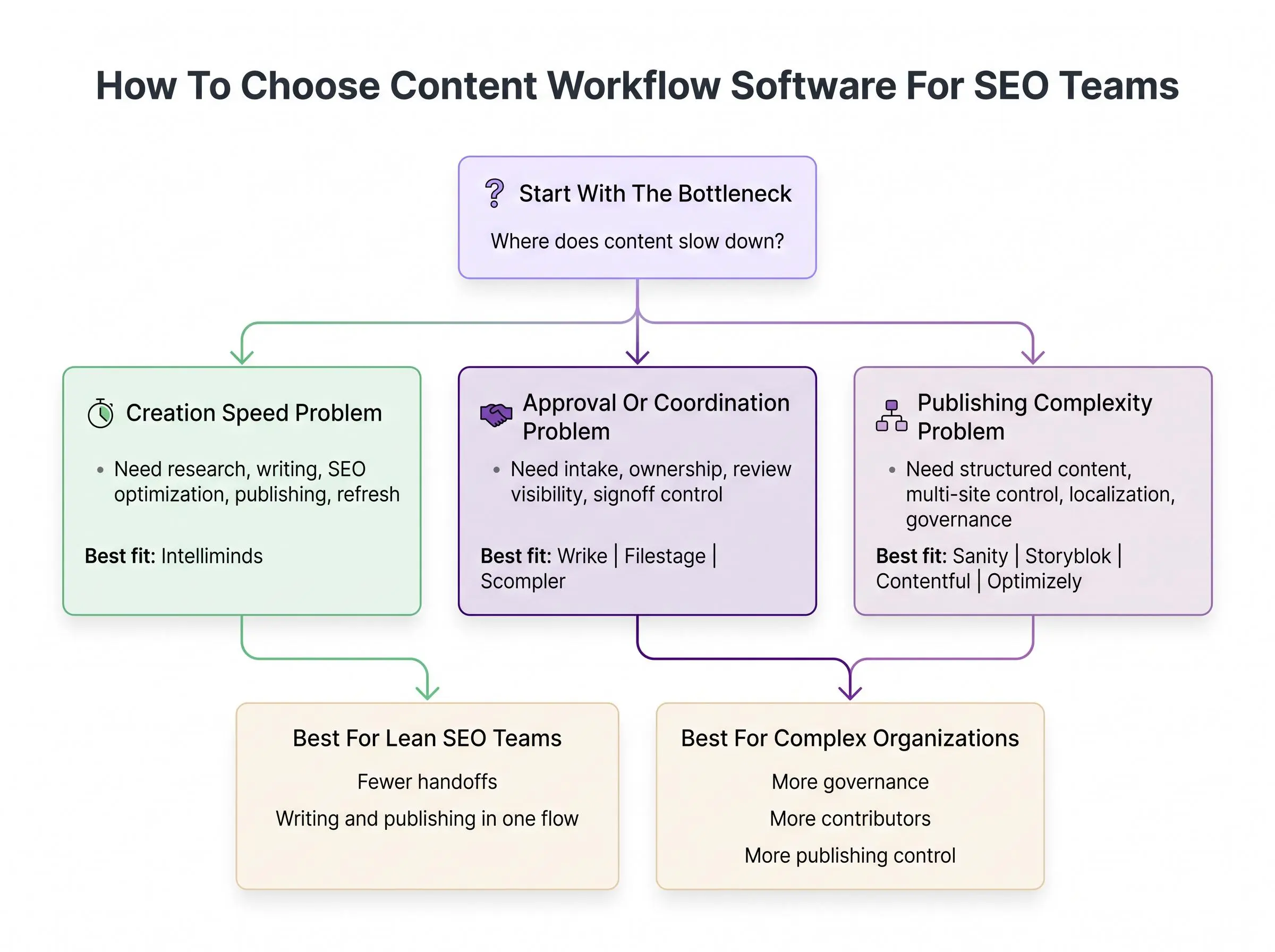
Don't start with the demo. Start with the bottleneck.
Teams get this backward all the time and end up buying software that solves the wrong problem. If content isn't shipping, figure out where it dies.
Use this lens:
- Creation speed problem: prioritize platforms that help research, write, optimize, and publish
- Approval problem: focus on review systems and governed workflow states
- Publishing complexity problem: look harder at CMS and structured content platforms
Then match the tool to how your team actually operates.
Lean marketing teams usually benefit from a seo tool with writing and publishing in one place because handoffs are the tax they can't afford. Larger organizations with editors, designers, legal reviewers, and multiple approvers need more explicit process control. Technical teams often want API-first flexibility because content has to live beyond one blog.
Pressure-test the workflow end to end:
Typical workflow sequence
- Discovery
idea and keyword discovery
- Drafting
brief and draft creation
- Approvals
review and approvals
- Publishing
cms publishing automation
- Maintenance
refresh and maintenance
If a platform only handles one or two stages, be honest about the rest of the stack. Best-of-breed setups can work, but only if your team can manage integrations and ownership without creating hidden delays.
Ask the uncomfortable questions before shortlisting:
- Do we need workflow software, a CMS, or a production-oriented SEO platform?
- Are we optimizing for speed, governance, or flexibility?
- Will marketers actually use this every day?
- How often do we refresh old content?
- Do we have the technical support this platform assumes?
The right tool usually looks obvious once you're honest about where the work actually slows down.
What Actually Matters for Teams That Need to Write and Publish SEO Content at Scale
At scale, you don't need more moving parts. You need fewer weak links.
The best content workflow software for SEO teams handles more than planning. It needs enough depth to support execution, enough governance to prevent mistakes, and enough publishing control to keep the pipeline moving.
The factors that matter most are straightforward:
- Workflow depth: does it cover research, drafting, optimization, publishing, and refresh cycles?
- Editorial governance: are approvals clear enough to prevent drift and last-minute confusion?
- Publishing control: can content move into the CMS without manual copy-paste chaos?
- Content model flexibility: will it support simple blogs, structured landing pages, or both?
- SEO execution support: does it help produce search-ready content, or just track tasks?
- Cross-functional collaboration: can multiple teams work in one process without losing visibility?
- Scalability: can it absorb more markets, categories, and contributors without breaking?
The right answer also changes by buyer type. SaaS teams usually need speed. Ecommerce teams often need repeatable workflows for category and collection content. Agencies care about client approvals and clarity. Enterprise teams usually care about governance, roles, and publishing state control.
Different teams break in different places. Buy for the break point.
Common Buying Mistakes to Avoid
Most software mistakes start with a category error. Teams buy a project management tool when they really need a platform to write and publish SEO content. Or they buy a CMS-first system without enough technical support to make it usable day to day.
A few mistakes show up again and again:
- choosing coordination software when the real need is SEO production
- overvaluing feature breadth and ignoring whether writers and editors will actually use it
- assuming approvals can keep living in email, docs, and chat without slowing output
- forgetting post-publication work like content refreshing and ownership of updates
- skipping role mapping across research, writing, approval, publishing, and performance follow-up
The biggest one is simple: not defining where the workflow starts and ends.
A tool that coordinates work is not the same as a tool that creates SEO content. A tool that governs publishing across channels is not the same as an all in one seo content tool. If you blur those categories, your shortlist gets messy fast.
Conclusion
The best content workflow software depends on where your SEO operation breaks first. Not where the vendor says it should.
If you need one system to research, write, optimize, publish, and refresh content, start with production-focused platforms built for SEO execution. If your pain is approvals, governance, or multi-team coordination, workflow-first and CMS-first platforms may fit better.
Keep the final evaluation practical. Map one real content workflow from idea to published page, then look for the platform that removes the most friction at each step. That's usually the right answer. Not the biggest feature list. Not the flashiest demo.
Just the system your team will actually use to get content live.
Article Record
ReferencesPrimary sources used for this article
- Wrike features enable work to flow for any workflow
- Fly through tasks with workflow automation and AI
- Plans built to drive work delivery at scale
- Filestage: Online Proofing Software – Free Trial & Demo
- Project Workflow Management Software | Filestage
- Filestage Pricing – Online Proofing Software
- Scompler Features | Platform for strategic communication
- Scompler Marketplace Apps
- Enterprise Headless CMS | Content Operating System | Sanity
- Get started with Sanity Content Agent
- Plans that scale with you
- Your Headless CMS for Enterprise Content Management | Storyblok
- Headless CMS | Storyblok
- Pricing | Storyblok
- Content platform | Contentful Help Center
- Introduction to Contentful | Contentful Help Center
- The CMS platform for product teams | Contentful
- About Scompler - Scompler Technologies GmbH