Most DIY SEO for small business fails because teams automate the visible work first, then publish pages nobody needs. More posts won’t fix unclear service pages, missing tracking, or content aimed at traffic that never converts.
Keep judgment where it counts: offers, customer language, facts, and final approval. Automate the repeatable grind so your team can stay consistent without turning SEO into a second job.
Start with these decisions:
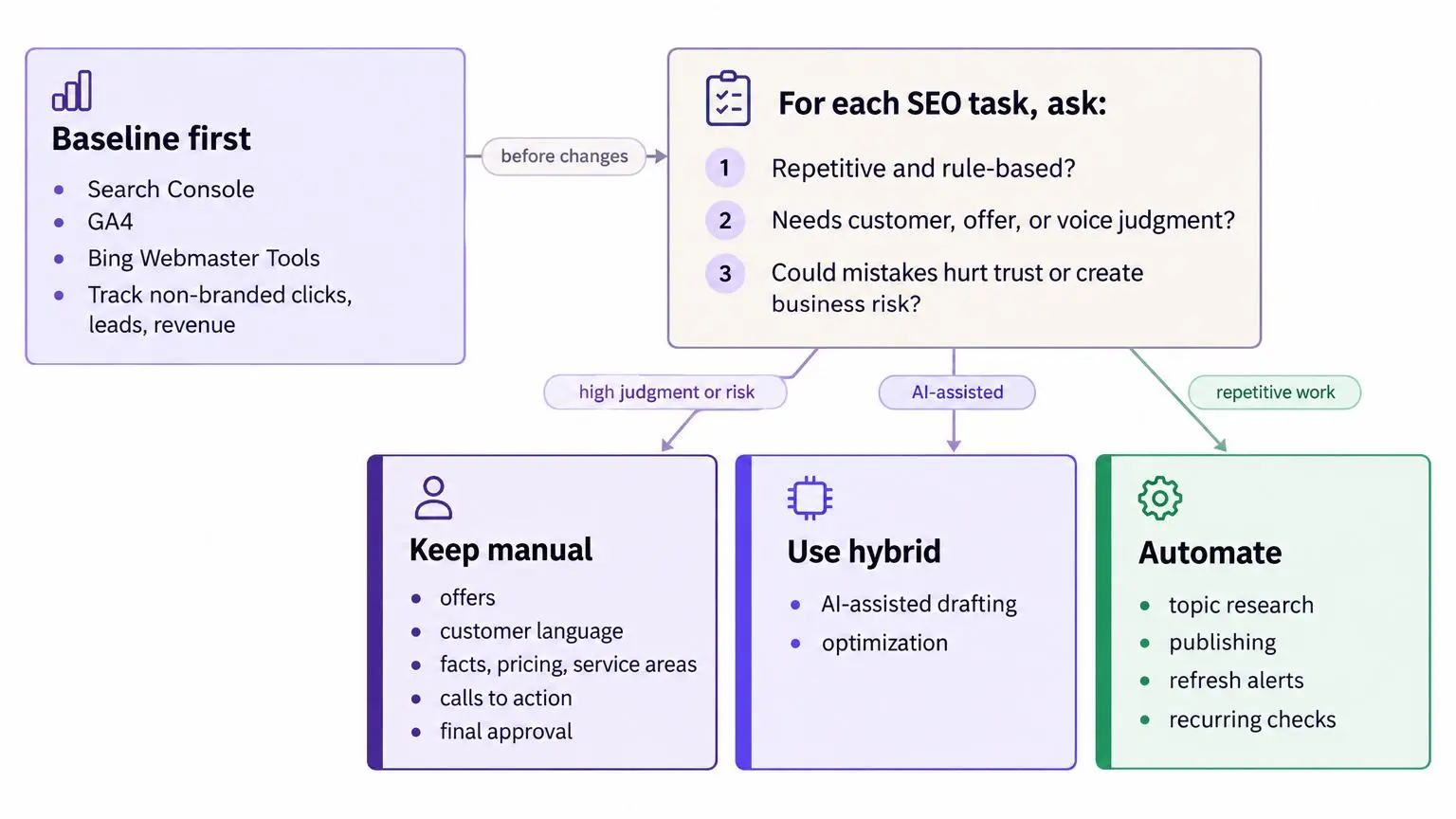
- Track non-branded clicks, leads, and revenue before changing pages
- Automate topic research, draft creation, publishing, and refresh alerts
- Manually verify claims, service areas, pricing, and calls to action
Build a system that brings in customers.
The Smarter Way to Think About DIY SEO
DIY SEO for small business usually gets framed the wrong way. People treat it like a test of discipline or technical stamina, as if the winner is the one willing to do every task by hand. That's not how good operators think.
This is a resource allocation problem.
You already know organic search matters. The issue is that keyword research turns into a rabbit hole, publishing slips when the week gets busy, technical checks pile up, and old content quietly decays. By the second month, SEO starts feeling like a guilt project.
The goal isn't fully hands-off SEO. It shouldn't be. Some parts need your judgment because they affect what you promise, who you attract, and whether the traffic is worth anything once it arrives.
Here's the split we recommend:
- Manual for business-critical decisions
- Hybrid for AI-assisted drafting and optimization
- Automated for recurring workflows and checks
That sounds simple because it is. The hard part is accepting that not all SEO work deserves equal human attention.
A practical DIY system usually covers five workstreams:
- keyword and topic research
- on-page work and small business website optimization
- technical SEO and indexing
- local SEO
- tracking, reporting, and content maintenance
If you keep trying to personally grind through all five at full depth, you'll either stop publishing or start cutting corners where it actually hurts.
Your judgment is scarce. Don't waste it on repeatable chores.
Start With a Baseline Before You Automate Anything
Automation without a baseline just creates cleaner-looking chaos. You'll get more activity, more reports, more dashboards, and still not know if anything improved.
Before you automate a single task, set up the tracking foundation:
- Google Search Console for impressions, clicks, queries, indexed pages, and sitemap submission
- GA4 for traffic sources, user behavior, and conversions
- Bing Webmaster Tools as a second visibility check
Then record the numbers that matter right now:
- Current organic traffic
- Top landing pages from organic search
- Current keyword visibility
- Number of indexed pages
- Local profile performance if local matters
- Leads, calls, demo requests, or purchases from organic traffic
Most small businesses skip this because it feels slow. Then 90 days later they can't tell whether the new blog posts helped, whether local SEO moved anything, or whether that new tool subscription is paying rent.
Don't track everything. That's another trap. Pick a short list of KPIs you can actually use:
- qualified organic traffic
- leads or revenue from organic search
- non-branded click growth
- rankings for high-intent terms
- indexed pages that actually matter
If you can't connect SEO work to revenue or lead flow, you'll end up optimizing for screenshots.
A Simple Decision Rule for What to Automate and What to Keep Manual
You don't need a complicated framework. You need three questions that stop bad decisions early.
Ask this for any SEO task:
- Is it repetitive and rule-based?
- Does it require deep knowledge of our customers, offers, or voice?
- Would a mistake create trust issues, bad claims, or business risk?
From there, most tasks fall into one of three buckets.
Automate it
Use automation when the work is structured, repeated, and easy to verify.
Examples:
- recurring site crawls
- keyword expansion
- content briefs
- scheduled publishing
- content refresh prompts
- batch index checks
Use a hybrid approach
This is where a lot of good do it yourself SEO strategies live. AI can often get the first 70 to 80 percent done fast, but the last mile still needs a human.
Examples:
- article drafts
- title options
- internal link suggestions
- Google Business Profile post drafts
- review request templates
Keep it manual
Keep humans on anything that shapes trust, positioning, or conversion.
Examples:
- deciding which services or categories deserve visibility first
- approving claims
- pricing and offer pages
- relationship-based link outreach
- final fact-checking
The right split depends on your business model and volume. A five-page local site doesn't need the same system as a SaaS company publishing every week. But the rule still holds: automate the predictable, guard the consequential.
What to Automate First for the Biggest Time Savings
If you're going to automate, start where the time drain is obvious and the quality risk is manageable. That's usually content operations, not big strategic decisions.
Keyword and topic research is the first easy win. Let software expand seed topics, cluster related queries, surface question-based searches, and show rough volume or difficulty patterns. Then review the output manually and cut anything that doesn't match commercial intent. Search volume alone is a terrible editor.
Content planning comes next. Weekly publishing schedules, topic queues, and keyword-to-article mapping are exactly the kind of recurring work machines handle well. This matters more than people admit. A decent plan removes the weekly "what should we publish?" debate that kills consistency.
First drafts are also fair game, especially for informational content. Use AI for outlines and initial copy, then review for tone, accuracy, examples, and claims. We wouldn't hand raw drafts straight to your site and hope for the best. That's how teams publish content that technically exists but doesn't persuade anyone.
Publishing workflows are another easy place to buy back time. Formatting, scheduling, and CMS uploads are not where your best people should spend their Thursday afternoon.
Content refreshing is underrated. A lot of older pages don't need to be replaced. They need to be updated before rankings slide too far. In practice, refreshing an existing post is often more efficient than writing a new one from scratch.
Then automate recurring monitoring:
- weekly crawls
- rank checks
- alerts for indexing issues
- broken link detection
- changes in page status
For local SEO, automation works best as support. Draft profile posts, review request templates, FAQs, and reminders. But keep manual control over hours, categories, service areas, contact details, and photos.
This is exactly where a content-focused platform earns its keep. Our Intelliminds SEO Automation Software is built for businesses that want to automate the content side of SEO, including topic research, AI writing, publishing, and content refreshing, while keeping human approval in the loop before anything goes live. That's the right balance for most growing teams.
What You Should Still Do Yourself, Even if You Use AI
The best manual SEO work is rarely mechanical. It's strategic, commercial, and annoyingly human.
You should decide who you're trying to attract and which products, services, or categories deserve visibility first. AI can suggest keywords. It can't tell you which offer has the best margin, shortest sales cycle, or strongest close rate.
You also need to review whether pages actually convert. A page can rank and still be weak. We see this all the time. Traffic lands, gets vague service descriptions, thin proof, a mushy CTA, and leaves.
Keep these manual:
- keyword mapping to real buyer journeys
- offer prioritization
- page-level conversion improvements
- final review of claims, pricing, service areas, timelines, and credentials
- editorial cleanup so the content sounds like your business
- review responses when nuance matters
- outreach, partnerships, and PR conversations
This matters even more in regulated or trust-sensitive categories. If you're in healthcare-adjacent services, legal, financial, or anything with compliance risk, a lazy publishing workflow can create a real problem.
One operator truth here: AI is very willing to sound certain when it shouldn't be. That's your job.
Manual SEO Techniques for Small Businesses That Still Move the Needle
Not every useful SEO improvement needs software. Some of the best manual SEO techniques for small businesses are basic, sharp, and easy to ignore because they don't feel sophisticated.
Start with title tags and meta descriptions on priority pages. Make them specific. Match the intent. A weak title doesn't just hurt rankings. It hurts clicks, which means you can rank and still lose traffic.
Then fix page intent matching. Don't force one page to target everything. Service pages, product pages, location pages, and blog posts each have different jobs. If a page tries to do all of them, it usually does none of them well.
A few more manual wins:
- Add internal links from relevant articles to service or product pages
- Use descriptive anchor text instead of vague "learn more" links
- Clean up headings so the page is easy to scan
- Add FAQs where they remove friction
- Strengthen trust with reviews, testimonials, photos, and proof
- Compress oversized images and add relevant alt text
URL slugs are another small detail that people rush. Keep them short, readable, and tied to the topic. If your team needs help there, our SEO Permalink Generator is a lightweight way to create cleaner slugs before publishing.
Small business website optimization usually isn't about obscure tricks. It's about making the right pages clearer, faster, and easier to act on. That's less glamorous than chasing hacks. It also works better.
Ways to Improve Local SEO Without Automating the Wrong Things

For many small businesses, local visibility matters more than national traffic. A plumber, clinic, law office, or home service company does not need random readers from three states away. They need the right searcher in the right area.
Local SEO is also where over-automation gets risky fast. A 2026 U.S. consumer survey summarized by Digital Applied found that local-business choices are typically made quickly and from a short shortlist. That makes accurate business details and trustworthy first impressions operationally important, not administrative cleanup.
Among 1,227 U.S. consumers surveyed in 2026 after a recent local-business search, 75% chose in under 30 minutes and 72% considered three or fewer businesses.
Sources
Digital Applied's 2026 review of BrightLocal survey data
- The figures are from a U.S. consumer survey and may not generalize to every country, industry, or purchase type.
- The available notebook evidence is a secondary 2026 data review reporting BrightLocal survey results rather than the original survey publication.
- The survey describes behavior and does not establish that any individual local-profile change causes selection.
| Behavior | Share of consumers |
|---|---|
| Chose in under 30 minutes | 75 |
| Looked at three or fewer businesses | 72 |
Keep these tasks manual or manually approved:
- primary category selection
- service area definitions
- business hours
- NAP review
- photo selection
- service descriptions tied to the real offer
Automate or semi-automate the support work:
- Google Business Profile post drafts
- review request templates
- FAQ drafts
- recurring citation scans
- reminders for seasonal updates
We've seen AI reduce Google Business Profile setup and optimization work from hours to minutes by generating checklists, draft descriptions, and implementation assets. That's useful. But humans still need to correct categories, service areas, contact details, and missing photos. Those details decide whether local trust holds up.
Citation management is a good example. Scheduled monitoring can surface inconsistencies without constant rechecking, which saves real time. But someone still needs to confirm the data before changes get pushed.
If you're looking for practical ways to improve local SEO, keep it grounded:
- keep business details consistent across listings
- publish local service content where it makes sense
- collect and respond to reviews consistently
- track profile-driven clicks, calls, and visits
- use UTM-tagged links if your team can measure them correctly
One warning here is worth stating plainly: don't let AI invent neighborhoods, service areas, or location claims you don't actually support. Local SEO is not the place for fiction.
The Best SEO Tools for Small Businesses by Job
You don't need a giant stack. You need a few tools matched to the job.
For keyword research, use tools that surface keyword ideas, question-based searches, search volume, and rough difficulty. Beginner-friendly tools are often enough for blog topics, service pages, and FAQs. Question-based research is especially useful for long-tail queries and voice-style searches.
For on-page SEO, use tools that help with titles, meta descriptions, sitemaps, schema, and content checks. And yes, plain writing tools matter too. Clean writing improves trust and conversion, even if the software wasn't built as an SEO product.
For technical SEO, use a crawler that catches broken links, duplicate titles, redirects, and crawl issues. Free desktop crawlers that audit up to 500 URLs are enough for many small sites. That's more than most local businesses need.
For tracking and analytics, the core stack is still simple:
- Google Search Console for search performance and indexing
- GA4 for traffic and conversion behavior
- Tag management tools if you need deeper event tracking
That last category is useful, but not always beginner-friendly. Don't install complexity you won't maintain.
All-in-one SEO suites make sense when you need rank tracking, audits, keyword research, competitor monitoring, and reporting in one place. If all you really need is help producing and maintaining content, a broad suite can be expensive overhead.
That's where content automation tools fit better. Intelliminds SEO Autoblogger is built for brands and agencies that want end-to-end blog automation, including keyword discovery, article generation, links and images, and publishing on a controlled schedule with approval oversight.
And for quick wins, small utilities matter more than people think. Our Google Index Checker lets you batch check up to 20 URLs to see whether important pages are indexed. Our Blog Title Generator gives you multiple SEO-friendly title ideas from a keyword and audience when your team gets stuck at the ideation stage.
| Job | Use a tool that helps with | Small-business guidance |
|---|---|---|
| Keyword research | Keyword ideas, question-based searches, search volume, and rough difficulty | Beginner-friendly tools are often enough for blog topics, service pages, and FAQs; question-based research is especially useful for long-tail and voice-style searches |
| On-page SEO | Titles, meta descriptions, sitemaps, schema, content checks, and plain writing support | Clean writing improves trust and conversion, even if the software was not built as an SEO product |
| Technical SEO | A crawler that catches broken links, duplicate titles, redirects, and crawl issues | Free desktop crawlers that audit up to 500 URLs are enough for many small sites |
| Tracking and analytics | Google Search Console for search performance and indexing, GA4 for traffic and conversion behavior, and tag management tools only if you need deeper event tracking | Keep the core stack simple; tag management is useful but not always beginner-friendly |
| All-in-one suite | Rank tracking, audits, keyword research, competitor monitoring, and reporting in one place | Makes sense when you need the full stack; otherwise it can be expensive overhead |
| Content production and maintenance | Content automation for keyword discovery, article generation, links and images, and publishing on a controlled schedule with approval oversight | A better fit than a broad suite when the main need is producing and maintaining content |
| Small utilities | Google Index Checker for batch checks of up to 20 URLs and Blog Title Generator for multiple SEO-friendly title ideas from a keyword and audience | Useful for quick wins such as checking whether important pages are indexed or getting unstuck at the ideation stage |
A 90-Day DIY SEO Plan That Is Realistic for a Small Team
You do not need to master all of SEO this quarter. You need a workable rhythm.
Days 1 to 30
Build the foundation.
- Set up Search Console and GA4
- Record your baseline
- Run a technical crawl
- Identify your most important pages
- Build a simple keyword-to-page map
- Fix obvious indexing, title, and broken-link issues
Days 31 to 60
Improve the pages that matter and start publishing with intent.
- Update top service, product, or category pages
- Publish a small number of high-intent articles
- Add internal links from new content to money pages
- Clean up your Google Business Profile and core local listings if local matters
Days 61 to 90
Measure, refresh, and systemize.
- Review query data, traffic, conversions, and ranking movement
- Refresh weak pages before producing more volume
- Decide which recurring tasks deserve automation
- Set a monthly rhythm for publishing, checks, and updates
Consistency beats heroic effort. Every time.
A small team is usually better off building one repeatable publishing workflow than trying to become great at technical SEO, local SEO, backlink outreach, analytics, and content production all at once.
Mistakes That Make DIY SEO Harder Than It Needs to Be
A lot of DIY SEO pain is self-inflicted. Not because people are careless, but because the work gets approached in the wrong order.
Watch for these mistakes:
- publishing AI content without review, fact-checking, or intent matching
- treating SEO as blog-only work while ignoring the pages that drive sales
- skipping crawlability, indexing, redirects, and sitemap basics
- buying too many tools before building a process
- measuring rankings without measuring conversions
- over-automating local SEO and letting hours, NAP data, or service areas drift
- chasing high-volume keywords that don't fit the real offer
- ignoring older content that could be refreshed
- confusing dashboard activity with business progress
- assuming DIY means doing everything alone
That last one causes more damage than people realize.
Good DIY SEO for small business doesn't mean solo suffering. It means using the right seo tools for small businesses, keeping approval where it counts, and refusing to spend human time on repetitive tasks just to feel virtuous.
Conclusion
Successful DIY SEO for small business comes down to one decision: which work needs your judgment, and which work should be systemized.
Keep strategy, positioning, accuracy, trust, and conversion decisions manual. Automate repetitive research, drafting, scheduling, monitoring, and refresh workflows. Use a hybrid approach for content and local SEO tasks where speed helps but approval still matters.
If you want a practical next step, audit your current SEO tasks this week. Label each one as automate, manual, or hybrid. Then build one repeatable workflow this month before you add anything more complicated.
If content production is the bottleneck, look at a human-in-the-loop platform like Intelliminds. It can reduce the manual workload around research, writing, publishing, and refreshing without asking you to give up editorial control.
Article Record
ReferencesPrimary sources used for this article
- Local SEO Statistics 2026: Reviews, Maps and AI Search Data
- Creating helpful, reliable, people-first content
- DIY SEO: A Basic 5-Step Guide That Anyone Can Follow
- DIY SEO: 6 Steps Anyone Can Follow to Get Results
- How to automate local SEO: 7 tasks you can take off your plate (without leaving them all to AI) - BrightLocal
- 11 Ways to Automate SEO with Agent A
- Plan your business
- Local Consumer Review Survey 2023