
Ecommerce content automation can turn a growing catalog into search coverage—or flood your site with thin, same-sounding pages. The usual mistake is automating drafts while keyword mapping, CMS uploads, internal links, and refreshes stay painfully manual.
What matters is controlled scale: clean product data, page rules that match search intent, and a human approval step before anything goes live. Don’t let “fast” become 400 pages nobody can find.
Watch these pressure points:
- Collection copy that names real materials, uses, and buyer questions
- Buying guides that link shoppers toward relevant categories, not random products
- Refresh schedules for pages losing rankings after inventory or season changes
Build a system your team can actually run.
What Ecommerce Content Automation Actually Means
Ecommerce content automation is not "use AI to write faster." That's the shallow version, and it usually falls apart.
What we mean by ecommerce content automation is a working system that uses AI, structured product data, rules, and publishing workflows to research, create, optimize, publish, and refresh content that drives organic growth for online stores. The important word there is system.
It covers more than product descriptions. A lot more.
An SEO program for an online store usually touches:
- keyword and topic discovery
- search intent mapping
- content drafting by page type
- internal linking
- CMS publishing
- refresh cycles when rankings or inventory change
That stack matters because SEO automation for ecommerce brands is really an operating model. It's how you stop rebuilding the same process every week.
Simple text generation gives you words. Real automation gives you throughput with control. Those are not the same thing.
Across the funnel, the use cases are different. Category pages help shoppers discover options. Product pages help them evaluate a specific item. Buying guides answer the questions people ask before they trust a product page. Support content reduces hesitation right before purchase. If each of those pages is handled with random prompts and manual uploads, your SEO effort becomes fragile fast.
The brands that win here don't treat content like a series of one-off writing tasks. They build a machine around research, production, publishing, and maintenance. That's where traffic compounds.
Why Manual Ecommerce SEO Operations Break Down So Fast
If you're running ecommerce SEO manually, the pain is probably already familiar.
Too many SKUs. Too many launches. Supplier data that arrives half-clean, half-useless. A content team that's capable, but buried. And the quiet pressure from leadership to grow traffic without growing payroll.
This is where good teams still get stuck. Not because they can't write. Because the math stops working.
A few numbers make the point:
- one ecommerce business had 40,000 product pages with weak structure and no scalable SEO process
- one retailer enriched 5,700 products and generated 63,000 unique keywords after shifting to AI-assisted workflows
- a fashion company managing 1,500 seasonal pages cut page creation time from roughly a month and a half to 30 minutes
- one brand cleared an 800-product backlog in 3 weeks by automating content operations
Those examples matter because they show the real bottleneck. It isn't creativity. It's operations.
Manual workflows usually fail in predictable ways:
- strong products get attention, weaker catalog pages stay thin
- metadata and collection copy slip to the bottom of the list
- refresh work gets delayed until rankings drop
- the CMS work starts after copy is done, which means the job is never actually done when people think it is
And quality gets weird under pressure. By Tuesday afternoon, the best writer on your team is still a human being staring at SKU number 214.
The SEO impact isn't subtle either. You end up with duplicate manufacturer copy, weak non-branded rankings, missed launch windows, stale category pages, and broad parts of the catalog that simply never earn visibility.
This is why we don't frame it as a writing problem. It's a systems problem wearing a writing costume.
The Real SEO Opportunity Is Bigger Than Product Descriptions
Most brands start automation with product descriptions because that's the obvious pain point. Fair enough. But product copy alone rarely moves the full SEO program.
The bigger opportunity comes from automating the content layers that support different search intents across the store.
Here's the stack we usually push teams to think about:
- product detail page copy
- collection and category page intros
- buying guides and comparison content
- FAQ and support-style content
- meta titles and descriptions
- refreshes for aging pages
Each layer does a different job.
Product pages can pick up long-tail demand and brand-plus-product searches. Collection pages go after broader commercial terms where buyers are comparing options. Buying guides build authority around product families and create natural paths into collection and product pages. Refreshes protect rankings that would otherwise decay quietly over time.
That last point gets ignored too often. A stale page doesn't always crash. It just loses ground one week at a time.
Organic growth for online stores comes from coverage that compounds. Not random bursts of publishing. Not a one-month sprint where 200 pages go live and nobody touches them again.
And more pages by themselves don't solve anything. More weak pages just give you more weak pages to maintain. Automation works when the page roles are clear, the search intent is real, and the content is prioritized instead of sprayed everywhere.
Which Ecommerce Content Types Are Best Suited for Automation
Some content types are perfect for automation. Some are not. The easiest way to tell is to score each type on four things: repeatability, data availability, business impact, and editorial complexity.
If a page follows repeatable patterns, pulls from usable inputs, affects revenue, and doesn't need delicate brand storytelling, automate it first.
High-fit content usually includes:
- product descriptions built from structured attributes
- collection page content built from category rules, filters, seasonality, and use cases
- buying guides built from recurring topic patterns and product clusters
- SEO titles, meta descriptions, and supporting on-page elements
- refreshes for pages losing visibility
Lower-fit content still needs more human judgment:
- major campaign launches
- homepage copy
- brand story pages
- legally sensitive or highly regulated claims
The reason repeating formats respond so well to automation is simple. Consistency improves. Review gets easier. Publishing speeds up. Your team spends less time fighting the blank page and more time catching errors, shaping positioning, and deciding what deserves attention.
That's a much better use of senior people.
We've seen the difference in scale examples too. One fashion retailer cut a 30-week manual description effort down to 14 days. Another brand saved around 140 hours each season while increasing output. Those aren't small gains. They change what the team can even attempt.
One important distinction, though. Automating page creation is not the same as automating page strategy. If you automate production without deciding what deserves coverage and why, you just get faster at being unfocused.
What a High-Performing Ecommerce Content Automation System Looks Like
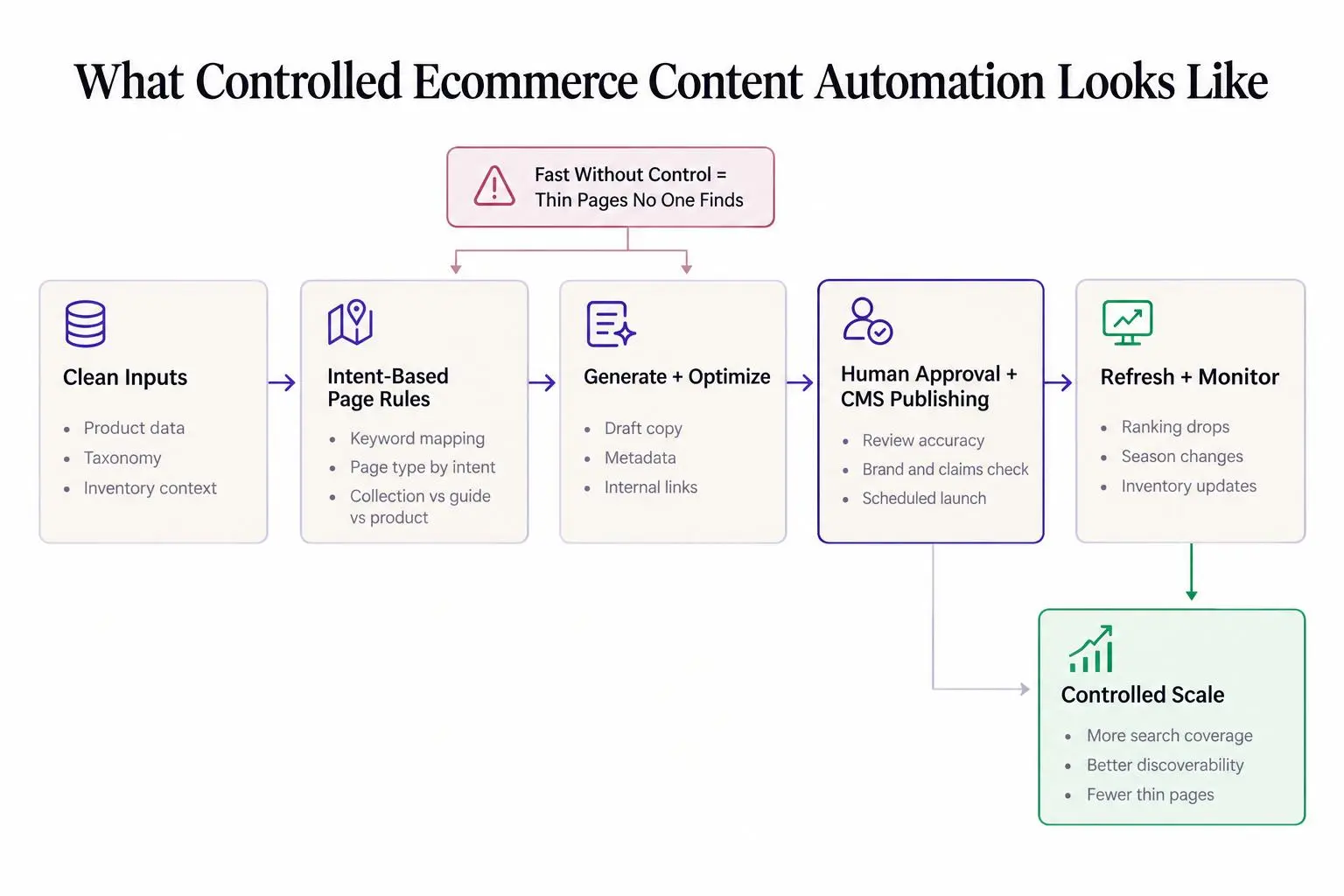
A good system has stages. If you skip one, the weakness shows up later.
Stage 1: Data readiness
Start with the inputs. Product attributes, category structure, naming rules, image quality, spec completeness. If your source data is sloppy, your output will be sloppy in a more efficient way.
This is where a lot of automation projects go sideways before they even begin.
Stage 2: Keyword and intent discovery
Map queries by page type. Product intent is different from collection intent. Editorial intent is different again. Prioritize non-branded opportunities instead of letting branded demand flatter the numbers.
Stage 3: Content generation
Use structured prompts, templates, and page-specific inputs. Product pages don't need the same depth as buying guides. Collection pages need commercial context. Guides need comparison logic and buyer questions.
Stage 4: Optimization and enrichment
This is where content starts acting like part of a site instead of a pile of text.
Add:
- internal links
- metadata
- heading structure
- schema considerations where they fit
- duplication and readability checks
Stage 5: Human review
Review for accuracy, tone, compliance, and merchandising fit. Human review is not a tax on automation. It's how you keep speed from becoming self-inflicted damage.
Stage 6: Publishing and scheduling
Push content into the CMS on a controlled schedule. Tie launches to inventory and seasonality. Publishing everything at once feels productive, but it often creates QA problems and hides performance signals.
Stage 7: Refresh and monitoring
Update aging pages. Revisit rankings that are slipping. Expand thin content when new demand appears.
This is one place where Intelliminds SEO Automation Software fits naturally. We built it around the actual workflow: automated keyword research, AI writing, CMS publishing, content refreshing, and human approval control in one process. That's a lot more useful than one tool for drafting and five spreadsheets for everything else.
The goal isn't fully hands-off content. We don't think that's the serious play. The goal is controlled scale with strategic oversight.
How to Automate Collection Page Content Without Creating Thin Pages
Collection pages are where a lot of ecommerce SEO value sits, and also where a lot of bad automation shows up.
They matter because they target broader commercial searches, shape product discovery, and often sit closer to purchase intent than blog posts do. A well-built collection page can do real work. A generic one just occupies a URL.
Many underperform for the same reasons:
- the intro could fit any category on the site
- there's no distinction by audience, season, style, or use case
- internal links are missing or random
- filters are doing all the work with no helpful copy around them
If you want to automate collection page content well, use a repeatable framework:
Collection page automation flow
- Taxonomy
Start with taxonomy and subcategory logic.
- Collection traits
Pull in actual collection traits such as materials, styles, benefits, seasonal cues, and common use cases.
- Keyword mapping
Map primary and secondary keywords by collection type.
- Content generation
Generate unique intros, supporting sections, FAQs, and internal links based on collection intent.
The quality rules matter more than the generation step.
A collection page should help a shopper narrow the field, not just reassure Google that text exists.
A few guardrails keep the page useful:
- don't publish boilerplate intros that could be swapped between categories
- reference traits that actually exist in the collection
- vary copy by audience, occasion, and buying criteria
- match content length to search competition and decision stage
Useful collection variations often include style-based pages, use-case pages, seasonal pages, and brand-plus-category pages. Those give you cleaner intent and better differentiation than one oversized category page trying to do everything.

How to Scale Buying Guide Content That Supports Revenue, Not Just Rankings
If you want to scale buying guide content, don't treat guides like top-of-funnel decoration.
Buying guides are some of the best ecommerce SEO assets because they capture mid-funnel research, answer comparison questions before shoppers hit a product page, and create natural internal links into products and collections. They also let you win traffic beyond exact product names.
The scalable version usually looks like topic clusters built around:
- product families
- use cases
- audience segments
- comparison angles
That doesn't mean every guide should sound templated. It means the structure is repeatable even if the judgment isn't.
Formats that automate well include best-for-use-case guides, comparison pages, beginner guides, sizing guides, and seasonal selection content. These have recurring patterns, recurring questions, and recurring link targets. That's exactly where automation helps.
It can speed up research and outlines, build first drafts from product and category data, and surface buyer questions consistently. Then your team reviews recommendations, nuance, and ordering. That's the split we like. Let the system do the heavy lifting. Let humans make the calls that affect trust.
This is also where Intelliminds SEO Autoblogger can make sense for teams that want controlled end-to-end blogging automation. It helps with buyer keyword discovery, article drafting, links, images, and scheduled publishing. That's different from tools that stop at a draft and leave the rest of the job on your desk.
Good buying guide systems tend to improve:
- keyword coverage
- internal linking depth
- topical authority
- assisted conversions from organic traffic
And yes, some guides will rank before they convert. That's normal. Give them real links into commercial pages and they'll pull their weight.
Where AI SEO Fits Inside an Ecommerce Team
AI SEO for ecommerce teams works best as an operating layer across functions. Not as a replacement for judgment.
SEO should set targeting and prioritization. Merchandising should supply product and category context. Brand or content teams should define tone and claims limits. Ecommerce ops should handle CMS QA and launch timing.
When those roles are clear, automation reduces friction in ways teams feel immediately:
- fewer manual briefs
- faster review cycles
- less copy-paste publishing
- more consistency across large catalogs
The team-level gains can be substantial. Some brands have saved 5 to 10 hours every two weeks on recurring product content and bulk listing work. Others cut weekly content effort from more than 60 hours down to review-focused workflows. Speed matters here because missed timing costs traffic, especially around launches and seasonal demand.
One D2C case study makes the operating change more concrete. A brand with more than 2,000 SKUs reduced weekly content work from 60 hours to 12 after connecting product data, generation, automated checks, human review, and Shopify publishing. The same case reported a 23% increase in organic search traffic within 60 days and an 8% improvement in product-page conversion rate. That is not proof that every implementation will produce the same lift, but it is a useful reminder to measure production efficiency and commercial outcomes together.
The objections are real, though. Brand dilution. Hallucinated product claims. Repetitive copy. Lower editorial standards.
Those problems don't get solved by optimism. They get solved by process:
- structured inputs
- brand examples
- clear templates and guardrails
- approval workflows
- publishing controls
If the system is loose, the output will be loose. That's not an AI problem. That's an operations problem again.
What the Best SEO Automation for Ecommerce Brands Should Include
If you're evaluating platforms or building your own stack, be picky. The wrong setup often saves time in one step and creates work in three others.
The capabilities that matter most are:
- automated keyword and topic research
- intent-based content planning
- page-type-specific generation
- CMS integration
- publishing schedules
- human review controls
- refresh workflows
- internal linking and on-page optimization support
There are clear tradeoffs between tool types. Generic AI chat tools are flexible, but weak for repeatable operations across large catalogs. Draft-only content tools make writing faster but leave planning, formatting, and publishing manual. Fully hands-off autobloggers can overpublish and create quality risk. Ecommerce-focused content systems are usually better when structured inputs and workflow control matter.
And they do matter.
Messy product data, repetitive output, compliance reviews, and forgotten maintenance are what break these projects in the real world. Not the initial draft.
Intelliminds SEO Automation Software is a fit for teams that want the content side of SEO automated with CMS workflow and a human in the loop, rather than a broad technical SEO suite. That's an important distinction. If your main bottleneck is planning, producing, publishing, and refreshing content, solve that bottleneck.
A few blunt evaluation questions help:
- Can it handle both editorial and commercial page types?
- Can it support refreshes, not just net-new content?
- Can it publish on a schedule instead of dumping pages all at once?
- Can it cut manual work without removing approvals?
If the answer to two of those is no, keep looking.
How to Measure Whether Content Automation Is Actually Working
Don't measure this by output alone. More pages is not the win. Better performance with less drag is the win.
Track SEO impact and operating efficiency together.
SEO and content KPIs should include non-branded keyword growth, collection page ranking gains, organic traffic by page type, indexation rate, content velocity, refresh cadence, and assisted conversions where you can see them.
Operational KPIs should include time to publish, hours saved, backlog reduction, catalog content coverage, and the shift from writing load to review load.
A few outcome patterns are worth watching for:
- ranking lifts across large impression sets
- movement from later search pages toward page one across large catalogs
- traffic gains within a few months on refreshed or expanded areas
- seasonal savings in time and production cost
Not every content type moves at the same pace. Product and collection pages may show commercial impact earlier. Buying guides often build slower but support broader authority and internal link strength over time.
If you're rolling out content in batches, indexation deserves special attention. We've found that a simple check can save a lot of false assumptions. Google Index Checker is useful here because you can review up to 20 URLs at once and quickly see whether new or refreshed pages are actually getting indexed.
If the pages aren't getting indexed, don't celebrate the publish count.
Common Mistakes That Make Ecommerce Content Automation Underperform
Most failures are avoidable. They're just boring enough that teams miss them.
The usual mistakes look like this:
- automating before product and category data is usable
- publishing near-duplicate copy across products or collections
- treating every page type as if intent is the same
- ignoring internal links between guides, collections, and product pages
- automating drafts while keeping research, publishing, and refreshes manual
- measuring volume instead of rankings, traffic quality, and conversion support
- forgetting maintenance as inventory, claims, seasons, and search behavior change
- letting automation run without approval on sensitive categories
- targeting generic keywords instead of real buyer intent
- focusing only on top sellers while the long tail stays thin
One of the worst traps is partial automation. Teams automate drafting, feel faster for two weeks, then realize the real bottlenecks were planning, uploading, linking, and maintaining pages. Half-automation can create the illusion of progress while the messy work stays exactly where it was.
A Practical Rollout Plan for Brands Starting Now
You don't need a giant transformation project to start. In fact, that's usually a mistake.
Use a phased rollout.
First, audit and prioritize. Find content gaps by page type. Look for high-opportunity collections, thin or duplicate product pages, and buying guide topics tied to core revenue categories.
Then prepare the inputs. Standardize product fields. Set brand voice examples. Define review rules and restricted claims. Boring work, yes. Necessary work, absolutely.
Next, launch a focused pilot. Pick one category or product family. Automate a small set of product pages, collection pages, and supporting guides. Measure time savings, indexation, ranking movement, and conversion support. Keep the test narrow enough that someone can actually learn from it.
After that, expand the workflow. Add CMS scheduling. Add internal linking rules. Add refresh cycles for pages that start to slip.
Then scale across the catalog by category priority, margin, seasonality, or inventory depth. Keep humans focused on QA, strategy, and exceptions.
Disciplined rollout beats mass publishing. Every time.
Conclusion
Ecommerce content automation works when research, writing, publishing, and refreshing operate as one workflow instead of four separate chores.
You do not have to choose between speed and quality. You do have to build controls, page strategy, and review into the system from the start.
If you're deciding where to begin, keep it simple. Audit one revenue-critical category. Find the content bottlenecks across product, collection, and guide pages. Build a small automation system there first. Once that system works, scaling it across the store stops feeling risky and starts feeling obvious.
Article Record
ReferencesPrimary sources used for this article
- 60 Hours of Manual Work Replaced with AI Content Pipeline | Saksham Solanki
- Automate E-commerce SEO with AI | 40,000 Products Optimized
- ContentHubGPT Streamlining Multi-Brand E-Commerce Listings
- Kontor AB Case Study - Cension AI
- From 4 months to 1 week: transforming content operations
- Case Study: Volcom’s 50% Cost & 83% Time Savings with AI
- Multi-Brand Ecommerce Leader Scales Product Content & SEO with Hypotenuse AI