
Internal linking automation sounds easy until your site has 500 pages, three product lines, and links added whenever someone remembers. Strong articles end up isolated, while pages that drive leads or sales stay buried.
What matters is a repeatable system: relevance first, automation second. You need rules that surface real opportunities without turning every keyword mention into a link (readers notice).
Start by looking for:
- Orphaned pages with no clear path from related content
- Hub articles missing links to newer supporting pages
- Revenue pages receiving links that actually match the reader’s next question
Less manual cleanup. Better paths to conversion.
Why Internal Linking Still Breaks as Content Programs Grow
Most teams don't ignore internal linking because they think it doesn't matter. They ignore it because the work keeps slipping between roles.
You publish more articles. Product pages expand. Old posts get refreshed. Category pages multiply. But links are still added by hand, usually late in the process, usually inconsistently, and often by whoever notices the gap first. That is not a strategy. That's cleanup.
Here's the pattern we see again and again:
- writers focus on getting the draft done
- editors fix clarity and brand tone
- SEOs chase keywords, titles, and refreshes
- nobody owns the link graph as a living system
So strong pages stay buried. New pages take longer to get traction. High intent pages don't get enough support from the rest of the site. Content hubs look good in a spreadsheet but don't actually reinforce each other on the page.
The frustrating part is that the content often isn't the problem. You may already have useful articles, decent rankings, and pages that should be helping each other. They're just sitting there disconnected from conversion paths and from each other.
That is the real issue. Not missing links in isolation, but missing systems for deciding where links should go, when they should be added, and how they should change as the site grows.
What Internal Linking Automation Actually Means
Internal linking automation means using rules, workflows, and software assisted recommendations to find, place, update, and maintain internal links across your site at scale.
It does not mean handing your site to a robot and hoping for the best.
There are a few separate jobs inside the phrase "internal linking automation":
- finding source pages that mention a topic or related concept
- identifying destination pages that deserve more link support
- suggesting anchor text opportunities inside the copy
- flagging orphan pages or pages with weak internal support
- revisiting older pages during refresh cycles to add newly relevant links
That distinction matters because many teams confuse automated link suggestions with automatic link insertion. They are not the same thing.
Good automation finds opportunities fast. Good judgment decides which ones belong.
For most brands, semi automated workflows are the sweet spot. You want speed in discovery and pattern matching, but you still need human review where brand tone, user intent, and conversion context matter. A link can be technically relevant and still be wrong for the paragraph.
If you're trying to scale internal links for SEO, the goal is not more links for the sake of it. The goal is more relevant pathways across the site without creating a tangled mess of forced anchors and awkward detours.
Why Internal Linking Matters More Than Most Teams Realize
Search engines don't just read pages. They read relationships between pages.
Internal links help clarify topical depth, page importance, and how ideas connect across your site. They also do something more practical that content teams often underweight: they move attention.
A well linked site tends to help in a few ways at once:
- new pages get discovered faster
- authority flows toward strategic pages instead of pooling in random blog posts
- readers have clearer paths into product, service, or category pages
- topic clusters feel connected instead of accidental
This compounds over time. Every new page can strengthen older pages. Every refresh can reopen link opportunities that did not exist six months ago. If you publish regularly, internal linking is not a one time optimization. It is a distribution layer.
That becomes especially important when you're building topic clusters or serving multiple audiences. A SaaS company may need educational content, comparison content, and product led pages to support each other. An ecommerce brand may need guides, category pages, and product collections to share context without cannibalizing attention.
Why content hubs raise the stakes
A content hub internal linking model is where this gets more interesting. In a real hub structure, the pillar page, subtopic pages, and related commercial pages reinforce a larger architecture. They don't just coexist under the same tag.
A lot of teams still treat internal linking like technical housekeeping. We don't. It sits closer to content distribution and site architecture than most people admit.
What Automation Can and Cannot Do Well
Automation is very good at repetitive pattern recognition. That's the part you should absolutely offload.
It can scan large content libraries, spot topic overlap, surface repeated mentions, and find pages that are isolated or underlinked. It can also standardize recurring workflows so the same checks happen every time content moves from draft to publish to refresh.
Where it tends to work well:
- scanning hundreds of URLs faster than a human ever will
- finding related pages based on shared keywords or topic patterns
- identifying mentions that could become links
- surfacing orphan pages and weak internal paths
- applying the same review logic across every publishing cycle
But there is still a line.
Human review matters when you need to decide whether a suggested link actually helps the reader, whether the anchor sounds natural, whether a page is already overlinked, or whether a link interrupts the journey instead of improving it.
The speed versus judgment tradeoff
If you fully automate insertion, you gain speed and lose context. If you review everything manually, you gain control and lose consistency at scale. Most teams need something in the middle.
Watch for these over automation mistakes:
- linking every exact match phrase on the site
- using the same anchor text again and again
- pushing links where the user intent doesn't match
- packing intros and conclusions with links because the software found easy matches
A practical benchmark helps here: internal linking automation should reduce repetitive work. It should not replace editorial priorities.
The Foundations You Need Before You Scale Internal Links for SEO
Automation works best when there is a clean structure underneath it. If the site is chaotic, automation just makes the chaos faster.
Before you scale internal links for SEO, get clear on a few basics:
- your content taxonomy
- page types such as blog, hub, category, product, feature, and service
- primary topics and subtopics across the site
- which pages are strategic destinations
We usually recommend a simple priority model:
- Authority pages that can send relevance outward
- Conversion pages that should receive more support
- Supporting articles that can act as source pages
- Legacy pages that need refreshes, consolidation, or repurposing
Keyword targeting matters, but don't reduce linking to phrase matching. Two pages can share terms and still serve different intent. A "best software" page and a "how software works" page may overlap heavily in vocabulary and still need very different link treatment.
This is the blunt question growth teams need to answer before automating anything: do you know which pages should send authority, and which pages most need to receive it?
If not, stop there first.
How to Manage Internal Linking at Scale Without Losing Relevance
The answer to how to manage internal linking at scale is not "run bigger audits." It's to make linking part of the operating system.
That means building repeatable workflows around the content lifecycle instead of treating links as a post publish patch.
A workable operating model
Use a framework like this:
- define target page groups
- set linking rules by page type
- create review checkpoints
- revisit links during updates and expansions
Then apply it at each stage:
- Planning: identify hub pages and business critical destinations
- Drafting: add likely internal targets while the topic is fresh
- Editing: review anchor quality and destination fit
- Publishing: confirm strategic links are in place
- Refreshing: add newer pages into older posts and reconnect outdated content
That last stage gets missed constantly. Older content is often your best source material because it already has authority, rankings, and stable traffic. By the second or third refresh cycle, some of those pages can do more for a cluster than the newest article ever will.
If resources are tight, prioritize in this order:
- money pages and major hubs
- orphan pages
- underlinked supporting content
At scale, this stops being page level editing and becomes portfolio governance. Different problem entirely.
Building a Sitewide Internal Link Strategy That Supports Growth
A sitewide internal link strategy is a set of rules for how relevance, authority, and user pathways should move across the whole site.
Without that, teams make random linking decisions in local contexts. One editor adds five product links. Another avoids product links completely. A writer links sideways to anything that sounds similar. Over time, the graph gets weird.
A stronger system usually includes these layers:
- navigational links
- contextual in content links
- hub to cluster links
- cluster to hub links
- cross cluster links where intent really overlaps
This is different from page by page optimization because it looks at distribution patterns across the entire site. It also protects strategic pages from being quietly overlooked.
What to document
You do not need a giant governance manual. You need a few durable decisions:
- which page types should link upward, sideways, or downward
- how many contextual links make sense by content type
- which commercial pages deserve ongoing support
- how often older content should be rescanned
This matters more for ecommerce brands, multi product companies, and agencies managing several content inventories at once. Once the site passes a certain size, nobody can hold the linking logic in their head anymore.
Broader platforms can help operationalize this. Our SEO Automation Software, for example, handles content research, writing, publishing, and content refreshing with a human still in the loop. That makes it easier to treat internal linking as an ongoing system instead of a once a quarter scramble.
Content Hub Internal Linking as the Highest-Leverage Use Case
If you're going to start anywhere, start with hubs.
Content hub internal linking tends to produce the clearest wins because topic relationships are easier to map, authority can be routed with intent, and the linking logic is easier for teams to repeat.
A solid hub structure usually includes:
- a central pillar or hub page
- supporting subtopic articles
- relevant commercial pages
- adjacent educational pages that deepen the topic
Good hub linking is not complicated, but it is disciplined:
- the hub links to core supporting pages
- supporting pages link back to the hub
- sibling pages link selectively when the overlap is real
- commercial pages appear contextually, not mechanically
Automation helps by finding missing reciprocal links, surfacing older pages that mention hub topics, and flagging support content that belongs in the structure but hasn't been connected yet.
One warning here. A lot of teams call something a hub when it's really just a group of articles with the same tag. If the links between them are thin, inconsistent, or one way only, it isn't doing much.
Start with one or two strategic hubs. Get the model right. Then expand.
A Step-by-Step Workflow for Internal Linking Automation
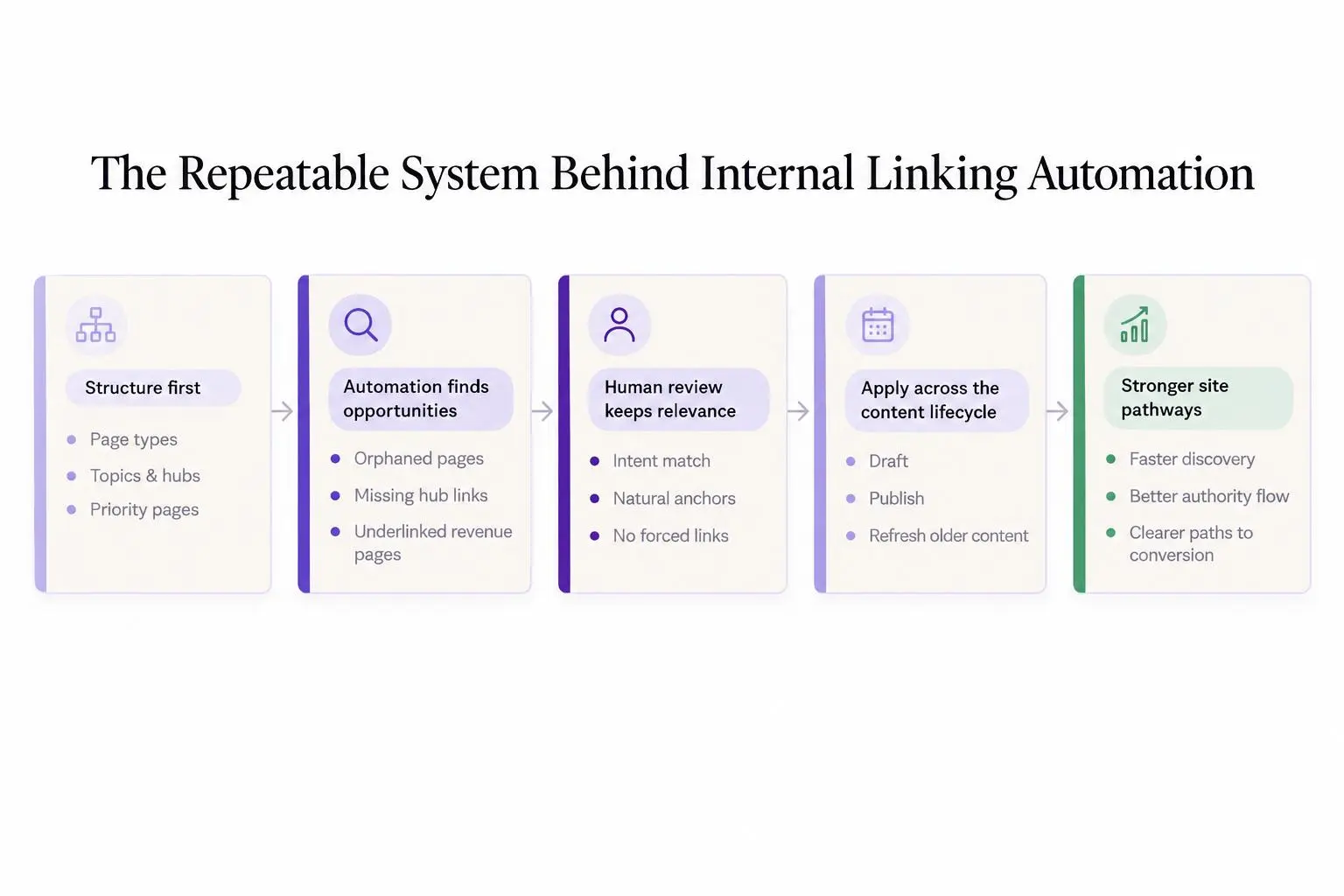
This is the process we'd hand to a content team that wants something practical, not theoretical.
Sequential workflow
- Inventory
Inventory pages by type, topic, and strategic importance.
- Choose destinations
Choose destination pages that need more internal support.
- Scan sources
Scan for source pages covering related concepts.
- Review suggestions
Review automated link suggestions for context, not just keyword overlap.
- Refine anchors
Refine anchor text so it reads naturally.
- Publish batches
Publish changes in batches and note the rules used.
- Revisit cycles
Revisit during refresh cycles as new content goes live.
That workflow flexes by team type.
A solo marketer can run it monthly against a small set of priority pages. An in house team can build it into editorial review. An agency can standardize the logic across multiple client inventories without forcing the exact same rules on every brand.
If you want structured workflows with approval control, tools matter. Our SEO Autoblogger is built to automate research through publishing, including adding links and publishing to your site, while still keeping human oversight in the process. That middle ground matters a lot more than people think.
How to Evaluate Automated Link Suggestions Before You Accept Them
Not every suggestion deserves a yes. In fact, a lot of them deserve a quick no.
Automated link suggestions are useful only when they improve navigation, relevance, and strategic distribution. The evaluation criteria should be simple enough that different editors can apply them the same way.
Check each suggestion against this list:
- Is the source page genuinely related to the destination?
- Do the user intents line up?
- Does the destination expand the point being made?
- Does the link fit naturally in the paragraph?
- Is the anchor clear without sounding forced?
- Are we varying anchors across the site?
Weak logic usually looks familiar. Suggestions based only on repeated keywords. Links to pages with similar terms but different purpose. A pile of links stuffed into intros because that's where the software found exact matches.
The fastest triage method is also the best one:
- accept obvious wins
- edit borderline anchors
- reject anything that adds noise
Create internal acceptance rules and keep them short. Otherwise each editor will develop their own taste, and your sitewide internal link strategy will drift.
Metrics That Tell You Whether Your Linking System Is Improving
Track internal linking like both an operational system and an SEO system.
On the operational side, watch:
- number of orphan pages
- average internal links to priority pages
- percentage of new pages published with strategic links already in place
- hub coverage across related content
On the performance side, pay attention to:
- discovery and indexing of new pages
- ranking movement for destination pages receiving stronger support
- traffic distribution across clusters
- assisted paths into conversion pages
Don't obsess over raw link counts. More isn't automatically better. Directional improvement is the real signal.
If you're publishing heavily, spot checking indexation can help confirm whether stronger linking is helping new pages get picked up. A simple utility like our Google Index Checker can check up to 20 URLs at once, which is enough for quick batch checks after a publishing run or refresh pass.
Compare performance before and after the process change, especially after refresh cycles. Internal linking often shows up as a compounding lift, not a dramatic overnight spike.
A controlled case study on a legal platform applied AI-generated internal links to 50,000 pages while leaving similar pages unchanged. It offers a useful directional benchmark for measuring both the immediate crawl response and the longer-term level after rollout.
A controlled experiment on 50,000 treated pages measured crawl lift against similar unchanged pages at three observation windows.
Sources
- The source is a vendor-published case study rather than an independently peer-reviewed study.
- The experiment concerns a large legal platform with programmatically generated pages, so results may not transfer to smaller sites or different content models.
- The reported outcome is Googlebot crawling; it does not directly establish effects on rankings, conversions, or revenue.
- The available evidence describes similar pages left unchanged but does not provide the full matching protocol for the comparison group.
| Observation window | Crawl lift |
|---|---|
| 48 hours | 237.0% |
| Weeks 2–3 (peak) | 394.0% |
| 35 days (stabilized) | 9.2% |
The initial spike did not persist at its peak, but crawl activity stabilized at a 9.2% lift, equating to 259,000 additional crawls over 35 days. For a linking-automation pilot, track a short-term discovery measure alongside a post-rollout plateau rather than treating the first spike as the expected steady state.
This is one vendor-published experiment on a large, programmatically generated legal site. It measures Googlebot crawling, not rankings, conversions, or revenue, so its result should not be treated as a universal performance forecast.
| Measurement area | What to watch | How to read the signal |
|---|---|---|
| Operational system | Number of orphan pages; average internal links to priority pages; percentage of new pages published with strategic links already in place; hub coverage across related content | Track internal linking like an operational system, not just a one-off cleanup task |
| SEO system | Discovery and indexing of new pages; ranking movement for destination pages receiving stronger support; traffic distribution across clusters; assisted paths into conversion pages | Look for directional improvement across search visibility and conversion support |
| Raw link counts | Do not treat higher link totals as the main success metric | More is not automatically better; directional improvement is the real signal |
| Indexation spot checks | Quick batch checks after a publishing run or refresh pass | Spot checking indexation can help confirm whether stronger linking is helping new pages get picked up; Google Index Checker can check up to 20 URLs at once |
| Before and after comparison | Performance before and after the process change, especially after refresh cycles | Internal linking often shows up as a compounding lift, not a dramatic overnight spike |
Common Mistakes That Undermine Internal Linking Automation
Most internal linking systems don't fail because the software is bad. They fail because the model underneath is fuzzy.
Common mistakes include:
- too many destination pages, which dilutes focus
- treating every page as equally link worthy
- confusing exact match anchors with effective anchors
- linking every article to the same few pages
- ignoring older content as a source of support
- failing to update links after consolidations or new hub creation
- running one large audit and assuming the job is done
- choosing workflows that save time on recommendations but create cleanup later
The deeper lesson is simple: automation only works when business priorities are clear. If your team hasn't decided what matters most, the software will happily scale indecision.
When to Use Rules, When to Use Editorial Judgment, and When to Refresh
Some internal linking decisions should be standardized. Others should stay human.
Use rules for repeatable patterns like hub to cluster links, minimum links for new articles, orphan page remediation, and rescans triggered by refreshes. Those are operational choices.
Keep editorial judgment for anchor phrasing, subtle cross topic links, links near conversion points, and any place where brand nuance matters. A machine can find a phrase. It can't always tell when the sentence should stay clean.
Refresh cadence matters too. Review internal links after:
- new cluster expansion
- major product or service page updates
- article consolidation
- performance drops that suggest pages have become isolated
The strongest teams don't ask whether internal linking is finished. They ask whether the linking system still matches the current strategy.
That is a better question.
Conclusion
Internal linking automation is not about replacing judgment. It's about removing repetitive work so your team can make better decisions at scale.
Build structure before you automate. Start with hubs and business critical pages. Use automated link suggestions carefully. Keep a sitewide internal link strategy alive through publishing and refresh cycles.
If you want a clean next step, pick one high value topic cluster. Map the ideal link paths between the hub, support content, and commercial pages. Then turn that pilot into the process you use across the rest of the site.
That's when internal linking stops being cleanup and starts acting like growth infrastructure.
Article Record
ReferencesPrimary sources used for this article
- Programmatic Internal Linking API Powered by GSC Boosts Crawl Discovery by 237% in 48 Hours
- Automate Internal Linking with SmartLink | Botify
- Internal Linking AI - Automate SEO Today | Quattr
- AI Internal Linking Tool for SEO – JetOctopus
- AI Internal Linking Tool | DataWise SEO
- Internal Linking Tool: Automatic Links for Any CMS
- 79% More Answer Engine Citations: How Kiteworks is Winning in the Age of AI Search with Quattr
- We built an internal linking map automatically
- Taking the Fast Lane to Traffic Growth - LinkStorm
- How LegalGPS tripled organic sessions in six months with automated internal linking - LinkStorm