
Most teams think writing is the bottleneck. It usually isn't. The cms publishing workflow is where solid content gets stuck in reviews, weird formatting, missing metadata, and one last Slack ping.
What matters is a system that holds up when volume climbs. If you're scaling for SaaS, ecommerce, or client sites, don't just move faster; fix the handoffs.
Start here:
- Who owns the jump from draft to live URL
- Which fields get missed: title tag, schema, internal links
- Where approvals stall, so you ship clean pages on time
What a CMS Publishing Workflow Actually Means
A cms publishing workflow is not the moment someone pastes an article into a CMS and hits publish. That's just one step, and usually not the one causing the real damage.
The workflow is the full path from topic selection to live URL to ongoing updates. It includes planning, drafting, optimization, review, formatting, metadata entry, scheduling, publishing, indexing support, internal linking, and content refreshing. If any one of those steps is loose, the whole system slows down.
A basic publishing process gets pages live. A performance-minded workflow gets pages live well, consistently, and in a way that supports rankings and customer acquisition. There's a difference. One creates content. The other creates outcomes.
For growing brands, that distinction matters fast. You're not just publishing blog posts anymore. You're managing landing pages, product content, comparison pages, location pages, sometimes across multiple sites. Without a connected system, every extra page adds friction.
The goal isn't faster publishing by itself. It's higher throughput without quality slipping.
We've seen teams chase speed and end up with thin metadata, broken links, missed review steps, and pages that technically publish but never really perform. A strong workflow protects quality while removing the repeatable drag.
Why Manual Publishing Breaks Down as You Scale

Most teams feel the problem before they name it. Writing isn't always the bottleneck. The handoff is.
Content sits in docs. Someone copies it into the CMS. Headings break. Bullets need reformatting. Images get uploaded manually. SEO fields have to be filled one by one. Categories, tags, schema, scheduling, maybe sitemap updates, maybe indexing requests. None of it is hard on its own. That's why it gets ignored for too long.
Then volume goes up.
In one fintech example from the research, teams were losing around 14 hours per week on administrative publishing alone. Not strategy. Not writing. Just the operational work around getting content live.
That lost time has a ranking cost too. If content misses a time-sensitive search window, the damage isn't just internal frustration. Competitors get indexed first. They collect the early clicks, links, and engagement signals while your article is still waiting for formatting or approval.
The pattern usually looks like this:
- content is ready, but not publish-ready
- SEO is waiting on edits
- design is waiting on assets
- publishing is waiting on approvals
- nobody owns the final mile
When content libraries get larger, manual technical management starts failing in predictable ways. Broken internal links. Missing metadata. Inconsistent markup. Pages published without the right structure. Small misses compound.
More volume doesn't fix this. It exposes it.
Why Brands Are Rebuilding the Publishing Layer Around Automation
This isn't a niche tactic anymore. It's an operating shift.
Marketers are already using AI and automation across content operations, and the adoption curve has moved quickly. Research shows AI use for content creation rising from 61 percent in 2023 to 85 percent in 2026. That tells you something important: teams no longer see automation as optional support. They see it as infrastructure.
The pressure is coming from both sides.
Buyers expect faster, more relevant content experiences. Search visibility depends on speed, consistency, and coverage. If your operating model still depends on manual handoffs and scattered tools, you're not just slower. You're harder to scale.
That said, automation by itself isn't the advantage. Low-governance automation creates a different kind of mess:
- weak brand consistency
- compliance risk
- thin or duplicated pages
- publishing errors at scale
This is also a search-quality concern. Google Search Central warns that extensive automation, mass-produced content, and content created mainly to attract search traffic are reasons to reevaluate how content is being produced. Automation should therefore support a people-first process, not replace subject-matter judgment, useful analysis, or quality control.
The winning model is simpler than people make it sound. Automation handles repetitive work. Governance keeps the system controlled. SEO discipline keeps output aligned with performance.
We don't want humans spending their best hours moving fields between tools. We want them making judgment calls, shaping positioning, and improving the pages that actually matter.
The Core Stages of a High-Performing CMS Publishing Workflow
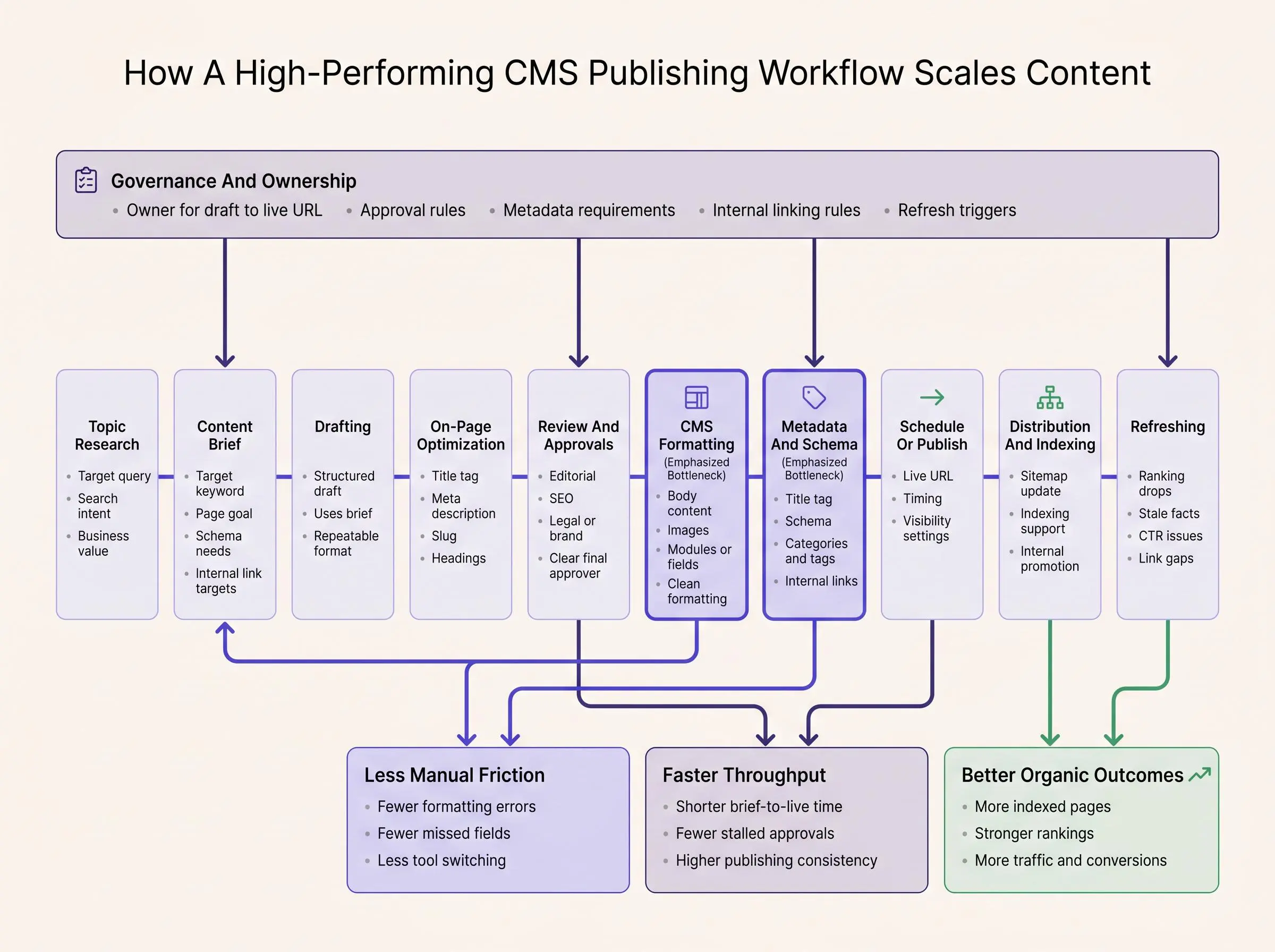
A high-performing workflow works like an editorial supply chain. Each stage has a clear input, a defined output, and no mystery in the middle. That's how throughput goes up without creating rework.
Here's the sequence we recommend:
Topic research
Identify target queries, search intent, business relevance, and opportunity level.Content briefing
Turn research into structure. Define target keyword, angle, internal link targets, schema needs, and page goal.Drafting
Create the page using the brief, not from a blank page and a vague idea.On-page optimization
Refine headings, entity coverage, title tag, meta description, slug, and intent alignment.Review and approvals
Editorial, SEO, legal, compliance, or brand review where needed.CMS formatting
Move structured content into the right fields, modules, or collections.Metadata and schema population
This is where a lot of teams still work by hand for no good reason.Scheduling or publishing
Push live with the right timing, authoring, and visibility settings.Distribution
Support indexing, update sitemaps, route to internal promotion channels.Refreshing
Bring pages back into the system when rankings, CTR, links, or facts change.
Some tasks are good automation candidates. Formatting, field mapping, metadata population, publishing triggers, update routing. Some should stay human-led. Search intent judgment, final editorial review, compliance calls, brand nuance.
The key is structure. If the brief is loose, drafting drifts. If the draft isn't standardized, publishing gets manual. If publishing data doesn't flow back, refreshes happen late or not at all.
Audit Your Current Workflow Before You Automate It
Don't automate a mess and call it progress. Map it first.
Start with every step from content idea to live page. Record who touches the content, what tool they use, and how long each step takes. Be literal about it. The boring details are usually where the leverage is.
Your map should include steps like:
- ideation
- keyword research
- outline creation
- first draft writing
- internal review
- revisions
- SEO optimization
- image sourcing
- formatting
- CMS upload
- category and tag assignment
- scheduling
- sitemap updates
- search engine notification
Then track weekly time spent on mechanical publishing work. Not content strategy. Not writing. Just the operational labor around publishing. That baseline matters because teams often underestimate how much time disappears into small admin tasks by the second afternoon of the week.
Look for three things:
Where content waits
Queues tell you more than effort does. If content sits untouched between draft and review, or between approval and publish, that's a design issue.
Where errors repeat
Missing metadata and formatting mistakes aren't random. They're signals that a step lacks structure or ownership.
Where tool switching is excessive
If someone has to move between docs, SEO software, image folders, spreadsheets, and a CMS just to publish one article, the workflow is asking for failure.
Separate automatable tasks from true quality gates. Editorial review, legal review, compliance approval, and brand voice checks are not the same thing as copying fields into a CMS. Also define exactly when content becomes publish-ready. Vague handoffs create quiet delays.
By the end of this audit, you should have two outputs: an automation opportunity map and a ranked list of bottlenecks by impact.
Design the Workflow Backward From Organic Growth Goals
A good workflow isn't built around content production. It's built around growth.
Start with the business goal. Traffic growth. Lead generation. Ecommerce revenue. Service page visibility. Multi-brand publishing. Agency delivery across client accounts. Those goals shape everything that follows, including approval depth, CMS choice, template structure, and publishing cadence.
Repeatable content types benefit most from standardization:
- blog posts
- product pages
- category pages
- comparison pages
- location pages
Research shows automated pipelines can reduce production time by roughly 40 to 60 percent for repeatable formats, and some structured page types can move even faster. That's not because the content becomes simple. It's because the operating friction gets removed.
Consistency matters here. Teams that publish consistently tend to improve visibility, but consistency only helps if the process holds up under pressure. Publishing more through a broken system just spreads the problem wider.
Scale comes from removing friction, not from asking the team to move faster inside chaos.
How to Connect Your SEO Platform to Your CMS Without Creating More Complexity
If you're serious about content operations, you need to connect seo platform to cms. Not as a technical flex. As a practical requirement.
The SEO layer should pass structured data into the CMS, including:
- target keyword
- search intent notes
- title tag
- meta description
- heading structure
- internal link targets
- schema requirements
- slug suggestions
- content status
Then the CMS or publishing layer should send data back:
- published URL
- publication date
- update status
- indexing checks
- performance signals
This is where cms integrations for content automation matter. The right setup might use native CMS connectors, APIs, webhooks, plugins, headless CMS endpoints, or workflow automation tools. The exact stack matters less than the data structure. Field-level mapping beats copy-paste every time.
Direct integrations reduce handoff friction, but they require setup discipline. Looser stacks are easier to start with, but they often leave the team doing manual cleanup forever. That's the tradeoff.
At Intelliminds, we think this layer should feel like one system. Topic research, article generation, publishing, and content refreshing should connect without forcing your team to rebuild context at every step. If your tools can't pass structured outputs cleanly, the workflow will keep leaking time.
The Must-Have Content Publishing Integrations for Scalable Teams
Scalable teams don't need more tools. They need the right content publishing integrations between the tools they already rely on.
The key categories are straightforward:
- content brief generation
- drafting
- SEO optimization
- media handling
- approval routing
- CMS publishing
- scheduling
- analytics
- refresh monitoring
One area deserves extra attention: internal linking automation. When content volume rises, broken or missing links show up fast, and they quietly hurt crawl paths, authority flow, and user movement. Teams often focus on publishing speed and miss the link layer until rankings flatten.
Elite workflows also standardize outputs between stages. A brief should produce a structured draft. A structured draft should populate CMS fields cleanly. Approvals should attach to status changes, not live in side conversations.
Parallel review paths often work better than cutting approvals altogether. SEO and brand review, for example, can often happen at the same time. That's faster than forcing everything into a single file moving one reviewer at a time.
For regulated or multi-stakeholder teams, governance needs to be built in:
- audit trails
- permissions
- version control
- accessibility checks
- rollback options
The strongest setup reduces developer dependency for routine publishing while preserving IT and compliance oversight. When evaluating integrations, stay practical: reliability, field mapping, multi-site support, permissions, error handling, scheduling control, and update support matter more than flashy feature lists.
How to Publish Articles Across CMS Platforms Without Rebuilding Your Process Each Time
A lot of teams don't live in one CMS. Agencies, ecommerce brands, and multi-brand companies often need to publish articles across cms environments. That's where brittle workflows start to break.
The fix is to build a content-first workflow, not a CMS-first one.
Create a canonical content model that can map into multiple systems. That model should include body content, metadata, author fields, categories, tags, featured images, schema blocks, and internal link modules. Once those elements are normalized, you can translate them into different CMS formats without reinventing the process every time.
A reusable workflow gives you consistent SEO standards across properties while still allowing channel-specific adaptation. That's important for edge cases like localization, franchise or location pages, and client formatting rules.
If each site has its own separate publishing logic, you'll duplicate effort and lose consistency. Standardize what must stay fixed, like metadata requirements and internal linking rules. Adapt what actually needs flexibility, like templates, modules, or local content blocks.
What Changes Across WordPress, Webflow, Shopify, and Other CMS Setups

The workflow should survive the platform, not depend on it. That's especially true across wordpress webflow shopify cms environments.
WordPress gives teams flexibility through plugins and custom fields. That's useful, but unmanaged stacks can become inconsistent fast. Two sites on WordPress can behave like completely different systems if the field structure and plugin setup aren't controlled.
Webflow handles structured publishing well when collections are designed clearly. If they aren't, teams end up manually re-entering content into visual components, which defeats the point.
Shopify adds a different constraint. Content workflows often have to live alongside ecommerce templates, merchandising priorities, and product context. A blog post isn't just a blog post there. It often needs to support buying journeys too.
Headless and enterprise CMS setups can make API-driven publishing cleaner, but they usually need more upfront planning around field design, governance, and publishing rules.
When comparing platforms, don't focus on brand hype. Focus on workflow needs:
- field structure
- editorial usability
- metadata support
- scheduling
- governance
- multi-site scalability
Build Approval Workflows That Speed Up Publishing Instead of Slowing It Down
Approvals become bottlenecks when ownership is unclear, reviews happen in serial, and developers get pulled into routine editorial tasks. In Adobe research covering more than 1,600 marketers, 89% of respondents said content must pass through three or more approval stages before publication. That makes multi-stage review the operating reality for most teams in the survey, not an enterprise edge case.
Reported approval complexity and approval-related workflow burden among marketers in Adobe research.
Source: Adobe research, survey of more than 1,600 marketers.
- The Adobe findings are self-reported survey results rather than observed workflow telemetry.
- The survey covers marketers broadly, so its results are not limited to CMS publishing workflows or organic-search teams.
- The evidence identifies associations and reported barriers; it does not test whether parallel approvals cause faster publishing.
View chart data
| Approval measure | Share of marketers |
|---|---|
| Three or more approval stages | 89% |
| Spend more than 40% of time on reviews and approvals | 58% |
| Cite lengthy manual approvals as a production barrier | 31% |
The survey measures reported experience across content operations, not a CMS-specific causal effect. Still, it reinforces the operational case for separating true quality gates from routine handoffs. Use parallel review when SEO and brand reviewers are evaluating independent criteria; keep stages sequential only when one decision genuinely depends on another.
A better setup is role-based:
- creator
- editor
- SEO reviewer
- legal or compliance reviewer if needed
- final publisher
For enterprise, healthcare, government, or heavily regulated teams, governance has to include accessibility checks, permissions, audit trails, version history, and rollback options. The point isn't to slow publishing down. It's to make speed safe.
Better governance is designed into the workflow architecture. Bolting it on later rarely works.
Treat Content Refreshing as Part of the Same Workflow
Publishing is the midpoint, not the finish line.
Content refreshing should be connected to the original workflow so pages can be improved based on rankings, click-through rates, internal linking gaps, content decay, competitor movement, or outdated facts. If refreshes live outside the system, they usually happen late and inconsistently.
A unified workflow can flag pages for updates, route them back into the editorial queue, and republish changes without restarting from zero. That's where compounding traffic actually comes from. Not just more new URLs, but better existing assets.
At Intelliminds, we treat refreshing as part of the same continuous SEO content engine. That's the practical model. Research, creation, publishing, updating. One loop.
Build refresh triggers into the process:
- ranking drops
- stale facts
- missing product context
- competitor movement
- internal linking gaps
High-value pages should move through versioned refresh cycles, not manual rescue efforts every six months.
The Metrics That Tell You Whether Your Workflow Is Actually Working
You need operating metrics, not just output counts.
Track time from brief to live as a core KPI. It exposes approval delays, handoff friction, and publishing bottlenecks quickly. Many teams target a 40 to 60 percent reduction in brief-to-live time after automation for repeatable content formats.
Also track workflow quality:
- publishing consistency
- percentage of pages published without manual formatting fixes
- metadata completion rate
- internal link completion rate
- approval cycle time
- refresh turnaround time
Then pair those with outcome metrics:
- indexed pages
- ranking growth
- organic sessions
- assisted conversions
- content-attributed revenue
Keep throughput metrics separate from quality metrics. Speed can hide bad content for a while. Search usually catches up.
Common CMS Publishing Workflow Mistakes That Quietly Hurt Organic Growth
Most workflow problems don't look dramatic. They just keep stealing momentum.
Common mistakes include:
- treating the CMS as a final upload destination instead of a connected system
- automating drafting while leaving formatting, metadata, approvals, and internal linking manual
- building one-off steps only one person understands
- over-customizing for one CMS and making reuse impossible
- ignoring governance and creating compliance or trust issues
- measuring content output instead of time-to-publish, update velocity, and impact
- excluding refreshing from the workflow
- keeping developers involved in routine publishing when permissions and integrations could remove that dependency
The pattern is simple. Teams automate the visible part and ignore the operational part. Then they wonder why volume goes up but results don't.
A Practical Rollout Plan for the Next 30 to 90 Days
You don't need to rebuild everything at once. In fact, you shouldn't.
A workable rollout looks like this:
Audit the current workflow
Document steps, bottlenecks, delays, and error points.Standardize templates and field requirements
Briefs, drafts, metadata, schema, and CMS entry should all have clear structure.Implement core integrations
Add the essential content publishing integrations and connect seo platform to cms so data moves cleanly.Build approvals and permissions
Match the workflow to team size, risk level, and governance needs.Add refresh workflows and reporting
Close the loop so published pages can improve over time.
Start with one repeatable content type and one CMS environment. Earn trust there first. Then expand across brands, sites, or client accounts.
Reliability comes before volume. Always.
CMS Publishing Workflow FAQ
Here are quick answers to common questions about building a cms publishing workflow that scales without adding unnecessary manual work.
What is a CMS publishing workflow?
A cms publishing workflow is the full path from topic selection to live URL and ongoing updates. It includes planning, drafting, optimization, review, formatting, metadata entry, scheduling, publishing, indexing support, internal linking, and content refreshing.
Why does manual publishing break down as content volume grows?
Manual publishing gets harder as more steps happen between draft and live page. Common friction points include reformatting headings and bullets, uploading images, filling SEO fields one by one, handling categories and tags, and waiting on approvals. Small misses like broken links or missing metadata compound at scale.
Which steps in a CMS publishing workflow are good candidates for automation?
Tasks like formatting, field mapping, metadata population, publishing triggers, and update routing are good automation candidates. Search intent judgment, final editorial review, compliance calls, and brand nuance should stay human-led.
What should you measure to know if the workflow is working?
Track time from brief to live as a core KPI, along with publishing consistency, metadata completion rate, internal link completion rate, approval cycle time, and refresh turnaround time. Pair those workflow metrics with outcome metrics like indexed pages, ranking growth, organic sessions, assisted conversions, and content-attributed revenue.
Should content refreshing be part of the same workflow?
Yes. The article treats publishing as the midpoint, not the finish line. Refreshing should stay connected to the original workflow so pages can be updated when rankings drop, facts change, competitor movement shifts, or internal linking gaps appear.
Conclusion
A cms publishing workflow is not just an editorial process. It's a growth system that connects research, creation, publishing, and refreshing into one operating model.
Organic scale comes from reducing handoff friction, standardizing the repeatable parts of execution, and keeping human judgment focused where it belongs: strategy, quality, and differentiation.
If you want a practical next step, do this this week: map your current workflow, identify the top two manual bottlenecks, and redesign those steps around a connected, performance-minded publishing engine. That's usually where the shift starts. Not with more effort. With less drag.
Article Record
ReferencesPrimary sources used for this article
- Adobe research finds demand for content will grow 5x by 2027
- Creating helpful, reliable, people-first content
- The new content operating model
- How to Eliminate Content Bottlenecks Without Sacrificing Security
- Content ops and AI: The harder question behind workflow automation in your CMS
- Lucas Mondora
- Lucas Mondora
- Lucas Mondora
- Publishing Workflow
Update HistoryMeaningful revisions to this article
- Added guidance from Google Search Central to the section on rebuilding the publishing process around automation.
- Helped readers better understand how useful, people-focused content supports a stronger publishing workflow.
- Added a data point showing that nearly nine in 10 surveyed marketers use at least three approval stages before publishing.
- Strengthened the approval workflow section to help large content teams understand how structured approvals can support faster publishing.
- Added a chart showing how multi-stage approvals can slow publishing and consume significant marketer time.
- Made the impact of approval delays easier to understand so readers can identify workflow improvements.
- Added a 5-question FAQ section to address common CMS publishing workflow questions.
- Organized key answers in one place to make the article easier to scan and use.
- Improved the reader experience by helping visitors find practical guidance faster.