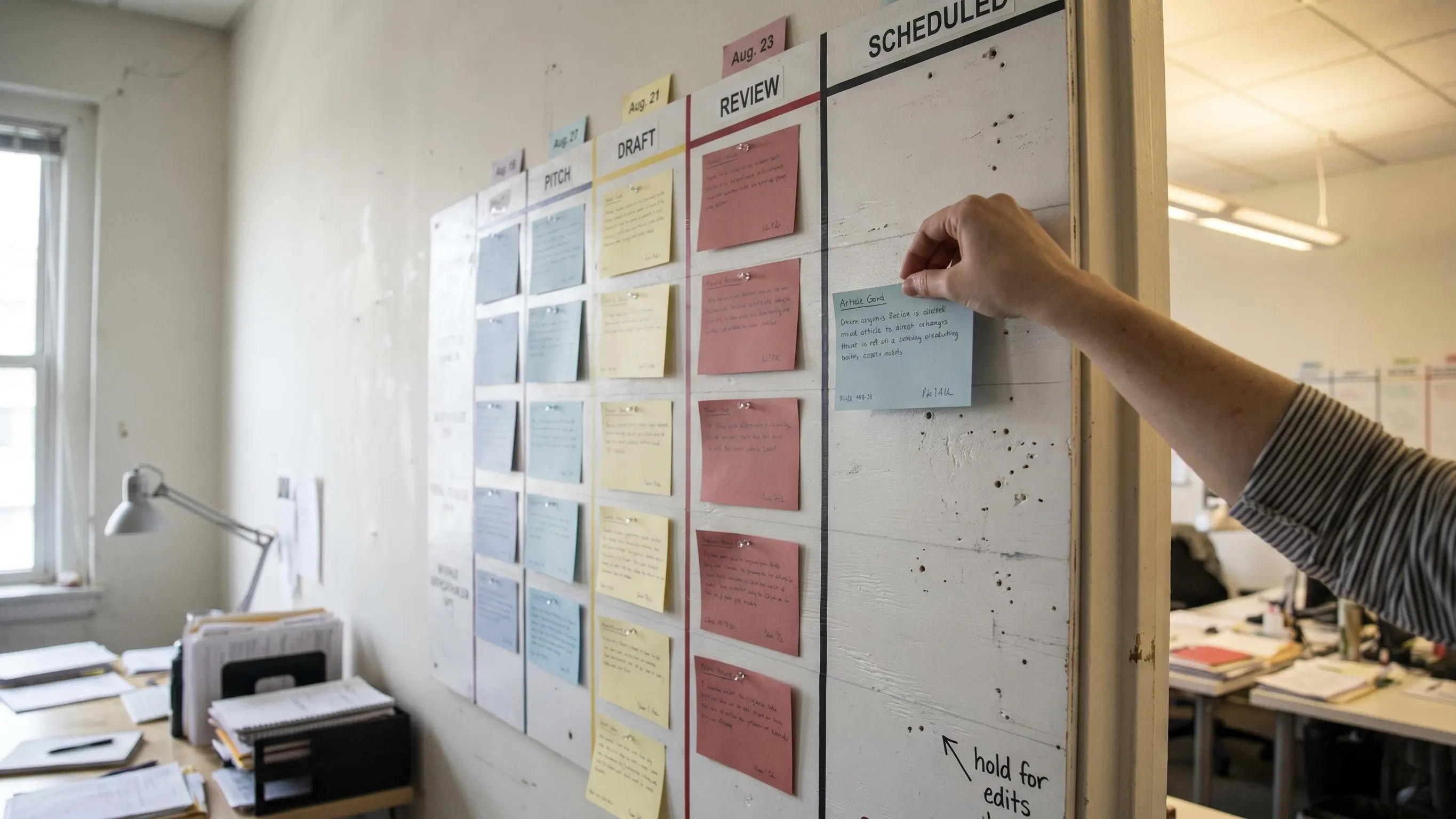
WordPress blog automation sounds easy until your queue fills with half-finished drafts, missed publish dates, and posts nobody refreshes. Most teams don't have a writing problem. They have a workflow problem.
What matters is how research, drafting, publishing, and updates connect when your team is trying to scale. For SaaS, ecommerce, and agency sites, small setup choices decide whether content keeps moving or gets stuck.
Start here:
- Draft first for money pages; auto publish only repeatable content.
- Build categories, tags, and internal links into the workflow early.
- Refresh older winners on schedule, so traffic does not leak away.
Why Scaling a WordPress Blog Breaks Under Manual Processes
Most teams don't have a content problem. They have a workflow problem.
The pattern is familiar. You have a list of good keywords somewhere, a few half-finished briefs, old posts that used to rank better, and a publishing calendar that only works when someone pushes hard for a week. Then client work, launches, hiring, or sales pressure takes over and the blog slips again.
Manual blog operations break in more places than people expect:
- Topic research gets done in batches, then goes stale
- Outlines live in docs that never become articles
- Drafting depends on whoever has time
- SEO metadata gets added at the end, if anyone remembers
- Internal links are inconsistent
- Categories and tags become messy
- Scheduling happens late
- Refreshes almost never happen on time
That doesn't just slow output. It weakens the whole growth model. Inconsistent publishing means weaker topical coverage, slower indexation momentum, and fewer chances to build authority around the terms that actually matter to your business.
For SaaS, ecommerce, service brands, startups, and agencies, this turns into a headcount trap. You need more content, but hiring your way out of operational friction is expensive and usually disappointing. More people inside a broken system just create more handoffs.
A lot of teams quietly assume the answer is to work harder. It isn't.
Scalable organic growth comes from workflow design, not weekly heroics.
Once you see content as a system, the pressure changes. You're no longer trying to will consistency into existence. You're building it.
What WordPress Blog Automation Actually Includes
When we talk about wordpress blog automation, we mean automating repeatable work across the content lifecycle systems.
Semi-automated vs fully automated
A semi-automated workflow uses AI to speed up production, but keeps human review before anything goes live. That's the right default for most brands. It protects quality while removing the repetitive work that drains the team.
A fully automated setup can publish without intervention. That can work, but only when content types are narrow, templates are strict, and the rules are proven. If your workflow is loose, full automation will scale mistakes very efficiently.
The point isn't to automate judgment. It's to protect judgment by removing the work that doesn't need a human brain every single time.
Human review should stay focused on the things that actually move outcomes:
- Positioning
- Factual accuracy
- Conversion intent
- Brand voice
- Risk checks on sensitive topics
That's where teams get this wrong. They debate whether AI can write well enough, while the bigger issue is whether the workflow can carry quality consistently.
The Growth Model Behind Automated Content Systems
Automation matters because organic growth compounds when your system can keep publishing, learning, and improving without constant manual rescue.
A blog grows when you can identify worthwhile topics, ship useful pages consistently, and update aging content before it decays. If any one of those breaks, the flywheel slows. Usually it's the last one.
WordPress powers roughly 43% of all websites, which makes it both familiar and highly automatable. That's useful. You don't need a custom stack to build a serious publishing engine.
The strategic gains are straightforward:
- Faster topic coverage across priority clusters
- More consistent publishing cadence
- Better alignment between keyword opportunity and production capacity
- More chances to update decaying pages before they lose commercial value
This matters even more when you need to cover different intent types at the same time. Informational posts, commercial comparisons, use-case pages, support content, and product-adjacent articles don't just appear because the roadmap says they should. They need throughput.
Where automation creates the most leverage
Automation is especially valuable for:
- Lean teams with aggressive growth targets
- Agencies managing multiple client sites
- Ecommerce brands with broad catalogs and seasonal demand
- SaaS companies with feature, comparison, integration, and support content needs
It should be used more carefully for thought leadership, regulated industries, and pages that depend on real subject matter depth or founder perspective. Some content needs a strong point of view, not just a strong process.
Good operators know the difference.
The Three Main Ways to Publish AI Articles to WordPress
If your goal is to publish ai articles to wordpress, there are three practical paths. The best one depends less on novelty and more on how much control your team actually needs.
WordPress-native plugins
These are the fastest to set up and the easiest for teams that already work inside the editor every day.
Some focus on in-editor assistance. Others lean further into automation. Bertha AI is geared toward direct generation inside WordPress. GetGenie combines writing with keyword research, SEO scoring, NLP-based analysis, and integration with Rank Math and Yoast. Journalist AI is closer to a hands-off model, with automated generation and scheduled publishing.
That convenience is real. So is the tradeoff. Plugin-first workflows are usually less flexible when you need multi-step QA, custom prompts by content type, or approvals across multiple people.
External AI platforms using the WordPress REST API
This is usually the better route for teams building a real system.
External platforms give you more control over models, prompts, templates, enrichment logic, and approval rules. Content can be sent to WordPress as a draft or published directly based on your workflow. They also tend to handle richer tasks around formatting, images, metadata, and internal links.
Application passwords are a common way to connect these workflows to WordPress. It's not glamorous, but it works.
If you're serious about repeatability, API-based publishing is often where the process starts feeling operational instead of improvised.
Automation tools and workflow platforms
These sit between systems and connect generation to publishing, notifications, approvals, and distribution.
They're useful when your content process extends beyond the CMS itself. For example:
- Publish after an approval step
- Notify the team when a draft is ready
- Push live posts into email or social workflows
- Coordinate activity across multiple marketing tools
This approach is a strong fit for teams already using no-code automation elsewhere.
One more thing worth watching: emerging agent-based WordPress integrations. The official WordPress MCP adapter points to where the ecosystem is heading, using the newer WordPress abilities framework and supporting WordPress 6.9 and above. But it's still experimental. Interesting, yes. Default choice for production, no.
What a High-Performing CMS Publishing Workflow Looks Like
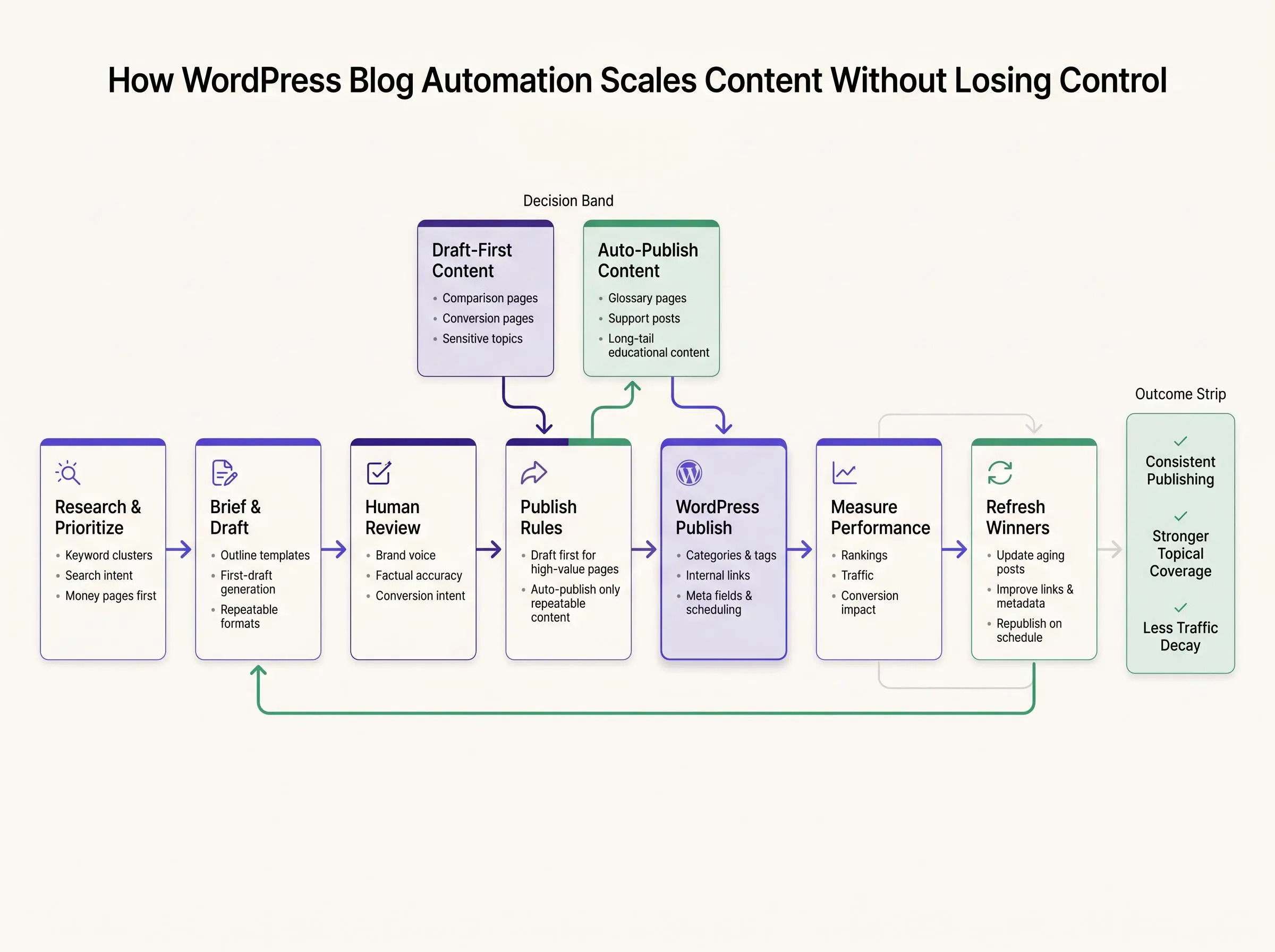
A cms publishing workflow is the path content takes from idea to live page, then into monitoring and refresh. That sounds simple until you look closely and realize most teams run it from scattered docs, Slack threads, inboxes, and memory.
A clean workflow usually follows this sequence:
- Plan
- Create
- Edit
- Approve
- Publish
- Measure
- Refresh
That sequence matters because weak handoffs quietly kill output. The issue usually isn't lack of ideas. It's that nobody can see where an article is stuck by the second afternoon.
What should be visible in the workflow
A strong workflow includes:
- Topic intake and prioritization
- Brief or outline generation
- Draft creation
- Brand and factual review
- SEO enrichment
- CMS formatting and taxonomy assignment
- Scheduling or publishing
- Post-publish monitoring
- Refresh triggers
It also needs a clear publish posture. Higher-risk or higher-value pages should always go to draft first. Lower-risk, template-driven content can move toward auto publish once the guardrails are proven.
A simple article handoff checklist
Before an article moves from one stage to the next, the owner should be able to answer these questions:
- Plan: Is the topic tied to a defined cluster, audience, and search intent?
- Create: Does the brief include the required outline, sources, CTA, and internal-link targets?
- Edit: Has someone checked the draft for factual accuracy, duplication, and brand fit?
- Approve: Is the publish posture clear, and are any sensitive claims or sections resolved?
- Publish: Are the title, slug, metadata, categories, tags, links, and featured image in place?
- Measure: Is the URL added to the monitoring queue with an owner and review date?
- Refresh: Is there a defined trigger for revisiting the page when it ages, changes, or underperforms?
If any answer is no, the article stays in its current status instead of moving forward on assumption. That small rule makes the bottleneck visible and gives the next person a clear handoff.
Workflow quality matters more than raw AI output quality.
We've seen solid content underperform because categories were sloppy, internal links were missing, metadata was thin, and publishing was inconsistent. Good words alone don't carry a weak system.
How to Auto Publish SEO Content Without Sacrificing Quality
A lot of teams want to auto publish seo content, but they're rightly nervous about quality. They should be. Bad automation doesn't just waste time. It leaves a visible trail.
The good news is that quality loss usually comes from weak inputs and missing controls, not from automation itself. Google Search Central likewise warns that extensive automation across many topics can be a problem when content is created primarily to attract search traffic, rather than to help people.
Guardrails that make auto-publishing viable
If you're going to automate publishing, set rules first:
- Topic selection based on search intent and business relevance
- Prompt templates tied to content type and brand voice
- Required structure for headings, FAQs, and support sections
- Checks for duplication and template compliance
- Baseline SEO readiness before content can move forward
- Human review where nuance or sensitivity matters
A lot of page elements can be automated safely when the workflow is configured well:
- Title
- Slug
- Meta description
- Categories
- Tags
- Internal link suggestions
- Schema suggestions
- Featured image placement
Where should you be more comfortable with auto-publish? Long-tail educational content, glossary entries, support-style posts, and lower-risk cluster coverage with stable formats.
Where should you stay draft-first? Comparison pages, conversion-heavy pages, highly opinionated industry content, and anything with legal, financial, or health implications.
The goal isn't lower editorial standards. It's the opposite. The goal is to enforce standards consistently at scale.
This is also where integrated platforms matter. When research, writing, publishing, and refreshes live in one coordinated system, you're not juggling five tools and hoping the last step gets done. That's the practical advantage behind platforms like Intelliminds.
How to Schedule AI Blog Posts for Consistency and Coverage
Scheduling is not just a calendar feature. It's a growth control.
Teams should schedule ai blog posts around topic clusters, sales cycles, seasonality, and actual review capacity. Otherwise you get the usual pattern: a burst of ten posts, then silence for three weeks. Search performance doesn't like feast-and-famine.
A smarter queue creates stability. At minimum, your statuses should make bottlenecks visible:
- Brief approved
- Draft ready
- In review
- Scheduled
- Published
- Refresh due
That visibility matters more than most teams think. If five posts are stuck in review, the problem is not content generation. It's process ownership.
Scheduling also works best when supporting assets are handled before publish time, not five minutes before:
- Featured image
- Category placement
- Tags
- Internal links
- Meta fields
- Final CTA alignment
Don't space posts randomly across the month. Stagger them by topic cluster and intent. Publish enough around a subject to build relevance, then expand. That creates stronger coverage than scattering unrelated posts because the queue happened to be full.
For agencies and lean teams managing lots of URLs, this is where calm replaces chaos.
Where WordPress SEO Content Software Should Help Most
The right wordpress seo content software shouldn't just write words. It should remove operational drag while improving relevance and consistency.
The capabilities that matter most are usually the least flashy:
- Topic discovery and prioritization
- Brief creation
- Long-form draft generation
- SEO field population
- Internal linking support
- CMS publishing
- Content refresh automation
Tools vary in where they help. Some focus on generation inside WordPress. Some combine keyword research and SEO scoring. Some lean into hands-off autopublishing. Some are fine at writing but weak at approvals, QA, or refreshes.
Integration with Rank Math or Yoast matters more than it seems. If metadata and optimization fields flow directly into the publishing process, you remove duplicate work and reduce the chance that SEO setup gets skipped.
When evaluating software, ask practical questions:
- Can it publish to draft and publish states?
- Does it support approval workflows?
- Can it handle categories, tags, and internal links?
- Does it support refreshes, not just new posts?
- Is it built for one site or many?
Point solutions are fine when you only need one task solved, like faster draft generation. Integrated systems are better when you want repeatability across research, publishing, and refresh. That's the operating model we believe in at Intelliminds, because isolated tools usually create another layer of manual cleanup.
Content Refresh Automation Is the Missing Piece of Scalable Growth
Most automation conversations obsess over new content. That's a mistake.
Older posts decay. Product language changes. competitors publish fresher alternatives. Internal links drift as the site expands. If your system only creates new URLs, you're quietly letting old value leak out of the bottom.
Refresh automation fixes that. It identifies aging or underperforming posts, updates them intelligently, and republishes them without rebuilding the process from scratch.
Start with pages that have the clearest upside:
- Former traffic drivers that are slipping
- Posts sitting near page one
- Ecommerce buying guides with outdated product framing
- SaaS feature or integration pages affected by product changes
A good refresh process can handle:
- Re-evaluating target keywords
- Expanding sections to match current SERP expectations
- Updating metadata
- Improving internal linking
- Revising headlines and summaries
- Republishing on a controlled schedule
This is often where returns come faster than net-new content. Improving a page that already has history, links, and some relevance is usually cheaper than starting from zero.
That distinction separates basic AI writing tools from platforms built for ongoing organic growth.
A Practical Setup Roadmap for Growing Teams

You don't need an all-at-once rollout. In fact, that's usually the wrong move.
A safer setup is phased.
Phase 1 to 3
- Phase 1: automate research and briefing with topic clusters, brief templates, and clear standards for what a usable article needs before writing starts
- Phase 2: automate draft generation and SEO enrichment, including titles, descriptions, internal link suggestions, and taxonomy rules
- Phase 3: connect publishing into WordPress through native tools, API workflows, or automation platforms, and decide what goes to draft versus what can move toward auto-publish
A practical decision rule helps here: if the content type needs interpretation, proof, or a strong point of view, keep it draft-first; if it follows a narrow template and low-risk intent, it can move further toward automation.
For example, a startup might automate a weekly cluster of glossary-style posts first, while keeping comparison pages in draft for review. That lets the team prove the publishing path without sending sensitive content straight to live.
Phase 4 and 5
- Phase 4: add QA gates such as template checks, brand review, duplicate checks, and factual validation for higher-stakes topics
- Phase 5: add refresh automation and reporting so aging posts trigger updates and impact can be tracked across rankings, traffic, and conversions
A few setup prerequisites make this smoother:
- WordPress access
- Application passwords or another API connection method
- Defined taxonomy structure
- Editorial templates
- A clear publishing posture
Startups usually prioritize speed and draft workflows. Ecommerce teams care more about scale, taxonomy, and seasonal scheduling. Agencies need workflow visibility, approvals, and multi-site repeatability. Same concept, different pressure points.
Common Mistakes That Make Automation Backfire
Automation usually fails in predictable ways.
Not because the technology is mysterious, but because teams scale the wrong thing.
Common mistakes include:
- Publishing volume without a topic strategy
- Treating automation as a replacement for editorial standards
- Publishing raw AI drafts with no brand calibration or factual review
- Ignoring categories, tags, internal links, and metadata in WordPress output
- Choosing tools based only on writing quality instead of workflow fit
- Over-automating high-stakes pages before templates are proven
- Letting refreshes fall behind
- Using experimental integrations on production sites too early
- Measuring article count instead of rankings, traffic, and acquisition impact
Here's the blunt version: a bigger content library is not the same as stronger organic growth.
If your system can't maintain relevance and quality, speed just multiplies clutter.
How to Measure Whether Automation Is Actually Driving Organic Growth
You should evaluate automation as both an operating system and a growth lever.
Operationally, track:
- Time from topic selection to publish
- Publishing consistency
- Volume of approved drafts in queue
- Percentage of posts refreshed on time
For SEO performance, look at:
- Keyword coverage by cluster
- Rankings and visibility trends
- Organic traffic growth
- Internal linking coverage across priority pages
- Recovery of decaying content after refresh
Then look at business outcomes:
- Leads or revenue influenced by blog content
- Conversion rates from organic landing pages
- Customer acquisition efficiency
- Cost per content output compared with manual production
The key comparison is before and after automation. Did cadence improve? Did more target topics get covered? Did rankings grow or stabilize? Did the team reduce manual effort without lowering quality?
If the answer is only "we published faster," you haven't finished the job.
Successful wordpress blog automation should create speed and compounding value at the same time.
Conclusion
WordPress blog automation works when it's treated as a disciplined growth system, not a shortcut. The strongest setups combine topic discovery, draft creation, SEO enrichment, publishing, scheduling, and refreshes inside a workflow that people can actually manage.
The real win is not fewer clicks in WordPress. It's a shift from reactive effort to reliable output.
Map your current cms publishing workflow. Pick the highest-friction step. Automate that first. Then build toward a system that helps you publish ai articles to wordpress consistently, protect quality, and scale organic growth without adding manual chaos.
Article Record
ReferencesPrimary sources used for this article
Update HistoryMeaningful revisions to this article
- Added a practical example to show how a high-performing CMS publishing workflow works in practice.
- Made the workflow easier to understand and apply to scalable blog publishing.
- Updated the section on publishing SEO content automatically with guidance from Google Search Central.
- Added trustworthy, practical advice to help readers maintain content quality as their publishing process grows.
- Replaced the practical example in the setup roadmap with a clearer, more actionable version.
- Helped readers understand how to apply the automation approach in a real team workflow.