
Most teams collect keywords, then let three similar pages fight over the same search. A keyword mapping template stops that mess before writers burn time on content that was never needed.
What matters is intent, not a spreadsheet full of volume numbers. Give each meaningful search a clear page owner, match it to the right CTA, and keep new briefs from creating overlap.
Start with the decisions that prevent expensive cleanup:
- Map one primary intent to one URL.
- Flag existing pages before creating another “helpful” article.
- Prioritize terms that can bring the right customer.
What a Keyword Mapping Template Actually Does
A keyword mapping template is not a keyword dump. It's a working document that groups related keywords by intent, then assigns each cluster to the page that should own it.
That sounds simple. In practice, it's the difference between a site that grows cleanly and a site that slowly talks over itself.
The goal is not one page for every keyword. That's how teams create thin pages, duplicate articles, and messy site structure. The real job is to give each meaningful search intent a clear home on your site. One page per intent. That's the rule that keeps the whole system from drifting.
A good keyword mapping template sits between research and execution. It turns raw search data into page decisions:
- Which existing page should target this topic
- Which keywords belong together on one page
- Which pages need to be updated, merged, or created
- Which opportunities are worth chasing because they can drive leads, sales, or qualified traffic
It also acts as governance. That's the part teams usually miss. The template is not just for planning next month's content. It's how you maintain content planning without duplication six months later when a writer pitches a "new" topic that's already half-covered by three URLs.
If your content operation is growing, the map becomes your memory.
Why Keyword Mapping Matters More Than Ever
The bigger your site gets, the more expensive bad content decisions become. This applies to ecommerce catalogs, SaaS sites, service businesses, and agencies managing multiple clients. Early on, you can get away with a little disorder. Then page count rises, more people touch content, and the cracks show.
Without a map, the same problems keep showing up:
- Two or three pages compete for the same query
- High-intent terms get assigned to blog posts instead of money pages
- Editorial calendars fill with SEO topic overlap
- Teams spend time writing pages that never had a real job
- SEO, content, and demand gen pull in different directions
The cost isn't abstract. You publish more and get less from it.
Search has also gotten less forgiving. Google is better at distinguishing intent, and AI search surfaces connected searches rather than isolated terms. A single prompt can expand into several related queries. If your content covers the topic loosely but page ownership is unclear, you won't get much credit for volume. Intent coverage matters more than volume for volume's sake.
There's also a timing problem. A keyword map loses value if it sits untouched while your site changes, search results shift, or competitors publish stronger pages. We've seen teams do the hard work once, then treat the sheet like archived strategy. At that point it's just decoration.
The mindset shift is pretty blunt:
Publishing more content is not a strategy. Publishing the right content in the right place is.
What One Long-Term SEO Program Measured
The business case for mapping is strongest when it is treated as part of an operating system, not a one-off spreadsheet exercise. In a case study of a B2B specialty insurance provider, a coordinated SEO program anchored by ongoing keyword mapping grew the site’s top-10 Google rankings from 321 in June 2022 to 984 in March 2026—a 207% increase. Over a later 13-month window, the site’s conversion rate rose from 3.35% to 4.06%, or 21%.
This is not proof that keyword mapping alone caused the gains: the program included multiple SEO activities, and the case study does not isolate mapping’s effect. It does show the scale of improvement observed when page-level keyword ownership was maintained as part of a long-running SEO program. That is the practical standard to aim for: use the map to make repeatable page, refresh, consolidation, and content decisions—not simply to document keywords.
The Biggest Problems a Keyword Map Solves
Most keyword mapping problems don't announce themselves early. They show up as slow drag. Rankings wobble. New posts don't stick. The wrong page ranks. Conversion paths get muddy.
A good map solves those issues before they become expensive.
The biggest one is cannibalization. If you assign a clear owner to each keyword cluster before content is created, you've already done most of the work required to prevent content cannibalization. That's true whether your team is building blog posts, service pages, category pages, landing pages, or resource content in parallel.
It also clears up a common misunderstanding around coverage versus duplication.
Healthy coverage vs duplication
Healthy coverage looks like this:
- A service page owns the main commercial term
- Supporting blog posts answer adjacent questions
- Internal links point clearly back to the core page
- Each page has a distinct job and CTA
Duplication looks like this:
- Three pages target the same intent with slightly different wording
- Two of them have nearly identical headings
- Internal links send mixed signals
- Nobody can say which page should rank
Many keyword ideas look different on the surface but are really the same intent. That's how seo topic overlap starts. A map forces you to stop pretending those are separate opportunities.
Common symptoms are easy to recognize once you know what to look for:
- Rankings split across similar URLs
- A blog post ranks where a service page should
- New articles fail despite decent keywords
- Updating pages doesn't move anything because ownership is unclear
And yes, this touches revenue. If a high-intent visitor lands on a low-intent page with the wrong CTA, you've turned good traffic into a weak handoff.
What to Include in a Keyword Mapping Template
Your keyword mapping template should help people make decisions. If it only stores keywords, it's not doing enough.
At minimum, your main sheet should include:
- Primary keyword
- Secondary keywords
- Topic cluster
- Search intent
- Funnel stage
- Search volume
- Keyword difficulty
- Assigned URL
- Page type
- Current ranking URL
- Current rank
- Target rank
- Content status
- Priority
- Recommended action
- Owner
- Notes
Each field has a job. Primary keyword establishes ownership. Secondary keywords keep the page from being optimized around one phrase so narrowly that it misses natural variants. Intent and page type keep the plan aligned with the results page you're trying to win. Status, priority, and owner turn the sheet into something operational.
A few supporting views make the template much more useful:
Supporting tabs worth adding
- A research pool where unmapped keywords live before assignment
- A cannibalization check tab that flags duplicate ownership or conflicting clusters
More mature teams can layer in extra fields such as organic traffic, conversions, internal link targets, SERP features, and AI overview presence. Useful, yes. Required, no.
Keep the template simple enough that writers, editors, SEO leads, and marketers can all use it without needing a translator. If only one person understands the sheet, the sheet will fail.
| Component | Include | Decision job |
|---|---|---|
| Ownership and keyword scope | Primary keyword; Secondary keywords; Topic cluster | Establish page ownership and keep the page from being optimized so narrowly that it misses natural variants. |
| Intent and journey alignment | Search intent; Funnel stage; Page type | Keep the plan aligned with the results page you are trying to win and where the visitor is in the funnel. |
| Opportunity sizing and difficulty | Search volume; Keyword difficulty | Add demand and competitiveness signals so the sheet supports decisions, not just storage. |
| URL and ranking tracking | Assigned URL; Current ranking URL; Current rank; Target rank | Show which page should own the keyword, what page ranks now, and what performance gap needs to be closed. |
| Execution and accountability | Content status; Priority; Recommended action; Owner; Notes | Turn the sheet into something operational that writers, editors, SEO leads, and marketers can all use. |
| Supporting tabs | Research pool; Cannibalization check | Keep unmapped keywords in a staging area before assignment and flag duplicate ownership or conflicting clusters. |
| Optional advanced fields | Organic traffic; Conversions; Internal link targets; SERP features; AI overview presence | Useful additions for mature teams, but not required for a simple shared template. |
How to Build the Template Step by Step
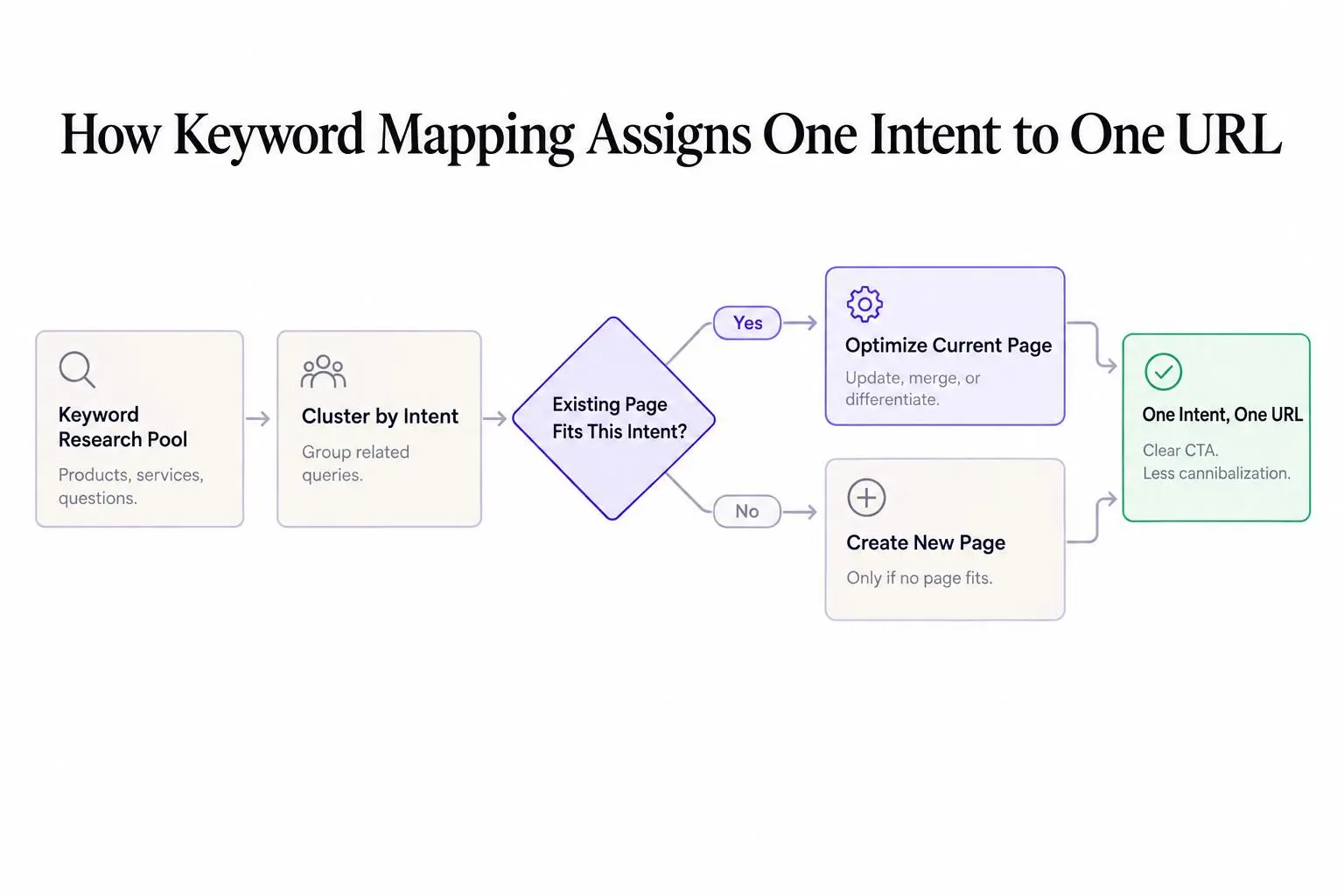
Start with the site you have, not the one you wish you had. That's where a lot of messy planning begins.
Here's the workflow we recommend.
Template workflow
- Inventory pages
List existing URLs and classify them by page type. Product, category, service, feature, landing page, blog post, resource, guide. Get the real inventory on the table first.
- Gather keywords
Gather keyword research around products, services, use cases, pain points, and customer questions. Don't start from random keyword exports. Start from the business.
- Group by intent
Group keywords by shared intent. Not phrasing alone. Intent.
- Match clusters to pages
Match each cluster to the best existing page. If no page fits, mark it as a new page opportunity.
- Assign target terms
Assign one primary keyword and a small set of supporting terms to each page.
- Choose an action
Add an action. Create, update, merge, differentiate, or monitor.
- Set priority and owner
If no one owns it, it won't happen.
A lot of teams try to map after publishing. That's cleanup, not planning. By then the duplication is already in production, and now you're spending time fixing work that should never have been commissioned.
Treat the map like an SEO operating system. It should guide what gets written, what gets refreshed, and what gets left alone.
How to Group Keywords Into Clusters Without Guesswork
Clustering is where smart keyword mapping separates from random assignment. Done well, it saves you from creating too many pages. Done badly, it creates confusion that spreads through the whole site.
Group keywords when they share the same intent, similar search results, and the same likely page format. Phrase order changes usually belong together. Singular and plural variants often belong together. Minor wording differences often belong together too.
But not always.
Use three checks before you cluster terms:
- Would the same page genuinely satisfy both searches?
- Do top-ranking pages overlap a lot?
- Is the next action you want from the visitor the same?
If the answer is yes across those checks, one page is usually enough.
Split them when the SERP format changes, the urgency changes, the buyer stage changes, or the CTA changes. "Software pricing" and "what is software" may share a topic, but they don't share a job. Search volume should not bully you into making extra pages if intent is still the same.
A common mistake is over-clustering broad terms that need distinct pages. Another is the opposite: turning every semantic variation into its own article. Both are forms of guessing.
Here's the operator version: if two queries would lead you to brief the same page, don't create two pages.
How to Match Each Cluster to the Right Page Type
Mapping is not just keyword to URL. It's keyword to the page type most likely to satisfy intent and convert.
That's where many content plans break. Teams identify the right keyword, then send it to the wrong format because that format is easier to produce.
In general:
- Transactional and commercial terms belong on service, product, category, or landing pages
- Informational research terms fit blog posts, guides, templates, or comparison content
- Local or vertical-specific terms may need dedicated location or industry pages
- Pricing, cost, symptom, or comparison queries often deserve their own support pages
One topic can create multiple pages if the intents are genuinely different. That's still consistent with one page per intent.
A few examples make this clearer:
- A high-intent service term belongs on a service page, not a blog post
- A cost question may convert better as a pricing guide than as a short section on a feature page
- A comparison query may need a dedicated versus page if the search results are full of comparison pages
Ask a practical question: what should the visitor do next on this page?
If you can't answer that cleanly, the mapping is probably off.
How to Avoid Keyword Cannibalization in Content Planning
Cannibalization is not some technical SEO mystery. It's what happens when multiple pages compete for the same or very similar intent.
That hurts because relevance signals get split, internal linking gets messy, Google may rank the wrong page, and your team ends up updating multiple URLs for one opportunity. That's wasted effort pretending to be content production.
The easiest way to avoid keyword cannibalization in content planning is to set ownership before briefs exist.
Use these rules
- Assign a primary keyword and page owner before writing starts
- Separate static pages and blog content when the intent differs
- Keep one canonical page for each core commercial topic
- Use supporting content to strengthen money pages, not copy them
- If two keywords show the same intent, keep them on one page
- If two pages serve the same buyer stage and CTA, consolidate or clearly differentiate
- If a new idea cannot claim distinct intent, it probably should not be a new page
This is really an editorial discipline problem. The map is just the tool that makes the discipline visible.
And prevention is much easier than repair. Once a site has a hundred overlapping assets, content planning without duplication becomes a cleanup project nobody enjoys.
How to Find and Fix Existing Content Cannibalization
If the overlap already exists, don't panic. But do get systematic.
Start with obvious signals: multiple URLs ranking for the same query, two pages trading places in rankings, weak traffic spread across near-identical articles, or core terms landing on blog posts instead of commercial pages.
Then review competing pages side by side. Check intent overlap, headings, shared subtopics, internal anchor text, and CTA conflict. Most duplication becomes obvious when the pages sit next to each other.
Your cleanup options are usually straightforward:
- Merge overlapping pages into the stronger asset
- Redirect the weaker duplicate
- Reposition one page around a genuinely different angle
- Rework internal links so the target page is unmistakable
Differentiation is better than consolidation when two pages can serve separate stages or when search results clearly show different content types winning. If that distinction isn't real, don't force it.
Document the fix in the map. Otherwise the same idea comes back three months later with a new title.
After major merges or redirects, it's smart to run a quick indexing check on the preferred URLs. For small batches, a simple tool like our Google Index Checker is enough to confirm search engines can find the pages you actually want indexed.
A Sample Keyword Mapping Template Structure the Reader Can Copy
Keep the structure plain. Fancy systems don't save weak decisions.
A solid template can live in Sheets, Airtable, or whatever your team already uses. Your main tab should have one row per page or page opportunity with these columns:
- URL
- Page type
- Primary keyword
- Secondary keywords
- Topic cluster
- Intent
- Funnel stage
- Current rank
- Status
- Priority
- Action
- Owner
- Notes
Then add two supporting tabs:
- Research pool for unmapped opportunities
- Cannibalization check for duplicate keywords, similar clusters on different URLs, and conflicting intent assignments
Color coding helps execution if you keep it restrained. Create, optimize, merge, refresh, monitor. Enough to spot movement at a glance.
The format itself is not the advantage. The advantage is using the same decision system every time a new content idea appears.
How to Turn the Map Into an Actual Content Plan
A finished map should feed production. If it doesn't, you're maintaining a spreadsheet, not running a search program.
Prioritize rows using a mix of business relevance, conversion potential, search demand, ranking feasibility, and current page strength. Not every high-volume keyword deserves attention. Not every low-volume one should be ignored either. Some lower-volume commercial terms pull more business value than broad informational topics ten times their size.
The map sharpens planning in three ways:
- New pages are created only when no existing page fits the intent
- Refreshes go to pages that already own a topic but need stronger execution
- Supporting articles are chosen because they strengthen core pages, not because they fill a calendar slot
Title work comes later. Page ownership first, packaging second. Once the cluster and page type are locked, lightweight tools like our Blog Title Generator can help turn that mapped topic into a stronger working title. That's useful. But title generation should never lead strategy.
A real content plan is partly about exclusion. The map should tell you what not to write.
When It Makes Sense to Automate Parts of the Workflow
Most teams don't fail because they misunderstand keyword mapping. They fail because they can't maintain it consistently once content volume picks up.
Some parts of the workflow are good automation candidates:
- Topic and keyword discovery
- Draft generation aligned to search intent
- Publishing schedules
- Ongoing refresh cycles
But automation should support structure, not spray random articles across your site.
That's why the fit matters more than the feature list. For teams that want research, writing, publishing, and refreshes connected in one workflow, Intelliminds SEO Automation Software can help automate the content side while keeping human approval in the loop. That's especially useful for lean teams and agencies that need repeatable output without adding manual workload every week.
The standard is simple: the platform should reinforce mapping discipline, page ownership, and refresh cadence. If it bypasses strategy, it's just helping you make mistakes faster.
How Often to Review and Update the Map
A keyword map gets stale faster than people expect. Review it at least every few months, and sooner when something material changes.
That includes new pages, removals, consolidations, ranking swings, algorithm shifts, competitor moves, and changes in product focus. Any of those can break an old mapping decision.
A useful review checklist is short:
- Are any clusters mapped to the wrong page based on current SERPs?
- Are new pages creating overlap with old ones?
- Are key commercial terms still assigned to the best converting URLs?
- Do support articles strengthen core pages or compete with them?
- Which pages need refreshes instead of replacements?
This should be part of SEO operations, not a once-a-year cleanup. If the map isn't part of your regular process, it won't protect you when the site starts growing faster.
Common Mistakes That Make a Keyword Mapping Template Useless
A lot of templates look organized and still fail in practice. Usually for predictable reasons.
Watch for these:
- Mapping every keyword to its own page
- Letting search volume override intent and business fit
- Assigning the same primary keyword to multiple pages
- Forcing high-intent keywords onto blog posts because they're easier to ship
- Ignoring existing URLs and planning like the site is brand new
- Building a spreadsheet nobody owns or updates
- Failing to document actions like merge, redirect, refresh, or re-optimize
- Treating the template like a keyword archive instead of a decision system
Here's the practical truth:
A simple keyword mapping template used every week beats a complicated one nobody follows.
Conclusion
A keyword mapping template is how smart SEO teams connect research, intent, pages, and content operations into one system that can actually scale.
Clearer page ownership leads to less topic overlap. Less overlap leads to stronger rankings, better CTAs, and cleaner customer acquisition paths. That's the part people feel in the numbers later, but it starts in the map.
Start simple. Apply one page per intent. Clean up existing overlap. Then use the map to guide what gets created, what gets refreshed, and what gets skipped. That's how content stops being a pile of articles and starts acting like an asset.