
Lead generation content ideas usually fail for a boring reason. You are publishing what gets clicks, not what gets buying intent, so the blog looks busy while leads stay flat.
If you are scaling a SaaS, ecommerce, service, or agency blog, you don't need more top-of-funnel filler. You need topics tied to real sales questions, comparison searches, pricing friction, and switching pain.
Pick better topics, and the blog starts pulling its weight.
How to Find Blog Topics That Drive Leads
Most SEO blogs don’t have a traffic problem. They have a topic problem. Teams over-index on informational posts that are easy to publish and easy to justify, then wonder why pipeline stays flat.
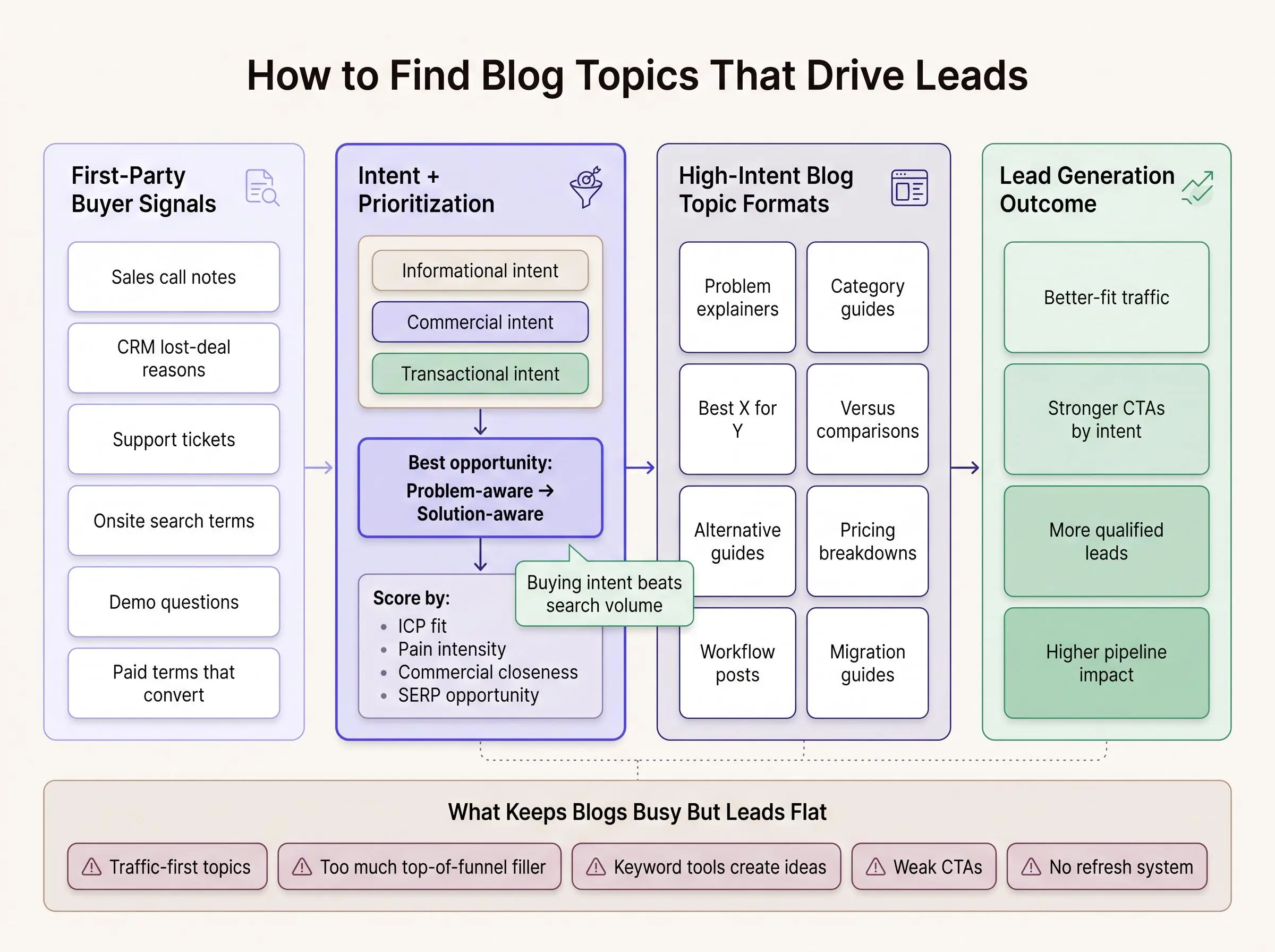
The split matters:
- Informational intent means the reader wants to learn.
- Commercial intent means they’re evaluating options.
- Transactional intent means they’re close to acting.
The best lead generation content ideas usually sit between problem-aware and solution-aware searches. That’s where readers know something is wrong and are actively trying to fix it. And the conversion gap is not small. Bottom-of-funnel content can convert around 4.78% versus roughly 0.19% for top-of-funnel traffic. That’s why high intent blog topics deserve more attention than their search volume suggests.
The gap can reverse the traffic leaderboard entirely. In one documented SaaS content case, 28,190 bottom-of-funnel visitors produced 1,348 conversions; 204,303 top-of-funnel visitors produced 397. That is 3.4 times more conversions from 86.2% fewer visitors. Treat it as an illustration rather than a universal benchmark, but it is a useful reminder that visitor volume is not the same thing as buying opportunity. The case details are reported here.
Start with first-party signals before keyword tools. Always.
Look at:
- sales call notes
- CRM fields and lost-deal reasons
- support tickets
- onsite search terms
- demo questions
- paid search terms that already convert
- lead lists and qualification notes
That’s where commercial content research gets real. Keyword tools can expand an idea. They usually shouldn’t create it.
Some of the best topics that convert have low volume, or no visible volume at all. If a phrase reflects buyer pain, switching intent, or industry language, we’ll take it seriously even if the tool says “0.” Search tools miss more than people admit.
Validate with a quick SERP review, ranking difficulty, adjacent queries, and format fit. Don’t let volume be the only filter. In 2026, plenty of searches end without clicks anyway, so your article needs direct answers, tight structure, and a clear point of view that can still stand out in AI summaries and search features.
A practical workflow for content planning for leads looks like this:
- Collect buyer questions from first-party sources.
- Group them by funnel stage.
- Score them by commercial value.
- Match each cluster to the right content type.
If your team wants to scale this without adding more manual content work, platforms like Intelliminds can automate topic discovery around your site, audience, products, services, and existing content. Useful, especially once the spreadsheet starts owning your week.
1. Problem and Symptom Explainer Posts
These posts work upstream of category searches. The buyer isn’t searching for a tool yet. They’re trying to understand why something feels off.
Good examples sound like real operating pain:
- why organic traffic is rising but leads are flat
- why demo conversions are dropping
- why old blog posts stop producing results
The key is phrasing. Use the same language prospects use on calls and in support threads. If your content sounds cleaner than the buyer’s problem, it usually converts worse.
Include likely causes, downstream consequences, common misdiagnoses, and what to evaluate next. Then introduce solution paths without pushing too hard. You’re helping them name the problem. That’s often the moment a search turns into a buying journey.
2. Solution Category Guides
A strong category guide helps readers decide whether a type of solution is worth considering at all. That makes it different from a glossary post, which usually explains terms without helping anyone choose.
Cover practical buying criteria such as:
- use case fit
- team size
- implementation complexity
- workflow impact
- expected outcomes
Also include when not to buy yet, what alternatives exist, and how to assess readiness. That last part builds trust fast. Experienced buyers can tell when a post is trying to shove them forward before they’re ready.
These guides matter because many B2B buyers self-educate long before they speak to a vendor. If you don’t help frame the category, someone else will.
3. Best X for Y Roundups
This is one of the clearest high-intent blog topics you can target. Searches like “best CRM for agencies” or “best SEO content platform for startups” usually come from people building a shortlist, not browsing.
Segmented roundups beat broad “best tools” lists because the buyer wants fit, not noise. Structure the post around selection criteria, then explain who each option is for, where the tradeoffs show up, and when someone should rule an option out.
A useful roundup doesn’t pretend every option is right for everyone. That’s not balanced. It’s evasive.
Category guides help readers accept the category. Roundups assume they already have.
4. Versus Comparison Posts
Versus searches are sharp intent. The reader is narrowing down. Often, they’re closer than your CRM suggests.
Organize the comparison so they can quickly scan the dimensions that matter most:
- setup effort
- pricing model
- reporting depth
- workflow fit
- support
- flexibility
- ideal team size
Don’t stop at features. Buyers care about what changes after adoption. Faster publishing, cleaner reporting, less manual coordination. That’s the real comparison.
The best versus posts aren’t defensive. They’re calm, specific, and honest about tradeoffs. If your article reads like a product page wearing a fake mustache, people know.
5. Alternative and Replacement Guides
Alternative searches come from frustration. That changes the tone and the urgency.
Readers are usually reacting to something specific:
- price increases
- missing functionality
- poor support
- weak reporting
- workflow friction
That makes this format different from roundups or versus posts. It’s not just evaluation. It’s replacement logic.
Cover migration effort, learning curve, data portability, and stakeholder buy-in. Also break the options into replacement scenarios rather than throwing every alternative into one flat list. Low-volume alternative terms often outperform bigger keywords because the buyer has already decided change is necessary.
6. Pricing and Cost Breakdown Posts
Buyers ask cost questions before they ask for permission to move forward internally. If your site dodges pricing, they still have the question. They just answer it somewhere else.
A useful pricing post should explain:
- what drives cost
- where implementation adds complexity
- how seat counts or service layers change the budget
- what ongoing maintenance looks like
Even if exact pricing isn’t public, transparent cost frameworks reduce friction. They also qualify leads better. Someone trying to build a business case doesn’t need a vague promise. They need enough structure to estimate the decision.
Include hidden costs, lower-cost paths, premium paths, and the cost of waiting. Delay has a price. Most pricing pages ignore that.
7. Use Case and Workflow Posts
These posts win when the buyer needs to see the work in context. Not the tool in isolation. The work.
Examples include:
- how to build a lead-generating content calendar
- how to refresh old posts for conversions
- how to turn product pages into acquisition assets
Anchor the article to a measurable outcome. Then walk through the logic, who owns each step, common blockers, and how to tell whether the workflow is actually working. That’s what separates a workflow post from a generic tutorial.
People don’t adopt software or services. They adopt a new operating model.
8. Integration and Stack Compatibility Posts
A buyer checking integrations is usually past casual interest. They’re asking whether your solution will fit into real operations without creating more mess.
Cover practical questions like data flow, setup ownership, maintenance burden, common blockers, and what breaks when tools don’t fit together. Add scenarios that feel lived-in, such as a lean in-house team, an agency-client workflow, or reporting across multiple systems.
General feature pages often feel abstract here. Compatibility posts feel real because they mirror the buyer’s actual fear: “Will this create work we can’t support?”
That’s a serious question. Treat it that way.
9. Industry-Specific Buying Posts
Specificity usually beats reach when lead quality matters. An industry-focused post may pull less traffic, but the right visitor often converts harder and faster.
Bring in the realities that shape the decision:
- sales cycle length
- compliance concerns
- reporting expectations
- seasonal demand
- team structure
- acquisition model
Use the language that industry actually uses. Not generic copy with the vertical swapped into the headline. Buyers can smell that by the second paragraph.
This format is especially strong for agencies, service providers, and B2B SaaS companies with repeatable wins in a few verticals.
10. Role-Specific Buying Guides
The same category looks different to a founder, a marketer, and a RevOps lead. If you write one article for all three, it usually serves none of them well.
A role-specific guide should cover:
- what that role cares about most
- the risks they’re trying to avoid
- their approval criteria
- what success looks like in their seat
- what to ask vendors
This matters in multi-stakeholder deals, where several people research the same purchase from different angles. A founder may care about leverage. A marketing lead may care about output quality. Ops may care about control and reporting. Same product, different threshold.
11. Template, Checklist, and Swipe File Posts
These posts convert because they create momentum, not just understanding. The reader gets something they can use today.
Useful formats include content planning templates, lead scoring checklists, article brief frameworks, and refresh audit worksheets. Keep the article itself valuable, even if there’s a downloadable asset attached.
There’s a real tradeoff here:
- low-friction capture usually converts more visitors
- high-friction forms may produce fewer, more qualified leads
Don’t overcomplicate it. If the asset is practical and the article does real work, these posts can perform across multiple funnel stages.
12. Case Study Breakdown Posts
A case study post should teach, not just celebrate. Thin testimonials rarely rank and rarely persuade sophisticated buyers.
Structure it around the situation, constraints, decisions, process, and outcomes. Include grounded context when supported, like industry, team size, the workflow problem, or the content bottleneck. Readers need enough detail to decide whether the story maps to their world.
The most effective case studies help someone say, “We’re in that exact mess.” That’s the job.
And yes, blog-form case studies can rank for long-tail searches while also building trust. That combination is hard to beat.
13. Audit, Mistake, and Readiness Posts
Self-diagnosis content works because it creates urgency without pressure. The reader sees the gap on their own.
A simple structure works well:
- symptoms
- quick checks
- severity
- what to fix first
Add a mini scoring framework if you can. It makes the post more actionable and gives the reader a clearer next step. These pieces naturally support consultations, demos, or tool-led workflows because they move the buyer from vague concern to named problem.
Generic best practices often feel safe. Safe content rarely converts.
14. Migration and Switching Guides
Migration content targets buyers who have already accepted that the current setup isn’t good enough. That’s why intent is usually high.
Address the fears directly:
- downtime
- data loss
- stakeholder resistance
- retraining
- publishing gaps
Then give the reader a path through it. Timelines, prep checklists, what to export, what to preserve, and what success looks like after the change. Alternative posts help people choose. Migration posts help them execute safely. Different job.
Operational reassurance closes more deals than clever copy.
15. ROI, Business Case, and Benchmark Posts

Some buyers need proof before they need product details. Especially budget holders.
Use benchmarks carefully where they help frame the case. Qualified lead conversion may sit around 2.9%, forms around 1.7%, inbound calls around 1.2%, and SEO content can deliver lower CPL than many paid channels once it compounds. The point isn’t the exact number. It’s giving the buyer logic they can use internally.
Frame ROI around:
- lead quality
- sales velocity
- content production efficiency
- customer acquisition impact
Pricing answers what it costs. ROI answers whether it’s worth doing.
16. Objection-Handling FAQ Hubs
A good FAQ hub pulls repeated pre-sales questions into one searchable resource. In a zero-click search environment, that matters more than most teams realize.
Source questions from sales calls, chat logs, demos, and support interactions. Then answer the things that slow action:
- implementation time
- who owns the work
- fit for smaller teams
- content quality concerns
- reporting visibility
- ongoing maintenance
Pair short answers with deeper sections so the piece works for skim readers and serious evaluators. Product-page FAQs usually miss the search demand and the language buyers actually use. That’s wasted intent.
How to Prioritize High-Intent Blog Topics for Content Planning
Once you have ideas, the real work is prioritization. A long keyword list is not a strategy. It’s inventory.
We use a scoring model built around:
- ICP fit
- pain intensity
- commercial closeness
- SERP opportunity
- authority
- refresh potential
Also keep the distinctions clean. An idea is broad. A topic is a real content opportunity. A keyword is one expression of demand. An angle is how you frame it. A finished article is the asset that actually competes.
Weight business value first and volume second. A small share of pages often drives most organic leads anyway. Publishing more is not the fix if you’re publishing the wrong things.
Map the 16 formats across the funnel, then match CTA style to intent. Some posts should drive email capture. Others should push demos, consultations, or trials. If you want to operationalize that without expanding manual workload, Intelliminds can help automate article writing, scheduling, publishing, and refreshing around your existing site and content.
Common Mistakes That Keep SEO Blogs from Generating Leads
Most weak SEO programs don’t fail because the team is lazy. They fail because the system rewards the wrong output.
Watch for these mistakes:
- choosing topics because they’re easy to rank for, not because they attract the right buyer
- treating keyword tools as the source of ideas instead of validating first-party customer insight
- overproducing top-of-funnel content and underproducing topics that support buying decisions
- writing broad articles that answer a question but don’t help the reader decide what to do next
- using weak CTAs that don’t match topic intent
- ignoring refreshes as rankings, accuracy, and conversion power decay
- measuring traffic and impressions while missing qualified leads, assisted conversions, and pipeline influence
- publishing in bursts instead of building a compounding system through consistency, internal linking, and topic clusters
Traffic without commercial intent is easy to celebrate and hard to bank.
Conclusion
Lead generation content ideas work when they’re chosen for buying intent, not just search volume. That’s the shift. Once you make it, the whole blog starts behaving differently.
The strongest SEO programs mix problem diagnosis, commercial evaluation, workflow clarity, pricing transparency, and proof. Not every post needs to close the deal. But every post should know where it sits in the deal.
Audit your current calendar. Replace a few traffic-only topics with higher-intent formats from this list. You don’t need a total rebuild to change the output. You need better bets.
If you want to make that process more systematic and reduce the manual workload, you can test a more automated approach with Intelliminds, including a free trial with 3 free articles.
Article Record
ReferencesPrimary sources used for this article
- How to Generate Content Ideas with Topic Research
- How to Find Content Ideas with Semrush
- How to Create a Perfect Lead Generation Content Strategy
- The ultimate guide to audience research methods for digital publishers | Audiencers
- Content that ranks and converts: the 5-step system we use · Radyant
- How to come up with content ideas that convert · Radyant
- Content Marketing Lead Generation: The Complete B2B Guide (2026)
- Lead Generation Guide: The Complete Playbook 2026
Update HistoryMeaningful revisions to this article
- Added a concrete case study to show how lower-traffic, bottom-of-funnel content generated more than three times the conversions of higher-traffic content.
- Strengthened the guidance on finding blog topics that are more likely to drive leads.