
Surfer SEO promises something content teams desperately want: a clearer answer to “what should we change before this page can compete?” After working through its editor, research tools, scoring, and optimization panels with a real article, I can see why people become attached to it. Surfer turns a vague SEO brief into an unusually concrete workspace. You can see the terms competitors cover, the questions they answer, the structure they use, and how your draft compares.
That clarity is also where the danger lies. Surfer produces confident numbers and enormous recommended ranges that can feel more authoritative than they deserve. Used as a diagnostic tool, it is powerful. Used as a paint-by-numbers writing system, it can push a perfectly sensible article toward bloated, copycat content.
Intelliminds competes in the AI SEO content category, so this is a hands-on workflow assessment rather than a neutral directory listing.
If you want the short answer: Surfer is a strong fit for teams that already have editorial judgment and want better optimization guidance. If you want software to make the hard editorial decisions for you, its scores may create false confidence. For a broader comparison, see our guide to the best AI SEO software.
Surfer SEO at a glance
Surfer is best understood as an optimization workspace, not an autonomous content strategy. Its strongest experience is Content Editor, where research, writing, scoring, internal-link suggestions, and pre-publish checks sit around the draft.
What impressed me:
- Importing an existing article made the product useful almost immediately.
- The editor translated competitor research into clear, inspectable recommendations.
- Keyword clustering exposed many adjacent article opportunities without requiring spreadsheet gymnastics.
- The AI Search and question panels were useful prompts for editorial review.
What frustrated me:
- Recommended word and heading ranges could become absurdly large.
- Several promising workflows depend on Google Search Console, a higher plan, or another connection.
- The product can make a score feel like the goal when ranking and reader satisfaction are the actual goals.
- Annual billing materially changes how the headline monthly prices should be interpreted.
The result is a product I would gladly put in front of a capable content strategist, but hesitate to hand to a junior writer without guidance. Surfer is very good at showing patterns. It is not qualified to decide which patterns deserve to shape your article.
How we evaluated Surfer
We evaluated Surfer as a working content team would: by creating a project, importing an existing article, inspecting the recommendations, exploring the editor, testing pre-publish checks, and tracing the features that depend on Google Search Console.
We also used Keyword Research to build clusters around a commercial query and took AI Visibility through to a completed report. That gave us a useful cross-section of the product: optimizing an existing page, planning future content, and seeing how site and prompt data become an ongoing monitoring workflow.
To separate Surfer's behavior from quirks in the imported page, we pasted an original, unpublished plain-text control article into a fresh editor. We let the baseline finish calculating, made one useful change, and waited for the same scores to settle again. That gave us a cleaner look at what the numbers actually respond to.
The important distinction is that we tested Surfer as an operator, not as a benchmark lab. The observations below describe how the product behaved in those workflows and what that behavior means for a growing content team.
Content Editor is the main event
Content Editor is where Surfer stops feeling like a collection of SEO features and starts feeling like a coherent product. We imported a published article for the query “best AI SEO software,” selected the United States mobile market, and ran Deep Research. The analysis took a little over 45 seconds, after which the article appeared inside a writing interface surrounded by live guidance.
The starting scores were 55 for Content Score, 54 for SEO, and 55 for AI Search. Those numbers were not especially meaningful on their own, but the panels behind them were. Instead of a generic “optimize this page” instruction, Surfer broke the problem into terms, structure, questions, AI-answer coverage, readability, links, and publishing.
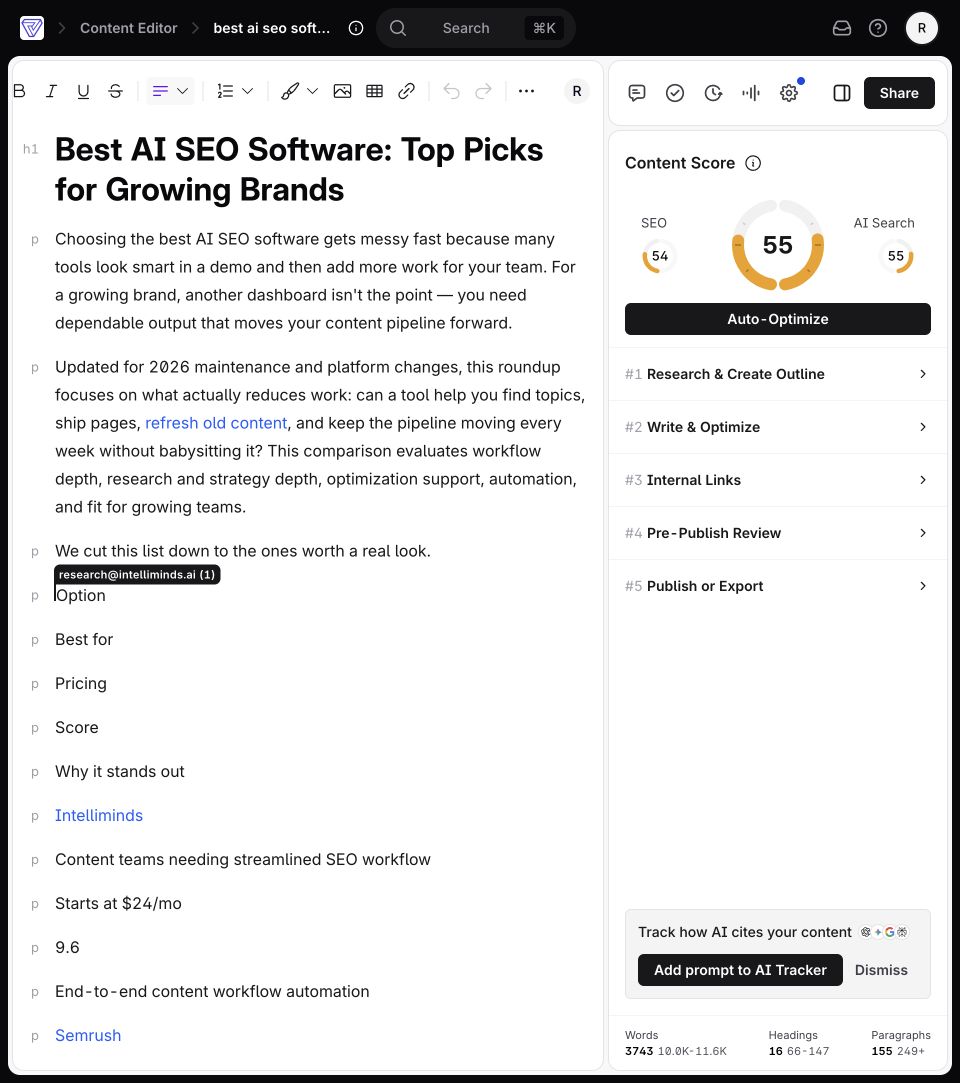
This is a genuinely satisfying moment. SEO work often involves bouncing among a search-results page, a spreadsheet, a document, a keyword tool, and a CMS. Surfer compresses much of that context into one screen. You can write while checking why a recommendation exists, which is much more useful than receiving a mysterious final grade.
The interface also keeps the original content editable. That sounds obvious, but it matters: Surfer does not force you to rebuild an existing article from scratch just to analyze it. For refresh work, the import path is likely the fastest route to value.
The catch is cognitive load. There are enough panels, scores, suggestions, and upgrade paths around the editor that a new user can easily start serving the software rather than the reader. The editor works best when someone owns the editorial decision and treats every recommendation as a hypothesis.
The recommendations need judgment
The most startling result was Surfer's structural guidance. Our imported article contained 3,743 words, 16 headings, and 155 paragraphs. Surfer recommended roughly 10,000 to 11,600 words, 66 to 147 headings, and at least 249 paragraphs.
At first, I wondered whether the imported page's broken formatting had exaggerated those ranges. It had not. A clean, unpublished 352-word control article produced targets of 8,700 to 10,100 words, 58 to 147 headings, and at least 191 paragraphs.
That is not a subtle nudge. It is a request to turn a focused article into something enormous, with a heading every few paragraphs. My immediate reaction was disbelief, followed by a useful realization: Surfer was describing patterns in its selected competitors, not issuing a law of good writing.
The scores did respond sensibly to a controlled edit. We added one relevant 67-word paragraph about Search Console and choosing AI SEO tools. Content Score moved from 25 to 32, SEO moved from 15 to 21, and the terms we had genuinely covered changed from red to green. That felt fair. It proved Surfer noticed the added coverage. It did not prove the page would rank or that a reader would prefer it.

This is the product's central tension. The recommendation is valuable because it exposes a structural gap. It becomes dangerous when a team treats the target as a quota instead of asking whether more length, headings, or terms genuinely help the reader.
AI guidance is useful, not magical
Surfer’s AI Search panel added another layer of analysis beyond traditional keyword coverage. It surfaced questions and themes that could help a page become more useful in answer-oriented search experiences. The outline and competitor panels also made it easy to compare the subjects other pages emphasized.
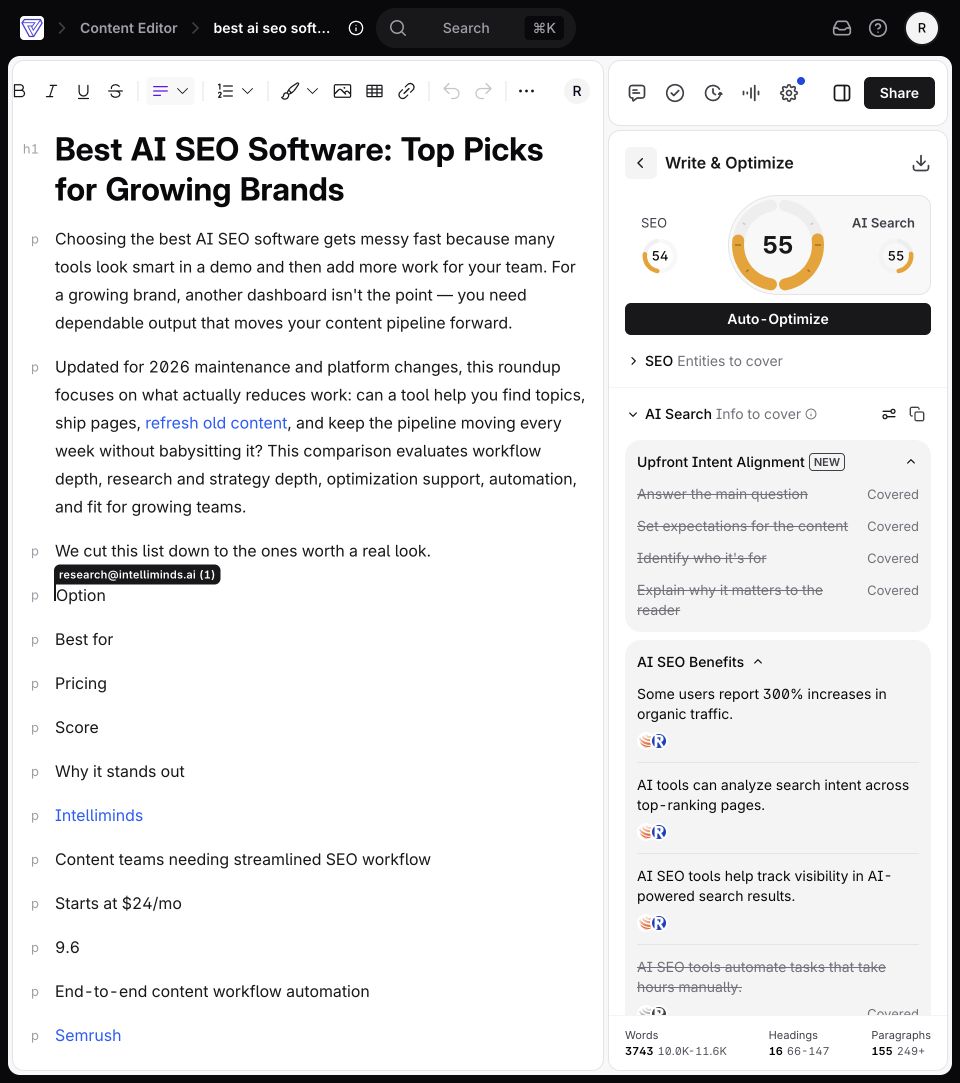
I liked this more than I expected. The suggestions did not feel like a replacement article waiting to be accepted. They felt like prompts for an editorial meeting: Have we explained the selection criteria? Have we addressed how these tools fit different team sizes? Have we answered the question a skeptical buyer will ask before paying?
That is a productive use of AI. It draws attention to blind spots without pretending every suggested sentence belongs in the draft.
The question coverage was broad, though, and breadth can disguise shallowness. A page can mention every question in a panel and still give weak answers. Surfer can tell you that a concept appears absent; it cannot reliably determine whether your explanation is original, persuasive, or based on meaningful experience.
The same warning applies to Content Score. Research has found correlations between content characteristics and rankings, but a score inside one platform is not a causal ranking guarantee. It is better treated as a quality-control signal. If the score is low, investigate why. If it rises, verify that the edits improved the page for a human reader.
Readability feedback felt practical
The clean control draft revealed an important boundary: AI Readability stayed locked until Content Score climbed above 40. Once eligible, Pre-Publish Review returned 10 suggestions and rated the text at 3.0, which Surfer described as college-level reading difficulty.
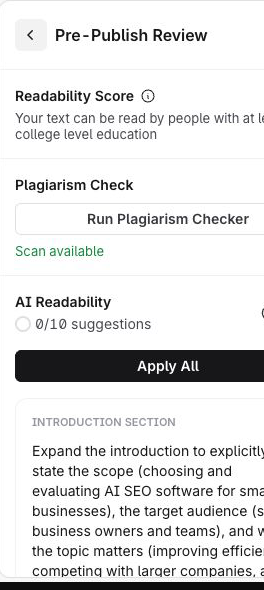
The suggestions were easy to inspect. Surfer asked for a clearer introduction, an earlier confirmation of the target query, proper H2 structure, and bullets for a dense run of evaluation questions. Some advice was sensible. Some was mechanical. The point is that I could see the exact recommendation and decide whether it made the article better.
That inspectability matters. I am much more comfortable with an AI tool that points to a specific problem than one that silently rewrites an entire section. Surfer generally keeps the writer in control, which is the right behavior for brand-sensitive content.
The plagiarism result also taught us something, although not what the enormous red number first suggested. The scan eventually reported 68% matched content across 63 paragraphs. That sounds awful until you know the document had been imported from a live published page. Surfer was largely finding the source article itself.
This one is on the test design, not the checker. A published page is a terrible plagiarism fixture. Still, the experience shows why the matching sources matter more than the percentage. Surfer highlighted the affected text and opened the match panel, but nobody should interpret that 68% as evidence that the original article was copied.
There is also a broader plan boundary around automation. Surfer's documentation says Auto-Optimize can propose rewritten sections with relevant NLP terms and lets users accept, reject, or undo changes. It is not available on Discovery, and generating a suggestion can consume usage even when all changes are declined. That is exactly the kind of detail teams should understand before building a high-volume process around it.
Internal linking needs more setup
The internal-linking panel looks promising because it puts suggestions where the writer is already working. Surfer’s automated internal-linking documentation says the workflow requires Google Search Console. Semantic internal linking also requires a Content Audit project for the chosen domain.

That dependency makes sense: useful internal links require knowledge of the actual site. It also means the panel is not an isolated editor feature you can fully judge on a disconnected draft. Teams should expect to connect site data before relying on it.
Once configured, Surfer presents suggested URLs and anchor placements for review. The review step is important. Internal links are editorial choices, not just graph edges. The right destination depends on intent, page hierarchy, and whether the link helps someone continue their journey.
The export controls were more immediately understandable. Content Editor supports copying or downloading plain text, HTML, and Markdown, plus a WordPress workflow. That range should fit most editorial handoffs. Surfer’s documentation says new WordPress exports become drafts by default, while updates to already published posts can remain published and appear immediately. Teams should test that behavior carefully before letting an optimization workflow touch live content.
Keyword Research uncovers real opportunities
Keyword Research gave us 42 clusters around the target topic. Each cluster combined useful planning signals such as search intent, volume, difficulty, constituent keywords, and a direct action for creating an editor document. A CSV export was also available.
Opening a cluster made the result much easier to judge. The seo writing tool group was labeled Customer Investigation, with aggregate monthly volume of 490, estimated traffic of 3, and difficulty of 25. Underneath it, Surfer exposed three phrases with their own volume and difficulty values. That detail is what lets a strategist decide whether the cluster is coherent or just mathematically convenient.
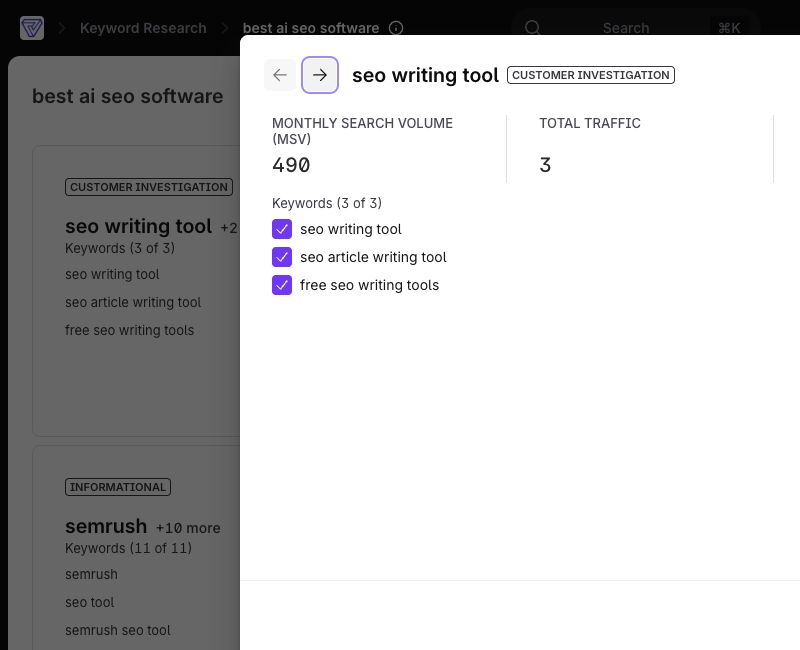
This was one of the clearest value moments outside Content Editor. A small team could use the clusters to map supporting articles, compare relative difficulty, and move a promising topic directly into an optimization brief.
The limitation is familiar: a cluster is a research aid, not a content strategy. Search volume does not tell you whether the topic attracts the right buyer, supports a commercial goal, or deserves a full article. The operator still has to make those calls.
AI Visibility feels promising but separate
AI Visibility became much more convincing once we moved beyond setup. We selected 35 prompts, finished the configuration, and waited for the report to process 175 responses and 3,006 source observations. The overview then populated prompt-level scores, competitor comparisons, and 664 source domains or pages to inspect.
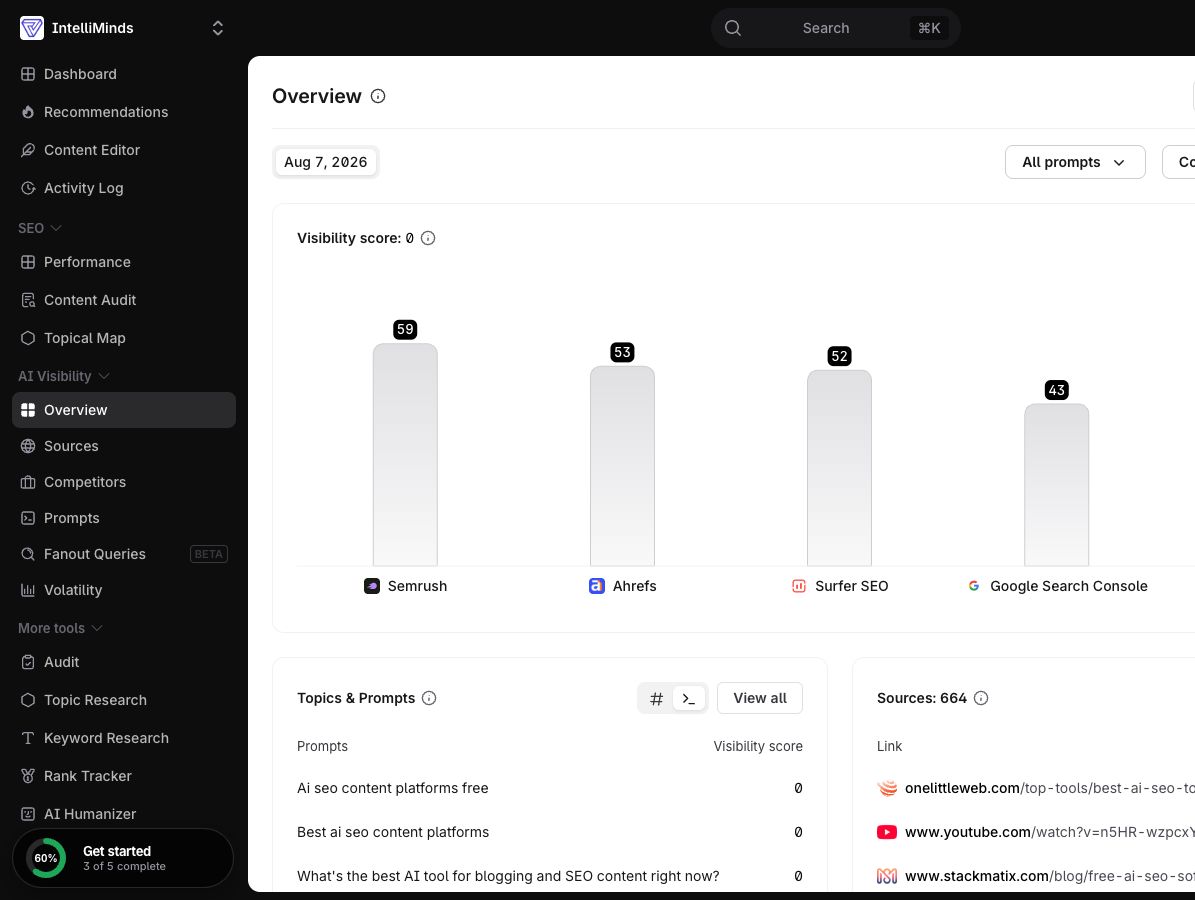
The first result was blunt: Intelliminds had a Visibility Score of 0 for this prompt set. The comparison chart showed Semrush at 59, Ahrefs at 53, Surfer SEO at 52, Google Search Console at 43, and ChatGPT at 42. That is not flattering data, but it is useful data. The report turned a fuzzy question about AI presence into specific prompts, competitors, and cited sources we could investigate.
The product still feels adjacent to the writing workflow. Content Editor answers "how should we improve this page?" AI Visibility answers "how are models representing this brand?" Those jobs belong in the same strategy, but Surfer does not yet make the path from a weak visibility result to a concrete content edit feel automatic.
That separation may be a strength for teams that want monitoring without surrendering editorial control. It also means buyers should be honest about which job they need. A team focused on refreshing pages may get most of its value from Content Editor and Keyword Research. A brand investing seriously in AI-search monitoring will care more about prompt coverage, sources, competitor mentions, and whether someone owns the follow-up.
Pricing deserves a careful look
Surfer’s annual pricing page listed Discovery at $49 per month, Standard at $99, Pro at $182, and Peace of Mind at $299. Discovery included 120 documents; Standard and Pro listed 360; Peace of Mind offered unlimited documents subject to fair usage.
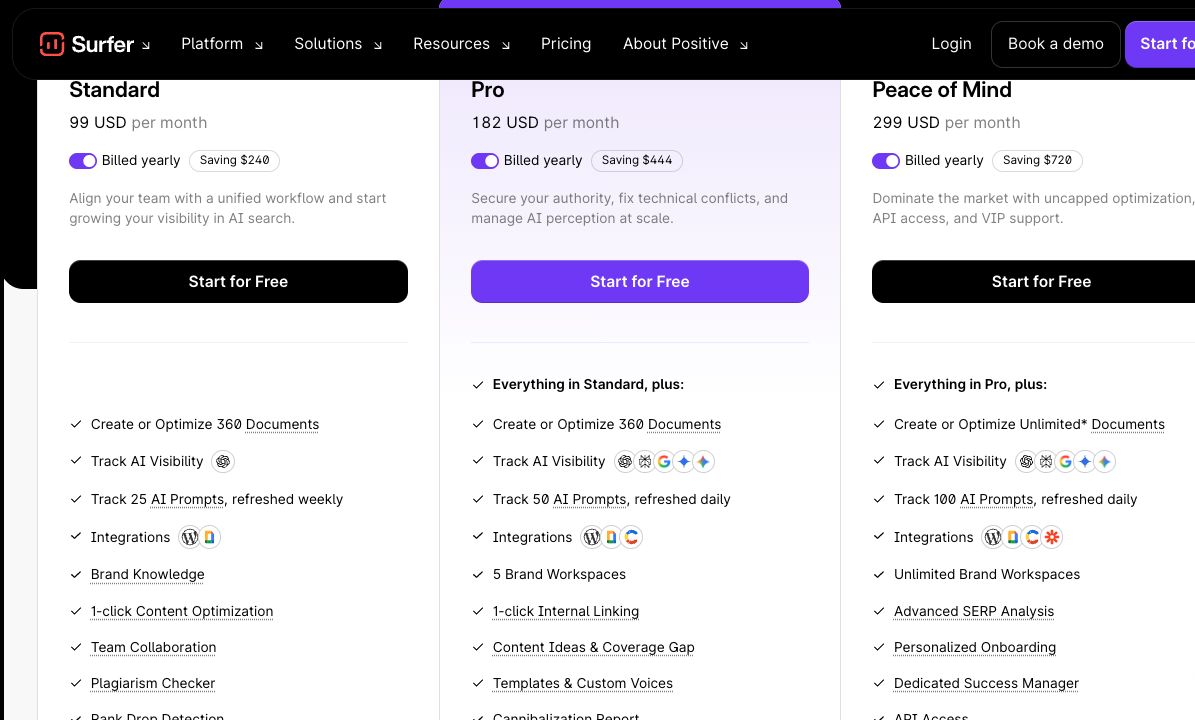
Those monthly figures are useful for comparing tiers, but they are billed yearly. That makes the actual commitment much larger than the number a buyer first sees. Discovery works out to $588 for the year, Standard to $1,188, Pro to $2,184, and Peace of Mind to $3,588 before any taxes or extras.
The practical question is not simply “which features do I want?” It is “how many documents, users, tracked prompts, and automated optimizations will we actually use over a year?” A team that refreshes content every week can spread the cost across a meaningful workflow. A founder who wants help with five important pages may find the annual commitment difficult to justify.
Plan limits also shape the product experience. Discovery can introduce the core editor, but higher-value automation and monitoring vary by tier. AI Tracker capacity rises across Standard, Pro, and Peace of Mind. Auto-Optimize is unavailable on Discovery. Site-connected workflows add value but also add setup and operational dependencies.
Annual billing warning: compare the full annual cost, not only the displayed monthly equivalent. Confirm document allowances, AI tracking capacity, automation access, and team needs before choosing a tier.
| Plan | Price / month* | Annual cost | Documents |
|---|---|---|---|
| Discovery | $49 | $588 | 120 |
| Standard | $99 | $1,188 | 360 |
| Pro | $182 | $2,184 | 360 |
| Peace of Mind | $299 | $3,588 | Unlimited* |
What other reviewers say
Independent reviews broadly support the same picture: people value Surfer’s structured guidance and approachable content workflow, while criticism tends to concentrate around price, limits, support, and the risk of treating optimization scores too mechanically.
G2 reviewers often praise the Content Editor and the way Surfer makes on-page recommendations easier to act on. Capterra reviews provide another useful view of usability and value across different team types. These sources should not be collapsed into one synthetic rating; their reviewer populations and questions differ.
The most credible positive theme is workflow clarity. Surfer gives teams a shared vocabulary for discussing optimization. A strategist can point to missing topics, a writer can see the affected section, and an editor can decide whether the proposed change helps.
The most credible criticism is that clarity can become rigidity. Once a score is visible, teams naturally want to raise it. That incentive can reward term insertion, unnecessary length, or excessive structural mimicry. The software cannot protect a team from using it badly.
Who should use Surfer
Surfer makes the most sense for:
- Content teams refreshing existing pages. The URL import and live editor create a fast path from published page to concrete optimization plan.
- Agencies managing repeatable SEO production. Shared guidance, clusters, collaboration, and export options can reduce handoff friction.
- Experienced writers who want better research context. Strong editors can use Surfer’s ranges and suggestions without obeying them blindly.
- Brands connecting content and search data. Google Search Console unlocks more meaningful site-level audit, topical, and linking workflows.
It is a weaker fit for:
- Occasional publishers. The annual cost can be hard to spread across a small number of pages.
- Teams looking for autonomous strategy. Surfer presents evidence and recommendations; it does not understand the business well enough to own the final decision.
- Writers who optimize for the score. The product’s confident guidance can encourage bloated, derivative content when nobody pushes back.
- Teams unwilling to connect site data. Several of the broader optimization loops become less useful without Google Search Console and project setup.
If your team already knows what good content looks like, Surfer can make the diagnostic work faster and more consistent. If you are hoping the software will supply that judgment, you may end up with a high score and a forgettable article.
Final verdict
Surfer SEO is at its best when it acts like an experienced analyst sitting beside the writer. It gathers competitor patterns, turns them into inspectable recommendations, and keeps the evidence close to the draft. Content Editor is genuinely useful, Keyword Research creates actionable starting points, and the readability and AI-answer panels can expose blind spots that are easy to miss.
It is at its worst when the interface’s precision is mistaken for truth. A recommendation to triple an article’s length and multiply its headings is not a writing instruction. It is a signal that deserves investigation. The teams that get the most from Surfer will be the ones confident enough to ignore it when the reader would be better served.
That makes the buying decision fairly simple. Choose Surfer if you publish or refresh content frequently, have someone capable of interpreting SEO evidence, and will use its workflow enough to justify an annual commitment. Skip it if you need occasional keyword help, expect automation to replace editorial judgment, or know your team will chase a score at the expense of clarity.
Surfer does not make great content automatic. It makes the evidence behind a great edit much easier to see. For the right team, that is valuable enough.
Surfer SEO review FAQ
What is Surfer SEO best used for?
Surfer is most useful as an optimization workspace rather than an autonomous content strategist. Content Editor brings research, writing guidance, scoring, internal-link suggestions, and pre-publish checks around the draft, while Keyword Research helps build topic clusters.
Can Surfer SEO replace editorial judgment?
Surfer can expose missing topics, questions, terms, and structural patterns, but its recommendations need editorial judgment. The review found that some suggested word and heading ranges were extremely large, so teams should treat them as signals rather than quotas.
Who should use Surfer SEO?
Surfer makes the most sense for content teams refreshing existing pages, agencies managing repeatable SEO production, experienced writers who want more research context, and brands connecting content workflows with search data. It is a weaker fit for occasional publishers or teams seeking autonomous strategy.
How much does Surfer SEO cost?
Surfer’s annual pricing page listed Discovery at $49 per month, Standard at $99, Pro at $182, and Peace of Mind at $299, billed yearly. The corresponding annual commitments were $588, $1,188, $2,184, and $3,588 before taxes or extras. Buyers should also check document allowances, AI tracking capacity, automation access, and team needs.
Article Record
ReferencesPrimary sources used for this article
Update HistoryMeaningful revisions to this article
- Added four frequently asked questions to help readers find answers about Surfer SEO more easily.